第五章:Tool Calling
特别鸣谢:B站:堂吉诃德拉曼查的英豪,ChatGPT
在 Agent 系统中,Tool Calling 要解决的核心问题是:如何让大模型从”只会生成文字”,变成”能够触发外部工具执行任务”。
传统聊天大模型本身并不直接连接外部世界。它可以理解用户的问题、生成自然语言回答、进行推理和总结,但它不能天然感知环境,也不能天然改变环境。比如用户问”广州今天的天气怎么样?适合出门吗?”,如果模型只依赖自身知识,它并不知道今天广州的实时天气;如果用户说”帮我发一封邮件给张三”,模型可以写出邮件内容,但它不会真的把邮件发送出去。
因此,大模型在没有工具调用能力时,主要存在两个限制:
第一,无法感知环境。模型无法主动访问外部数据源,比如实时天气 API、搜索引擎、企业数据库、用户本地文件、远程知识库等。它的回答只能依赖训练时学到的知识和当前上下文中已有的信息。
第二,无法改变环境。模型无法直接执行真实动作,比如运行代码、发送邮件、创建日程、上传文件、查询订单、修改数据库记录等。它可以告诉用户”你可以这样做”,但不能替用户真正完成操作。
Tool Calling 的出现,就是一种让模型连接外部系统、访问训练数据之外信息的方式。
1. Function Calling
Function Calling 是最基础的工具调用方式,也是最底层、最基础的工具调用机制。指的是一种让大模型根据用户输入,自动选择函数并生成结构化调用参数的机制。它的基本思想是:开发者先把可用函数的名称、用途说明、参数结构告诉大模型;当用户提出问题时,大模型根据上下文判断是否需要调用某个函数。如果需要,模型不会直接返回普通文本,而是返回一个结构化的函数调用请求,大模型通常并不真正执行函数。它只是告诉外部程序:”我要调用这个函数,并且参数是这些。”真正执行函数的是 AI 应用程序的后端、Agent 框架或模型服务商提供的工具运行环境。
Google Gemini 的官方文档也采用类似定义:Function Calling 可以把模型连接到外部工具和 API,使模型判断何时调用特定函数,并提供执行真实动作所需的参数。 Anthropic 的 Claude 文档也说明,工具使用流程通常是模型根据用户请求和工具描述决定是否调用工具,然后返回结构化调用,由应用程序执行。OpenAI 当前文档也将 Function Calling 视为 Tool Calling 的一种形式,并将函数定义为一种由 JSON Schema 描述的工具。
1.1 Function Calling 的工作原理
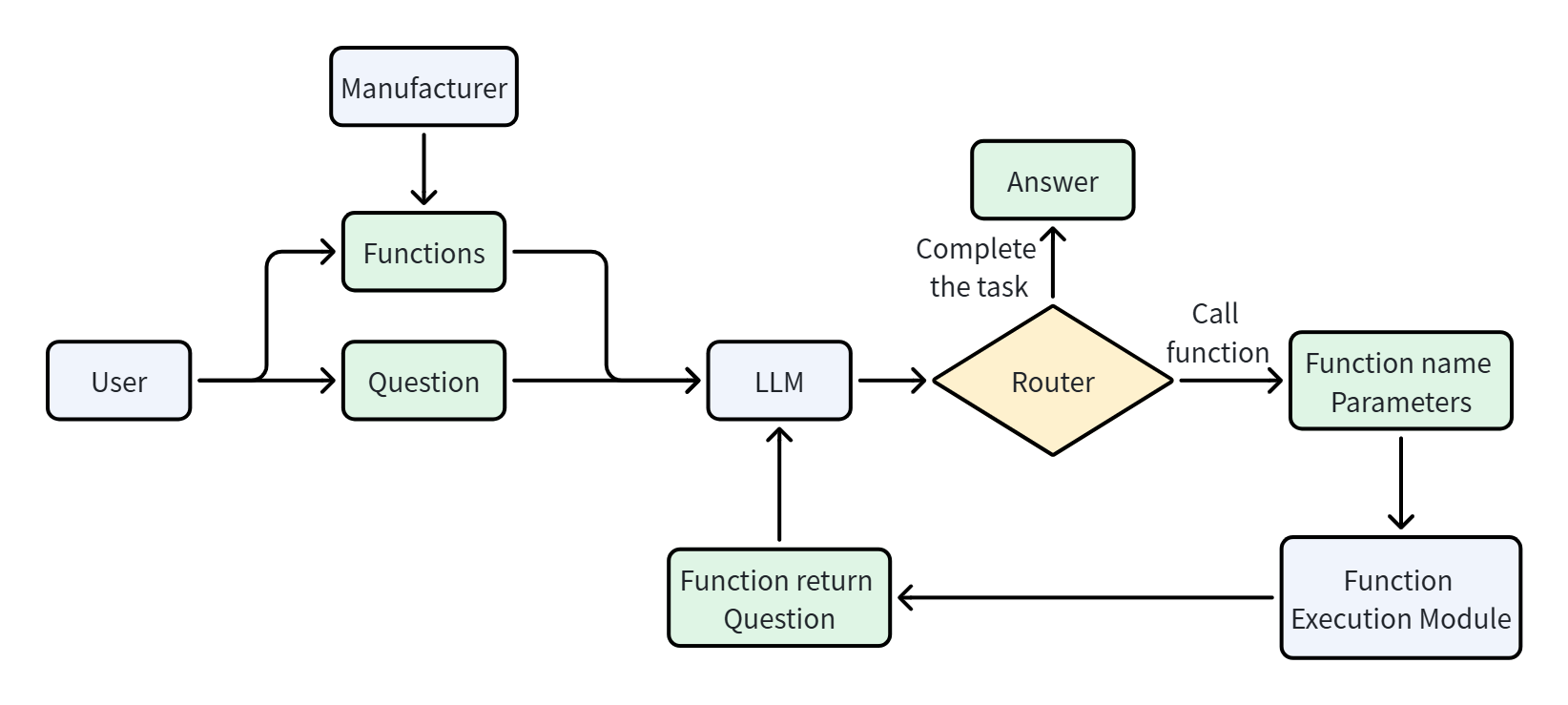
Function Calling 的工作流程
1
2
3
4
5
6
7
用户提出需求
→ 应用程序把用户消息和工具定义发给模型
→ 模型判断是否需要调用工具
→ 模型返回函数名和参数
→ 后端校验并执行真实函数
→ 后端把函数执行结果返回给模型
→ 模型根据结果继续调用工具或生成最终回答
1.2 Function Calling 的组成部分
定义一个完整的 Function Calling,不能只写一段函数描述。它实际上包含两个层面:模型可见的工具契约 + 后端可执行的函数实现。模型可见的工具契约告诉大模型”有什么工具以及应该怎样调用”;后端实现则负责”真正完成这项工作”。一个完整的 Function Calling 系统通常包含以下部分:
| 组成部分 | 作用 |
|---|---|
函数名称 name | 让模型识别和选择函数 |
函数描述 description | 告诉模型函数的用途、适用场景和限制 |
参数结构 parameters | 规定参数名称、类型、含义和必填项 |
| 函数实现 | 真正查询数据或执行操作的后端代码 |
| 工具注册与分发器 | 根据模型返回的函数名找到对应实现 |
| 参数校验与权限控制 | 防止错误参数、越权调用和高风险操作 |
| 工具结果 | 将执行结果或错误信息返回给模型 |
| 调用循环 | 决定继续调用工具还是生成最终回答 |
其中,提供给模型的通常是前三项,后面的执行和安全逻辑由应用程序负责。
函数名称
函数名称应该清楚表达动作和对象,通常采用”动词 + 名词”的形式:
1
2
3
4
5
get_weather
search_documents
send_email
create_calendar_event
update_customer_record
不建议使用含义模糊的名称:
1
2
3
4
do_task
process
handle
tool_1
因为模型会把函数名称作为工具选择的重要依据。名称越明确,模型越容易在多个工具之间作出正确选择。
函数描述
函数描述不是普通的代码注释,而是模型选择工具时的重要决策依据。一个好的描述应该说明:
- 函数能做什么
- 什么时候应该调用
- 什么时候不应该调用
- 返回什么信息
- 有哪些限制
例如,不建议只写:
1
2
3
{
  "description": "查询天气"
}
更合理的描述是:
1
2
3
{
  "description": "查询指定城市在指定日期的天气情况。适用于用户询问气温、降雨、是否需要带伞、穿衣建议或是否适合户外活动的场景。不用于查询历史气候统计。"
}
Anthropic 的工具定义指南特别强调,详细描述是影响工具调用效果的重要因素,描述中应说明工具用途、适用与不适用场景、各参数含义以及重要限制。
参数结构
参数通常使用 JSON Schema 描述,包括:参数名称,参数类型,参数描述,是否必填,可选值范围,是否允许额外字段
例如:
1
2
3
4
5
6
7
8
9
10
11
12
13
14
15
16
17
18
19
20
21
22
23
24
25
26
{
  "type": "function",
  "name": "get_weather",
  "description": "查询指定城市在指定日期的天气情况。",
  "parameters": {
    "type": "object",
    "properties": {
      "city": {
        "type": "string",
        "description": "城市名称,例如广州、北京或上海"
      },
      "date": {
        "type": "string",
        "description": "查询日期,格式为 YYYY-MM-DD"
      },
      "unit": {
        "type": "string",
        "enum": ["celsius", "fahrenheit"],
        "description": "温度单位"
      }
    },
    "required": ["city", "date", "unit"],
    "additionalProperties": false
  },
  "strict": true
}
这里各字段的含义是:
type: "function":声明这是一个函数工具。name:函数名称。description:函数的用途和调用条件。parameters:函数参数的 JSON Schema。properties:定义各个参数。required:列出必填参数。enum:限制参数只能取指定值。additionalProperties: false:禁止模型生成未定义参数。strict: true:要求模型生成的参数严格遵守 Schema。
OpenAI 当前的 Function Calling 接口将函数作为一种 tool,核心定义字段为 type、name、description、parameters 和 strict。在严格模式下,函数参数能更可靠地遵循 Schema;但后端仍然需要进行业务校验和权限校验。
不同模型厂商的具体字段略有区别。例如 OpenAI 常用 parameters,Anthropic 使用 input_schema,Gemini 也通过函数声明和参数 Schema 描述工具,但它们的核心思想基本一致:函数名负责识别,描述负责选择,Schema 负责约束参数。
后端函数实现
工具定义只是告诉模型如何提出调用请求,还必须有真正可执行的代码:
1
2
3
4
5
6
7
8
9
def get_weather(city: str, date: str, unit: str) -> dict:
    # 实际项目中,这里会调用天气 API
    return {
        "city": city,
        "date": date,
        "unit": unit,
        "temperature": 35,
        "condition": "暴雨"
    }
通常还会建立一个工具注册表:
1
2
3
TOOL_REGISTRY = {
    "get_weather": get_weather
}
当模型返回函数名时,后端通过注册表找到对应函数:
1
2
3
4
5
6
7
8
9
function_name = tool_call["name"]
arguments = tool_call["arguments"]

function = TOOL_REGISTRY.get(function_name)

if function is None:
    raise ValueError(f"不存在的工具:{function_name}")

result = function(**arguments)
因此,定义 Function Calling 时需要区分两个经常被混淆的概念:
1
2
工具定义:写给模型看,帮助模型选择和填写参数
函数实现:写给程序运行,真正访问数据或执行动作
模型通常只能看到工具定义,看不到函数源码、数据库密码或第三方 API 密钥。
基于提示词的 Function Calling
基于提示词的 Function Calling,是指不使用模型厂商提供的原生工具调用接口,而是在 Prompt 中人为约定函数列表和输出格式,让模型用文本生成函数调用指令。
例如:
1
2
3
4
5
6
7
8
9
10
11
12
13
14
15
16
17
18
19
20
21
22
23
24
25
26
27
28
29
30
31
32
33
34
# 角色

你是一个函数调用助手。请根据用户的请求判断是否需要调用函数。

# 可用函数

1. get_weather
作用:查询指定城市的天气。
参数:
- city:string,城市名称
- date:string,查询日期

2. get_time
作用:查询指定城市的当前时间。
参数:
- city:string,城市名称

# 输出规则

需要调用函数时,只能输出以下 JSON:

{
  "name": "函数名",
  "arguments": {
    "参数名": "参数值"
  }
}

不需要调用函数时,输出:

{
  "name": null,
  "arguments": {}
}
用户输入:
1
广州今天需要带伞吗?
模型预期输出:
1
2
3
4
5
6
7
{
  "name": "get_weather",
  "arguments": {
    "city": "广州",
    "date": "今天"
  }
}
后端再解析这段文本,并执行对应函数:
1
2
3
4
5
6
7
8
9
10
11
12
13
14
15
16
import json

model_output = """
{
  "name": "get_weather",
  "arguments": {
    "city": "广州",
    "date": "今天"
  }
}
"""

tool_call = json.loads(model_output)

function = TOOL_REGISTRY[tool_call["name"]]
result = function(**tool_call["arguments"])
优点:
实现简单、兼容性强
缺点:
第一,输出格式不稳定。模型可能在 JSON 前后加入解释文字,甚至生成无法解析的 JSON。
第二,缺少强约束。模型可能编造不存在的函数名、参数名或参数类型。
第三,解析逻辑由开发者维护。开发者需要自行处理代码块、自然语言、非法 JSON 和各种边界情况。
第四,Prompt 会不断膨胀。工具越多,需要放入上下文的函数说明和规则越多,增加选择难度。
因此,基于提示词的方案更准确地说是”用文本模拟 Function Calling”。OpenAI 的提示指南也建议,在模型原生支持工具调用时,应优先通过 API 的 tools 字段传入工具,而不是手动把工具 Schema 注入 Prompt 并自行编写解析器。
基于 API 的 Function Calling
基于 API 的 Function Calling,是指模型厂商在模型能力和 API 协议层面直接支持工具调用。开发者通过专门的 tools 字段提供工具定义,模型通过专门的结构化字段返回函数调用,而不是把调用指令混在普通自然语言中。
以 OpenAI Responses API 风格为例,首先定义工具:
1
2
3
4
5
6
7
8
9
10
11
12
13
14
15
16
17
18
19
20
21
22
23
24
25
26
tools = [
    {
        "type": "function",
        "name": "get_weather",
        "description": (
            "查询指定城市在指定日期的天气情况。"
            "适用于天气、降雨、带伞和户外活动建议。"
        ),
        "parameters": {
            "type": "object",
            "properties": {
                "city": {
                    "type": "string",
                    "description": "城市名称,例如广州"
                },
                "date": {
                    "type": "string",
                    "description": "日期,格式为 YYYY-MM-DD"
                }
            },
            "required": ["city", "date"],
            "additionalProperties": False
        },
        "strict": True
    }
]
然后将用户问题和工具定义一起发送给模型:
1
2
3
4
5
6
7
8
9
from openai import OpenAI

client = OpenAI()

response = client.responses.create(
    model="YOUR_MODEL",
    input="广州今天的天气怎么样,适合出门吗?",
    tools=tools
)
如果模型决定调用工具,它会返回结构化的函数调用对象,其中包含函数名、参数和调用标识:
1
2
3
4
5
6
{
  "type": "function_call",
  "call_id": "call_001",
  "name": "get_weather",
  "arguments": "{\"city\":\"广州\",\"date\":\"2026-07-11\"}"
}
应用程序解析参数并执行函数:
1
2
3
4
5
6
7
8
9
10
11
12
13
14
15
16
17
18
import json

tool_outputs = []

for item in response.output:
    if item.type != "function_call":
        continue

    arguments = json.loads(item.arguments)

    if item.name == "get_weather":
        result = get_weather(**arguments)

        tool_outputs.append({
            "type": "function_call_output",
            "call_id": item.call_id,
            "output": json.dumps(result, ensure_ascii=False)
        })
最后,把工具结果返回给模型:
1
2
3
4
5
6
7
final_response = client.responses.create(
    model="YOUR_MODEL",
    input=response.output + tool_outputs,
    tools=tools
)

print(final_response.output_text)
模型根据工具结果生成最终回答:
1
2
广州今天有暴雨,气温较高,不太适合长时间户外活动。
必须外出时建议携带雨具,并留意交通和积水情况。
优点:
函数定义与普通 Prompt 分离
模型返回专门的结构化调用对象
函数名和参数更容易解析
可以使用严格 Schema 约束
能够通过 call_id 关联调用与结果
更容易支持多轮和多个工具调用
从工程角度看,基于 API 的 Function Calling 可以理解为:模型负责生成带类型约束的动作建议,后端负责决定该动作是否允许以及如何安全执行。
2. MCP
MCP(Model Context Protocol,模型上下文协议)是一套用于连接 AI 应用与外部工具、数据和提示模板的开放协议。 它规定了应用如何发现外部能力、提交请求并接收结果,使同一项能力可以被不同的 AI 应用接入。
2.1 为什么需要 MCP
MCP 将其中的交互方式标准化:工具提供方实现 Server,应用通过 Client 发现和使用其能力。业务 API 仍然需要接入,但这部分实现可以在多个应用之间复用。他标准化了三类能力:工具tools,资源resources,提示模板prompts
只有一个应用和一个工具,直接编写这些代码很自然。当聊天助手、IDE 助手和内部办公助手都需要接入天气、文件、数据库和日历时,各个应用可能重复编写相似的适配代码。
- 不同模型之间的工具定义标准不一,每次切换模型需要重写->工具定义需要兼容不同模型的定义
- 不同人定义同一个工具,可能有不同的效果->工具能力需要统一
- 当项目一定义了一个工具之后,项目B同时也要用到这个工具4->工具能力需要可复用,可分享
Function Calling 负责产生工具调用请求,MCP 负责应用与工具服务之间的通信。二者可以同时使用。MCP 本身不规定必须使用哪一家模型,也不替应用实现推理、任务规划和调用循环。
2.2 MCP 的整体架构与组成部分
MCP 架构中的三个角色是 Host、Client 和 Server。其中,Host 是应用,Client 是应用中的协议组件,Server 是提供能力的程序
1
2
3
4
5
6
用户
 ↓
Host:天气助手应用 ←→ 大模型
 ├─ MCP Client A ←→ 天气 Server ←→ 天气 API
 ├─ MCP Client B ←→ 文件 Server ←→ 本地文件
 └─ MCP Client C ←→ 日历 Server ←→ 日历服务
Host:宿主应用
Host 是承载 AI 助手或 Agent 的应用程序,不只是前端界面。 它包含用户交互及相关执行逻辑,这些逻辑可以分布在前端和后端,并通过内部的 MCP Client 连接外部 MCP Server。
Host 接收用户问题,组织模型上下文,并决定哪些外部能力可以使用。在天气助手中,Host 负责把用户的“今天”转换为有明确时区的日期背景,向模型提供天气工具,并把工具结果交还给模型。
Host 还需要管理工具权限、用户交互和调用次数。例如,查询天气可以直接执行,而修改日历是否需要确认,应由应用结合用户授权决定。
Client:协议客户端
Client 负责与对应的 Server 建立通信,处理初始化、请求发送和结果接收。一个 Host 可以管理多个 Client;在这里采用的架构中,每个 Client 对应一个 Server。
“MCP 客户端”在产品介绍中有时指整个 AI 应用,但讨论架构时,应区分宿主应用和它内部负责协议通信的组件。
Server:能力提供方
可以把 MCP Server 粗略理解成一个“工具包”:它可以提供一个或多个 Tool,也可以提供 Resources(资源)和 Prompts(提示模板)。应用接入的是 Server,模型选择调用的是其中的具体工具;MCP 本身则是规定这些交互方式的协议。
Server 对外暴露能力,对内调用业务实现。例如,天气 Server 接收 get_weather 请求,校验城市和日期,再查询天气服务。Server 可以运行在本机,也可以部署在远程;它不必拥有模型,也不必获得整个聊天历史。
这里需要区分三层:模型提出调用,Server 处理调用,天气 API 提供实际天气数据。如果 API 密钥由 Server 管理,就无需把它作为工具参数交给模型。
日常交流中说“接入一个 MCP”,通常指接入一个 MCP Server;严格来说,MCP 指的是协议本身。 常见说法可以这样理解:
- “开发一个 MCP”:通常指开发一个按 MCP 协议提供工具、资源或提示模板的 Server。
- “安装或配置一个 MCP”:通常指在宿主应用中配置某个 Server 的本地启动方式或远程连接地址。
- “这个应用支持 MCP”:通常指应用能够通过内部的 MCP Client 接入 MCP Server。
因此,口语中的“一个 MCP”通常是对某个能力服务的简称,不能据此把 MCP 协议与 MCP Server 完全等同。一个 Server 也可以提供多个工具,而不只是一个函数。
2.3 MCP 的工作原理
以“广州今天需要带伞吗?”为例,一次完整交互可以分为准备阶段和执行阶段。
准备阶段:初始化与工具发现
Client 首先发送 initialize,与 Server 协商协议版本和能力;收到响应后发送 notifications/initialized,然后才能正常使用服务。
接着,Client 通过 tools/list 获取工具定义。Host 可以筛选允许使用的工具,并将其转换为模型接口所需的格式。对于前文使用的 Responses API,这一步包括把 MCP 的 inputSchema 映射到函数工具的 parameters。
执行阶段:模型决策与工具执行
1
2
3
4
5
6
7
8
9
用户提出天气问题
→ Host 将用户消息和工具定义发送给模型
→ 模型返回 get_weather 及其参数
→ Host 检查工具名称、参数和调用权限
→ Client 通过 tools/call 请求天气 Server
→ Server 校验输入并执行天气查询
→ Client 接收工具结果,交给 Host
→ Host 将结果作为工具输出交给模型
→ 模型继续调用工具,或生成最终回答
其中,tools/list 获取的是“有哪些工具以及怎么调用”,tools/call 才请求执行某个工具。模型输出的 Function Calling 对象与 MCP 请求是两种消息,由 Host 负责衔接。工具发现与调用
与直接调用函数的流程对照
前文中,应用通过工具注册表找到函数,然后执行 get_weather(**arguments)。接入 MCP 后,这个位置变为 await session.call_tool("get_weather", arguments),实际业务实现放在 Server 中。
用户消息、模型决策和结果回填依然存在。MCP 改变的是应用访问工具的方式,因此只启动一个 Server,还不足以形成一个能够回答用户问题的 Agent。
2.4 MCP 提供的三类核心能力
Server 可以按需提供 Tools、Resources 和 Prompts,不要求每个 Server 都实现全部三类。
| 能力 | 提供什么 | 常见使用方式 | 天气场景示例 |
|---|---|---|---|
| Tools | 可执行操作 | 模型提出调用,应用控制执行 | 查询某城市天气 |
| Resources | 可读取的上下文数据 | 应用选择并加入上下文 | 天气字段说明文档 |
| Prompts | 可复用的消息模板 | 用户选择,应用获取并使用 | 生成出行建议的模板 |
上述控制方式描述的是典型交互设计,实际界面由应用决定。
下面按 MCP 2025-11-25 协议列出常用接口。tools/list 这样的名称是协议请求的方法名,不是返回值,也不一定对应一个 HTTP URL。 例如,Client 发送 tools/list 请求,Server 返回工具列表;工具名称、描述和参数 Schema 位于响应中的 result.tools 数组里。
Tools:可调用的工具
| 请求方法 | 作用 | 通俗理解 |
|---|---|---|
tools/list | 获取工具列表,包括名称、描述和输入参数 Schema | “你有哪些工具,分别怎么用?” |
tools/call | 提交工具名称和参数,获取执行结果 | “请用这个工具执行操作。” |
发现工具不会执行工具。 tools/list 和 tools/call 是 MCP 规定的方法;get_weather 则是某个 Server 提供的具体工具名,通过 tools/call 的参数指定。工具接口规范
1
2
3
4
Client → Server:tools/list
Server → Client:返回工具列表,其中包含 get_weather 的定义
Client → Server:tools/call,指定 name=get_weather 和城市、日期参数
Server → Client:返回天气查询结果
工具定义延续了前文“名称 + 描述 + 参数结构”的思想。下面是 tools/list 返回的工具数组中一个简化的天气工具定义,不是完整的协议响应:
1
2
3
4
5
6
7
8
9
10
11
12
{
  "name": "get_weather",
  "description": "返回指定城市和日期的模拟天气,用于学习工具调用,不提供真实天气预报。",
  "inputSchema": {
    "type": "object",
    "properties": {
      "city": {"type": "string", "description": "城市名称"},
      "date": {"type": "string", "description": "日期,格式为 YYYY-MM-DD"}
    },
    "required": ["city", "date"]
  }
}
inputSchema 描述输入;可选的 outputSchema 描述结构化输出。执行结果可以包含 content 内容块,也可以包含 structuredContent。业务执行失败可通过 isError: true 表达。MCP 的 Schema 不等于某家模型 API 的严格生成模式,Server 仍需校验输入。
Resources:上下文资源
Resource 通过 URI 标识一份可读取的数据。应用可以调用 resources/list 发现资源,再通过 resources/read 获取内容;参数化资源还可以通过 resources/templates/list 发现。
| 请求方法 | 作用 | 通俗理解 |
|---|---|---|
resources/list | 获取可直接读取的资源列表 | “你有哪些资料?” |
resources/templates/list | 获取带参数的资源 URI 模板 | “怎样按条件访问资料?” |
resources/read | 根据具体 URI 读取资源内容 | “把这份资料给我。” |
resources/subscribe | 订阅指定资源的变化,需要 Server 支持 | “这份资料更新时通知我。” |
resources/unsubscribe | 取消指定资源的订阅 | “不再关注这份资料的更新。” |
订阅用于接收变化通知;收到通知后,应用可以再次读取资源以获取新内容。资源订阅是可选能力,提供 Resources 的 Server 不一定支持订阅。资源接口规范
例如,天气 Server 可以提供 weather://guide,说明温度单位、降水字段以及数据覆盖范围。Host 读取这份说明后,可以把相关部分放进模型上下文。资源被列出,并不意味着其完整内容已经自动发送给模型。
区分 Tools 与 Resources 时,不能简单理解为“工具负责写,资源负责读”:查询天气、搜索文档同样可以是只读工具。区别主要在于,对外提供的是可调用操作,还是按 URI 读取的上下文内容。
Prompts:可复用的提示模板
Server 可以提供带参数的模板,应用通过 prompts/list 发现模板,再通过 prompts/get 获取填充后的消息。
| 请求方法 | 作用 | 通俗理解 |
|---|---|---|
prompts/list | 获取提示模板列表及其参数说明 | “你有哪些现成的任务模板?” |
prompts/get | 提交模板名称和参数,获取填充后的消息 | “用这些参数填好这个模板。” |
获取模板返回的是消息内容,不是模型生成的最终答案。提示模板接口规范
例如,一个名为 travel_advice 的模板接收 city 和 date,生成“请查询该城市当天的天气,再说明是否需要带伞”的消息。应用仍然需要将消息交给模型,并处理后续调用。
它与前文“基于提示词的 Function Calling”讨论的是不同事情:前者复用任务指令,后者约定模型如何用文本表达函数调用。获取 MCP Prompt 本身不会自动执行天气工具。
其他协议能力
除上述三类服务端能力外,MCP 还定义了初始化与能力协商、连接检查、日志、进度通知和请求取消等机制。在本节采用的协议版本中,Client 还可以提供 Sampling(允许 Server 请求模型生成)、Roots(向 Server 提供根目录信息)和 Elicitation(允许 Server 请求用户补充信息)等能力。这些需要相应实现支持,初学时可以先掌握工具发现与调用,再逐步了解其他机制。协议概览
协议定义了哪些能力,不等于每个 Server 都具备全部能力。 例如,只有天气查询工具的 Server 可以仅声明支持 Tools;应用应根据能力声明选择可用接口。
2.5 MCP 的通信机制
消息层:JSON-RPC
MCP 使用 JSON-RPC 2.0 表达请求、响应和通知。下面是一条天气查询请求:
1
2
3
4
5
6
7
8
9
{
  "jsonrpc": "2.0",
  "id": 2,
  "method": "tools/call",
  "params": {
    "name": "get_weather",
    "arguments": {"city": "广州", "date": "2026-10-30"}
  }
}
对应的简化响应如下,示例数据:
1
2
3
4
5
6
7
8
{
  "jsonrpc": "2.0",
  "id": 2,
  "result": {
    "content": [{"type": "text", "text": "模拟天气:广州,25 摄氏度,小雨。"}],
    "isError": false
  }
}
请求和响应通过相同的 id 关联;通知没有请求 id,也不等待对应响应。这里的 JSON-RPC id 与模型接口中的 call_id 属于不同层,应用和 SDK 分别维护它们。
传输层:stdio 与 Streamable HTTP
| 传输方式 | 如何交换消息 | 常见场景 |
|---|---|---|
stdio | Client 启动子进程,通过标准输入和标准输出传递协议消息 | 本地工具、个人开发环境 |
| Streamable HTTP | Client 向 MCP HTTP 端点发送请求,响应可以是 JSON 或 SSE 流 | 独立服务、远程访问、多客户端接入 |
stdio Server 的标准输出必须留给协议消息,调试日志应写入标准错误。Streamable HTTP 可以使用 SSE 传递流式消息,但它与早期单独称为 HTTP+SSE 的传输方案有区别;选用教程和客户端时需要核对兼容性。
初始化、能力和错误
初始化中的能力声明回答“是否支持工具、资源或提示模板”;工具列表回答“具体有哪些工具”。声明支持 Tools,不意味着支持所有业务操作,也不代表用户已经授权执行。
错误还需要区分层次:无法建立连接或请求超时属于通信问题;请求格式不合法可能产生 JSON-RPC 错误;工具执行中遇到无效日期或业务 API 失败,可以返回工具错误。应用应保留可处理的错误信息,而不能把失败包装为成功结果。
2.6 如何通过配置将 MCP 接入 Agent
对于已经支持 MCP 的 Agent 应用,接入一个新的 MCP Server,通常只需要添加一段配置。 应用已经实现了 MCP Client 和工具调用流程,用户只需告诉它“启动哪个服务、使用哪些参数”,就能接入该服务提供的能力。
添加 MCP Server 配置
下面以采用 mcpServers 格式的宿主应用为例,同时接入文件系统和网页抓取两个 Server:
1
2
3
4
5
6
7
8
9
10
11
12
13
14
15
16
{
  "mcpServers": {
    "filesystem": {
      "command": "npx",
      "args": [
        "-y",
        "@modelcontextprotocol/server-filesystem",
        "D:/docs"
      ]
    },
    "fetch": {
      "command": "uvx",
      "args": ["mcp-server-fetch"]
    }
  }
}
filesystem 提供文件读写、目录浏览等能力;这里用 D:/docs 指定允许访问的目录。fetch 提供网页内容抓取能力,其启动方式采用官方文档中的 uvx mcp-server-fetch。Filesystem Server、Fetch Server
这段 JSON 应放入宿主应用指定的 MCP 配置文件或设置入口。mcpServers 是部分应用采用的配置格式,不是 MCP 协议规定所有应用都必须使用的格式;具体文件位置、字段和重载方式要以所用应用为准。
配置中的字段是什么意思
| 字段或参数 | 含义 |
|---|---|
mcpServers | 应用要接入的 MCP Server 配置集合 |
filesystem、fetch | 此配置中用于区分服务的名称,不是模型调用的具体工具名 |
command | 应用启动本地 Server 时使用的命令 |
args | 传给该命令的参数列表,顺序与命令行一致 |
npx | 运行 Node.js 包提供的程序 |
-y | 让 npx 在需要安装包时跳过安装确认,不代表批准后续工具操作 |
@modelcontextprotocol/server-filesystem | 文件系统 Server 的 npm 包名 |
D:/docs | 传给文件系统 Server 的目录参数,应替换为实际存在且希望开放的目录 |
uvx | 在独立环境中运行 Python 工具的命令,由 uv 提供 |
mcp-server-fetch | 网页抓取 Server 的 Python 包名 |
使用上述配置前,需要安装 Node.js(提供 npx)和 uv(提供 uvx),并确保宿主应用能够找到这些命令。Windows 路径在 JSON 中可写成 D:/docs;若使用反斜杠,需要写成 D:\\docs 的 JSON 转义形式。
添加配置后,Agent 如何使用这些工具
1
2
3
4
5
6
7
8
用户添加 MCP Server 配置
→ 宿主应用读取配置,启动对应的 Server
→ 内部 MCP Client 建立通信,获取工具列表与参数说明
→ 应用将允许使用的工具提供给模型
→ 用户提出任务,模型选择合适的工具
→ 应用通过 MCP Client 调用 Server,并处理所需授权
→ Server 执行操作,结果返回模型
→ 模型根据结果继续处理任务或生成回答
例如,配置加载成功后,用户可以说“读取 D:/docs 下的笔记并总结”,应用就可以让模型使用文件系统 Server 提供的工具;用户给出网页地址并要求总结时,则可以使用 Fetch Server 获取内容。
这里配置的是 Server 的接入方式,不需要在 JSON 中逐个填写工具的函数名、描述和参数 Schema,这些信息由应用连接 Server 后获取。一个 Server 可以提供多个工具,因此“添加一段配置”可能同时引入一组能力。
以上展示的是通过本地命令启动 Server 的方式。远程 Server 通常配置服务地址和所需认证信息;具体写法仍取决于宿主应用。配置负责告诉应用去哪里获取能力,模型负责判断何时使用能力,应用负责组织和控制调用。
Chapter 5: Tool Calling
Special thanks to: Bilibili: 堂吉诃德拉曼查的英豪, ChatGPT
In agent systems, Tool Calling addresses a core question: how can a language model move beyond generating text to triggering external tools that perform tasks?
Traditional chat models are not directly connected to the external world. They can understand questions, generate natural language responses, reason, and summarize, but they cannot inherently observe or change their environment. For example, if a user asks, “What’s the weather like in Guangzhou today? Is it a good day to go out?”, a model relying only on its existing knowledge cannot know the current weather. If a user says, “Help me send an email to Zhang San”, the model can draft the message, but it cannot actually send it.
Language models without tool-calling capabilities therefore have two main limitations:
First, they cannot observe their environment. The model cannot independently access external data sources such as real-time weather APIs, search engines, enterprise databases, users’ local files, or remote knowledge bases. Its answers rely on knowledge learned during training and information already present in the context.
Second, they cannot change their environment. The model cannot directly perform actions such as running code, sending emails, creating calendar events, uploading files, querying orders, or modifying database records. It can tell the user how to perform an operation, but cannot complete it on the user’s behalf.
Tool Calling provides a way to connect models to external systems and access information beyond their training data.
1. Function Calling
Function Calling is the most basic tool calling method, and also the most fundamental tool calling mechanism. It refers to a mechanism that allows large models to automatically select functions and generate structured call parameters based on user input. The basic idea is: developers first tell the model the names, purpose descriptions, and parameter structures of available functions; when a user asks a question, the model determines based on context whether a function needs to be called. If needed, the model does not directly return plain text, but returns a structured function call request. The model typically does not actually execute the function. It only tells the external program: “I want to call this function, and these are the parameters.” The actual execution of the function is handled by the backend of the AI application, the Agent framework, or the tool execution environment provided by the model service provider.
Google Gemini’s official documentation adopts a similar definition: Function Calling can connect models to external tools and APIs, enabling models to determine when to call specific functions and provide the parameters needed to execute real actions. Anthropic’s Claude documentation also explains that the tool usage flow typically involves the model deciding whether to invoke a tool based on user requests and tool descriptions, then returning a structured call for the application to execute. OpenAI’s current documentation also treats Function Calling as a form of Tool Calling, defining a function as a tool described by JSON Schema.
1.1 How Function Calling Works
Function Calling workflow
1
2
3
4
5
6
7
User makes a request
→ Application sends user message and tool definitions to the model
→ Model determines whether to call a tool
→ Model returns function name and parameters
→ Backend validates and executes the real function
→ Backend returns function execution results to the model
→ Model continues calling tools or generates final response based on results
1.2 Components of Function Calling
A complete Function Calling setup requires more than a function description. It has two layers: a tool contract visible to the model and an executable backend implementation. The contract tells the model which tools are available and how to call them; the backend implementation performs the actual work. A complete Function Calling system typically includes the following components:
| Component | Purpose |
|---|---|
Function name name | Allows the model to identify and select functions |
Function description description | Tells the model the function’s purpose, applicable scenarios, and limitations |
Parameter structure parameters | Specifies parameter names, types, meanings, and required fields |
| Function implementation | The actual backend code that queries data or executes operations |
| Tool registry and dispatcher | Finds the corresponding implementation based on the function name returned by the model |
| Parameter validation and access control | Prevents incorrect parameters, unauthorized calls, and high-risk operations |
| Tool results | Returns execution results or error information to the model |
| Call loop | Decides whether to continue calling tools or generate the final response |
Among these, the first three are typically provided to the model, while the subsequent execution and security logic is handled by the application.
Function Name
Function names should clearly express the action and object, typically using a “verb + noun” format:
1
2
3
4
5
get_weather
search_documents
send_email
create_calendar_event
update_customer_record
Avoid using ambiguous names:
1
2
3
4
do_task
process
handle
tool_1
The model uses function names to help select tools. Clear names make it easier to choose the right function from the available options.
Function Description
Function descriptions guide the model’s tool selection and serve a different purpose from ordinary code comments. A good description should explain:
- What the function can do
- When it should be called
- When it should not be called
- What information it returns
- What limitations it has
For example, it’s not recommended to just write:
1
2
3
{
  "description": "Query weather"
}
A more appropriate description is:
1
2
3
{
  "description": "Queries weather conditions for a specified city on a specified date. Suitable for scenarios where users ask about temperature, rainfall, whether to bring an umbrella, clothing suggestions, or whether it's suitable for outdoor activities. Not used for querying historical climate statistics."
}
Anthropic’s tool definition guide particularly emphasizes that detailed descriptions are an important factor affecting tool calling effectiveness. Descriptions should include the tool’s purpose, applicable and inapplicable scenarios, the meaning of each parameter, and important limitations.
Parameter Structure
Parameters are typically described using JSON Schema, which specifies their names, types, descriptions, required status, allowed values, and whether additional fields are permitted.
For example:
1
2
3
4
5
6
7
8
9
10
11
12
13
14
15
16
17
18
19
20
21
22
23
24
25
26
{
  "type": "function",
  "name": "get_weather",
  "description": "Queries weather conditions for a specified city on a specified date.",
  "parameters": {
    "type": "object",
    "properties": {
      "city": {
        "type": "string",
        "description": "City name, e.g. Guangzhou, Beijing, or Shanghai"
      },
      "date": {
        "type": "string",
        "description": "Query date in YYYY-MM-DD format"
      },
      "unit": {
        "type": "string",
        "enum": ["celsius", "fahrenheit"],
        "description": "Temperature unit"
      }
    },
    "required": ["city", "date", "unit"],
    "additionalProperties": false
  },
  "strict": true
}
The meaning of each field is:
type: "function": Declares this as a function tool.name: Function name.description: The function’s purpose and calling conditions.parameters: JSON Schema for function parameters.properties: Defines individual parameters.required: Lists required parameters.enum: Restricts parameter values to a specified set.additionalProperties: false: Prevents the model from generating undefined parameters.strict: true: Requires the model’s generated parameters to strictly adhere to the Schema.
OpenAI’s current Function Calling interface treats functions as a type of tool, with core definition fields being type, name, description, parameters, and strict. In strict mode, function parameters can more reliably follow the Schema; however, the backend still needs to perform business validation and permission checks.
Specific fields may vary slightly between different model providers. For example, OpenAI commonly uses parameters, Anthropic uses input_schema, and Gemini also describes tools through function declarations and parameter schemas, but their core idea is essentially the same: the function name is responsible for identification, the description is responsible for selection, and the Schema is responsible for constraining parameters.
Backend Function Implementation
Tool definitions tell the model how to request a call; executable code must also implement the operation:
1
2
3
4
5
6
7
8
9
def get_weather(city: str, date: str, unit: str) -> dict:
    # In actual projects, this would call a weather API
    return {
        "city": city,
        "date": date,
        "unit": unit,
        "temperature": 35,
        "condition": "heavy rain"
    }
A tool registry is typically also established:
1
2
3
TOOL_REGISTRY = {
    "get_weather": get_weather
}
When the model returns a function name, the backend finds the corresponding function through the registry:
1
2
3
4
5
6
7
8
9
function_name = tool_call["name"]
arguments = tool_call["arguments"]

function = TOOL_REGISTRY.get(function_name)

if function is None:
    raise ValueError(f"Non-existent tool: {function_name}")

result = function(**arguments)
Therefore, when defining Function Calling, it’s necessary to distinguish between two concepts that are often confused:
1
2
Tool definition: Written for the model to see, helping the model select and fill in parameters
Function implementation: Written for program execution, actually accessing data or performing actions
The model can typically only see the tool definition, not the function source code, database passwords, or third-party API keys.
Prompt-based Function Calling
Prompt-based Function Calling defines the available functions and expected output format directly in a prompt, without using the model provider’s native tool-calling interface. The model then expresses function-call instructions as text.
For example:
1
2
3
4
5
6
7
8
9
10
11
12
13
14
15
16
17
18
19
20
21
22
23
24
25
26
27
28
29
30
31
32
33
34
# Role

You are a function calling assistant. Please determine whether a function needs to be called based on the user's request.

# Available Functions

1. get_weather
Purpose: Query weather for a specified city.
Parameters:
- city: string, city name
- date: string, query date

2. get_time
Purpose: Query the current time for a specified city.
Parameters:
- city: string, city name

# Output Rules

When a function needs to be called, only output the following JSON:

{
  "name": "function name",
  "arguments": {
    "parameter name": "parameter value"
  }
}

When no function needs to be called, output:

{
  "name": null,
  "arguments": {}
}
User input:
1
Do I need an umbrella in Guangzhou today?
Expected model output:
1
2
3
4
5
6
7
{
  "name": "get_weather",
  "arguments": {
    "city": "Guangzhou",
    "date": "today"
  }
}
The backend then parses this text and executes the corresponding function:
1
2
3
4
5
6
7
8
9
10
11
12
13
14
15
16
import json

model_output = """
{
  "name": "get_weather",
  "arguments": {
    "city": "Guangzhou",
    "date": "today"
  }
}
"""

tool_call = json.loads(model_output)

function = TOOL_REGISTRY[tool_call["name"]]
result = function(**tool_call["arguments"])
Advantages:
Simple to implement and broadly compatible
Disadvantages:
First, output format is unstable. The model may add explanatory text before or after the JSON, or even generate unparseable JSON.
Second, the output lacks strong constraints. The model may invent function names, parameter names, or parameter types that have not been defined.
Third, parsing logic is maintained by the developer. Developers need to handle code blocks, natural language, invalid JSON, and various edge cases themselves.
Fourth, the Prompt keeps expanding. The more tools there are, the more function descriptions and rules need to be placed in the context, increasing the difficulty of selection.
The prompt-based approach is therefore more accurately described as “simulating Function Calling with text.” OpenAI’s prompting guide also recommends using the API’s tools field when the model natively supports tool calling, rather than manually inserting tool schemas into the prompt and writing custom parsers.
API-based Function Calling
API-based Function Calling means that the model provider supports tool calling through both the model’s capabilities and the API interface. Developers supply tool definitions through a dedicated tools field, and the model returns calls in a structured format separate from ordinary natural language.
Using the OpenAI Responses API style as an example, first define the tools:
1
2
3
4
5
6
7
8
9
10
11
12
13
14
15
16
17
18
19
20
21
22
23
24
25
26
tools = [
    {
        "type": "function",
        "name": "get_weather",
        "description": (
            "Queries weather conditions for a specified city on a specified date. "
            "Use for questions about weather, rainfall, whether to carry an umbrella, or outdoor activities."
        ),
        "parameters": {
            "type": "object",
            "properties": {
                "city": {
                    "type": "string",
                    "description": "City name, e.g. Guangzhou"
                },
                "date": {
                    "type": "string",
                    "description": "Date in YYYY-MM-DD format"
                }
            },
            "required": ["city", "date"],
            "additionalProperties": False
        },
        "strict": True
    }
]
Then send the user question and tool definitions together to the model:
1
2
3
4
5
6
7
8
9
from openai import OpenAI

client = OpenAI()

response = client.responses.create(
    model="YOUR_MODEL",
    input="What's the weather like in Guangzhou today? Is it suitable for going out?",
    tools=tools
)
If the model decides to call a tool, it returns a structured function call object containing the function name, parameters, and call identifier:
1
2
3
4
5
6
{
  "type": "function_call",
  "call_id": "call_001",
  "name": "get_weather",
  "arguments": "{\"city\":\"Guangzhou\",\"date\":\"2026-07-11\"}"
}
The application parses the parameters and executes the function:
1
2
3
4
5
6
7
8
9
10
11
12
13
14
15
16
17
18
import json

tool_outputs = []

for item in response.output:
    if item.type != "function_call":
        continue

    arguments = json.loads(item.arguments)

    if item.name == "get_weather":
        result = get_weather(**arguments)

        tool_outputs.append({
            "type": "function_call_output",
            "call_id": item.call_id,
            "output": json.dumps(result, ensure_ascii=False)
        })
Finally, return the tool results to the model:
1
2
3
4
5
6
7
final_response = client.responses.create(
    model="YOUR_MODEL",
    input=response.output + tool_outputs,
    tools=tools
)

print(final_response.output_text)
The model generates the final response based on the tool results:
1
2
Guangzhou will have heavy rain and high temperatures today, making it unsuitable for prolonged outdoor activities.
If you need to go out, bring rain gear and watch for traffic disruptions and standing water.
Advantages:
Function definitions are separated from ordinary Prompts
The model returns a dedicated structured call object
Function names and parameters are easier to parse
Strict Schema constraints can be used
Calls and results can be associated through call_id
Easier to support multiple rounds and multiple tool calls
From an engineering perspective, API-based Function Calling can be understood as: the model is responsible for generating type-constrained action suggestions, and the backend is responsible for deciding whether the action is allowed and how to execute it safely.
2. MCP
MCP (Model Context Protocol) is an open protocol for connecting AI applications to external tools, data, and prompt templates. It specifies how applications discover external capabilities, submit requests, and receive results, allowing the same capability to be used by different AI applications.
2.1 Why MCP Is Needed
MCP standardizes these interactions: tool providers implement servers, and applications discover and use their capabilities through clients. The underlying business APIs still need to be integrated, but that implementation can be reused across applications. MCP standardizes three types of capabilities: tools, resources, and prompts.
- With only one application and one tool, writing the integration code directly is straightforward. When chat assistants, IDE assistants, and internal office assistants all need access to weather, files, databases, and calendars, each application may end up implementing similar adapters.
- Different models use different tool definition formats, requiring definitions to be rewritten when switching models → tool definitions need to accommodate different model interfaces.
- Different developers may define the same tool differently, resulting in different behavior → tool capabilities need to be standardized.
- After Project A defines a tool, Project B may also need it → tool capabilities need to be reusable and shareable.
Function Calling generates tool invocation requests, while MCP handles communication between applications and tool services. The two can be used together. MCP does not prescribe a model provider or implement reasoning, task planning, or the tool-calling loop for the application.
2.2 MCP Architecture and Components
The three roles in the MCP architecture are Host, Client, and Server. The host is the application, the client is a protocol component within that application, and the server is a program that provides capabilities.
1
2
3
4
5
6
User
 ↓
Host: weather assistant ←→ Language model
 ├─ MCP Client A ←→ Weather Server  ←→ Weather API
 ├─ MCP Client B ←→ File Server     ←→ Local files
 └─ MCP Client C ←→ Calendar Server ←→ Calendar service
Host: The Application
The host is the application that runs an AI assistant or agent, not just its frontend interface. It includes user interaction and execution logic, which can be distributed across the frontend and backend, and connects to external MCP servers through its internal MCP clients.
The host receives user questions, organizes model context, and determines which external capabilities are available. In the weather assistant, the host interprets the user’s “today” using an explicit timezone, provides the weather tool to the model, and passes tool results back to it.
The host also manages tool permissions, user interaction, and invocation limits. For example, a weather query can run directly, while the application determines whether a calendar change requires confirmation based on the user’s authorization.
Client: The Protocol Client
The client communicates with its corresponding server, handling initialization, sending requests, and receiving results. A host can manage multiple clients; in this architecture, each client corresponds to one server.
Product descriptions sometimes use “MCP client” to refer to an entire AI application. When discussing the architecture, however, it is useful to distinguish the host application from its internal protocol component.
Server: The Capability Provider
You can loosely think of an MCP server as a “toolbox”: it can provide one or more tools, as well as resources and prompt templates. The application connects to the server, while the model selects individual tools to call; MCP itself is the protocol that defines these interactions.
The server exposes capabilities and calls their underlying business implementations. For example, a weather server receives a get_weather request, validates the city and date, and queries a weather service. A server can run locally or remotely; it does not need its own model or access to the entire conversation history.
Three layers should be distinguished: the model requests the call, the server handles it, and the weather API supplies the actual weather data. If the server manages the API key, the key does not need to be passed to the model as a tool argument.
In everyday conversation, “connecting to an MCP” usually means connecting to an MCP server; strictly speaking, MCP is the protocol itself. Common expressions can be understood as follows:
- “Develop an MCP” usually means building a server that exposes tools, resources, or prompt templates through the MCP protocol.
- “Install or configure an MCP” usually means configuring a server’s local startup command or remote connection address in a host application.
- “This application supports MCP” usually means the application can connect to MCP servers through its internal MCP clients.
In everyday usage, “an MCP” usually refers to a service that provides capabilities. The MCP protocol and an MCP server are still distinct concepts. A single server can provide multiple tools.
2.3 How MCP Works
Consider “Do I need an umbrella in Guangzhou today?” A complete interaction can be divided into a preparation phase and an execution phase.
Preparation: Initialization and Tool Discovery
The client first sends initialize to negotiate the protocol version and capabilities with the server. After receiving the response, it sends notifications/initialized before proceeding with normal operation.
The client then retrieves tool definitions through tools/list. The host can filter the permitted tools and convert their definitions into the format required by the model interface. For the Responses API used earlier, this includes mapping MCP’s inputSchema to the function tool’s parameters.
Execution: Model Decisions and Tool Execution
1
2
3
4
5
6
7
8
9
User asks about the weather
→ Host sends the user message and tool definitions to the model
→ Model returns get_weather and its arguments
→ Host checks the tool name, arguments, and permissions
→ Client sends a tools/call request to the weather server
→ Server validates the input and performs the weather query
→ Client receives the tool result and passes it to the host
→ Host sends the result to the model as tool output
→ Model calls another tool or generates the final answer
tools/list answers “which tools are available and how can they be called,” while tools/call requests execution of a specific tool. A model’s Function Calling object and an MCP request are different messages, connected by the host. Tool discovery and invocation
Comparing with Direct Function Calls
Previously, the application used a tool registry to find a function and then executed get_weather(**arguments). With MCP, that step becomes await session.call_tool("get_weather", arguments), while the actual business implementation resides in the server.
User messages, model decisions, and result feedback remain part of the process. MCP changes how the application accesses tools, so starting a server alone is not enough to create an agent that can answer user questions.
2.4 Three Core MCP Capabilities
A server can provide Tools, Resources, and Prompts as needed; it does not have to implement all three.
| Capability | What It Provides | Typical Usage | Weather Example |
|---|---|---|---|
| Tools | Executable operations | Model requests a call; application controls execution | Query weather for a city |
| Resources | Readable context data | Application selects data and includes it in context | Documentation of weather fields |
| Prompts | Reusable message templates | User selects a template; application retrieves and uses it | A template for travel advice |
These control patterns describe typical interaction designs; the application determines the actual interface.
The following interfaces use MCP protocol version 2025-11-25. Names such as tools/list identify protocol request methods, not return values or necessarily HTTP URLs. For example, a client sends a tools/list request, and the server returns tool definitions. Their names, descriptions, and parameter schemas appear in the response’s result.tools array.
Tools: Callable Operations
| Request Method | Purpose | Plain-Language Meaning |
|---|---|---|
tools/list | Retrieve tool definitions, including names, descriptions, and input schemas | “Which tools do you have, and how do I use them?” |
tools/call | Submit a tool name and arguments and receive its execution result | “Please perform this operation with that tool.” |
Discovering a tool does not execute it. tools/list and tools/call are MCP methods; get_weather is a particular tool exposed by a server and selected through the arguments to tools/call. Tool interface specification
1
2
3
4
Client → Server: tools/list
Server → Client: tool list containing the get_weather definition
Client → Server: tools/call with name=get_weather and city/date arguments
Server → Client: weather query result
Tool definitions follow the “name + description + parameter structure” approach introduced earlier. The following is a simplified weather tool entry in the array returned by tools/list, rather than a complete protocol response:
1
2
3
4
5
6
7
8
9
10
11
12
{
  "name": "get_weather",
  "description": "Return simulated weather for a specified city and date to demonstrate tool calling. Does not provide real weather forecasts.",
  "inputSchema": {
    "type": "object",
    "properties": {
      "city": {"type": "string", "description": "City name"},
      "date": {"type": "string", "description": "Date in YYYY-MM-DD format"}
    },
    "required": ["city", "date"]
  }
}
inputSchema describes the input, while optional outputSchema describes structured output. Execution results can include content blocks as well as structuredContent. Business execution failures can be indicated with isError: true. An MCP schema is separate from a model API’s strict generation mode, and the server still needs to validate inputs.
Resources: Context Data
A resource uses a URI to identify readable data. Applications can discover resources with resources/list and retrieve their contents with resources/read. Parameterized resources can also be discovered through resources/templates/list.
| Request Method | Purpose | Plain-Language Meaning |
|---|---|---|
resources/list | List resources that can be read directly | “What information do you have?” |
resources/templates/list | Retrieve parameterized resource URI templates | “How can I access information using parameters?” |
resources/read | Read resource content using a concrete URI | “Give me this information.” |
resources/subscribe | Subscribe to changes in a resource, if supported by the server | “Notify me when this information changes.” |
resources/unsubscribe | Cancel a resource subscription | “Stop notifying me about changes to this resource.” |
Subscriptions deliver change notifications; the application can read the resource again to obtain updated content. Subscription support is optional, even for servers that provide resources. Resource interface specification
For example, a weather server could provide weather://guide to explain temperature units, precipitation fields, and data coverage. After reading this guide, the host can include relevant sections in the model’s context. Listing a resource does not mean its complete contents have automatically been sent to the model.
Tools and resources cannot simply be distinguished as “tools write, resources read”: weather queries and document searches can also be read-only tools. The main distinction is whether the interface provides a callable operation or context content retrieved by URI.
Prompts: Reusable Prompt Templates
A server can provide parameterized templates. Applications discover them through prompts/list and retrieve populated messages through prompts/get.
| Request Method | Purpose | Plain-Language Meaning |
|---|---|---|
prompts/list | Retrieve prompt templates and descriptions of their arguments | “What ready-made task templates do you have?” |
prompts/get | Submit a template name and arguments and retrieve populated messages | “Fill in this template with these arguments.” |
Retrieving a template returns message content, not the model’s final answer. Prompt interface specification
For example, a template named travel_advice could accept city and date and generate a message asking the model to check the city’s weather for that date and explain whether an umbrella is needed. The application must still send the message to the model and handle subsequent calls.
This addresses a different concern from the earlier discussion of prompt-based Function Calling: prompt templates reuse task instructions, while prompt-based Function Calling specifies how the model expresses function calls in text. Retrieving an MCP prompt does not automatically execute the weather tool.
Other Protocol Capabilities
Beyond these three server features, MCP defines initialization and capability negotiation, connection checks, logging, progress notifications, and request cancellation. In the protocol version used here, clients may also offer Sampling (allowing a server to request model generation), Roots (providing root-directory information to a server), and Elicitation (allowing a server to request additional information from the user). These require corresponding implementation support. Start with tool discovery and invocation, then explore the other mechanisms as needed. Protocol overview
A capability defined by the protocol is not necessarily implemented by every server. A server that only offers a weather tool can declare support for Tools alone. Applications should use capability declarations to determine which interfaces are available.
2.5 MCP Communication
Message Layer: JSON-RPC
MCP uses JSON-RPC 2.0 to represent requests, responses, and notifications. Here is a weather query request:
1
2
3
4
5
6
7
8
9
{
  "jsonrpc": "2.0",
  "id": 2,
  "method": "tools/call",
  "params": {
    "name": "get_weather",
    "arguments": {"city": "Guangzhou", "date": "2026-10-30"}
  }
}
The corresponding simplified response uses example data:
1
2
3
4
5
6
7
8
{
  "jsonrpc": "2.0",
  "id": 2,
  "result": {
    "content": [{"type": "text", "text": "Simulated weather: Guangzhou, 25 degrees Celsius, light rain."}],
    "isError": false
  }
}
Requests and responses are associated through the same id. Notifications have no request id and do not wait for a corresponding response. JSON-RPC’s id and the model interface’s call_id belong to different layers and are maintained separately by the SDK and application.
Transport Layer: stdio and Streamable HTTP
| Transport | How Messages Are Exchanged | Typical Scenarios |
|---|---|---|
stdio | Client starts a subprocess and exchanges protocol messages through standard input and output | Local tools and personal development environments |
| Streamable HTTP | Client sends requests to an MCP HTTP endpoint; responses can be JSON or an SSE stream | Independent services, remote access, and multiple clients |
A stdio server must reserve standard output for protocol messages and write debugging logs to standard error. Streamable HTTP can use SSE to deliver streaming messages, but differs from the earlier transport known as HTTP+SSE. Check compatibility when choosing tutorials and clients. Transport specification
Initialization, Capabilities, and Errors
Capability declarations during initialization answer “are tools, resources, or prompts supported?” A tool listing answers “which specific tools are available?” Declaring support for tools does not mean every business operation is supported or that the user has authorized execution.
Errors also need to be distinguished by layer. Connection failures and request timeouts are communication problems. Malformed requests may produce JSON-RPC errors. An invalid date or a business API failure during tool execution can be returned as a tool error. The application should retain actionable error information instead of presenting a failure as a successful result.
2.6 Connecting MCP to an Agent through Configuration
In an agent application that already supports MCP, connecting a new MCP server usually requires only an additional configuration entry. The application already implements an MCP client and the tool-calling flow. Users specify which service to start and which arguments to pass to make its capabilities available.
Add the MCP Server Configuration
The following example connects filesystem and web-fetching servers in a host application that uses the mcpServers format:
1
2
3
4
5
6
7
8
9
10
11
12
13
14
15
16
{
  "mcpServers": {
    "filesystem": {
      "command": "npx",
      "args": [
        "-y",
        "@modelcontextprotocol/server-filesystem",
        "D:/docs"
      ]
    },
    "fetch": {
      "command": "uvx",
      "args": ["mcp-server-fetch"]
    }
  }
}
filesystem provides file reading, writing, and directory operations; D:/docs specifies an allowed directory. fetch retrieves web content and uses the officially documented startup command uvx mcp-server-fetch. Filesystem Server, Fetch Server
Place this JSON in the host application’s designated MCP configuration file or settings interface. mcpServers is a configuration format used by some applications, not a format required of every application by the MCP protocol. File locations, fields, and reload procedures depend on the host.
What the Fields Mean
| Field or Argument | Meaning |
|---|---|
mcpServers | Collection of MCP server configurations for the application |
filesystem, fetch | Names identifying services in this configuration, not individual tool names called by the model |
command | Command the application uses to start a local server |
args | Arguments passed to that command, in command-line order |
npx | Runs a program provided by a Node.js package |
-y | Skips the package installation confirmation when needed by npx; it does not authorize subsequent tool operations |
@modelcontextprotocol/server-filesystem | npm package name of the filesystem server |
D:/docs | Directory argument for the filesystem server; replace it with an existing directory you want to make accessible |
uvx | Runs Python tools in isolated environments; provided by uv |
mcp-server-fetch | Python package name of the web-fetching server |
Install Node.js (which provides npx) and uv (which provides uvx) before using this configuration, and ensure the host application can find these commands. In JSON, a Windows path can use forward slashes as in D:/docs; backslashes must be escaped, as in D:\\docs.
How the Agent Uses the Tools after Configuration
1
2
3
4
5
6
7
8
User adds MCP server configuration
→ Host reads the configuration and starts the servers
→ Internal MCP clients connect and retrieve tool lists and parameter definitions
→ Application offers permitted tools to the model
→ User requests a task; model selects a suitable tool
→ Application calls the server through its MCP client and handles authorization
→ Server executes the operation and the result returns to the model
→ Model continues the task or produces an answer
After the configuration loads successfully, a user might ask, “Read and summarize the notes in D:/docs.” The application can then let the model use the filesystem server’s tools. When the user supplies a webpage URL and asks for a summary, the Fetch server can retrieve its contents.
The configuration defines how to connect to a server. Users do not need to list individual function names, descriptions, or parameter schemas in this JSON; the application retrieves them after connecting. A server can provide multiple tools, so one configuration entry may introduce several capabilities.
This example starts local servers through commands. Remote servers typically use a service address and any required authentication settings, with the exact format depending on the host. Configuration tells the application where to obtain capabilities, the model decides when to use them, and the application organizes and controls execution.