Java Basics
一、认识 Java
Java 是由 Sun Microsystems 公司于 1995 年 5 月推出的面向对象程序设计语言和 Java 平台的总称,由 James Gosling 和同事共同研发,后来 Sun 公司被 Oracle 收购,Java 成为 Oracle 的产品。
Java 的特性
1. 平台无关性(跨平台) 这是 Java 最核心、最具辨识度的特性,即“一次编写,到处运行”。Java 源代码编译后生成的是与特定硬件和操作系统无关的字节码,只要目标平台安装了对应的 Java 虚拟机(JVM),字节码就能运行。这一机制打破了 C/C++ 依赖特定平台编译的限制,使其能够轻松部署在 Windows、Linux、macOS 等各种系统上。
2. 面向对象 Java 是一门纯粹的面向对象语言。除了少数基本数据类型外,Java 中的一切皆为对象。它全面支持封装、继承和多态,强制开发者以模块化和可复用的思维构建软件。与 C++ 不同,Java 去除了多重继承、运算符重载等复杂特性,通过接口实现多继承的灵活性,使语言更简单、更纯粹。
3. 自动内存管理 Java 引入了垃圾回收机制(Garbage Collection, GC),由 JVM 自动回收不再被引用的对象所占用的内存。程序员无需像在 C/C++ 中那样手动管理内存的分配与释放,从而有效避免了内存泄漏、悬空指针等导致程序崩溃的问题,大大提升了程序的健壮性和安全性**
JDK
JDK 全称是 Java Development Kit,即 Java 开发工具包。它是整个 Java 开发的核心,包含了开发 Java 程序所需的各种工具和运行环境
IntelliJ IDEA
IntelliJ IDEA 是由 JetBrains 公司开发的一款专业的集成开发环境(IDE),主要用于 Java 和 Kotlin 开发,被公认为 Java 领域最强大的开发工具之一
Hello World
1
2
3
4
5
6
7
8
9
10
11
12
13
14
15
16
17
18
//public:访问修饰符,表示这个类是公开的,任何其他类都能访问;
//class:关键字,用于声明一个类;
//HelloWorld:类名,必须与文件名 HelloWorld.java 完全一致

//public:访问修饰符,表示这个 main 方法对外公开,JVM 可以调用;
//static:静态修饰符,表示方法属于类本身,不需要创建对象就能调用;
//void:返回类型,表示方法不返回任何值;
//main:方法名,是 Java 程序的入口,JVM 从这里开始执行;
//String[]:参数类型,表示字符串数组;
//args:参数名,用来接收命令行传入的参数
public class HelloWorld {
    public static void main(String[] args) {
        //这是一个单行注释
        /*这是一个
        多行注释*/
        System.out.println("Hello, world!");
    }
}
注释
行注释:单行注释以双斜杠 // 开始:
多行注释:多行注释以 /*开始,以 */结束:
文档注释:文档注释以 /** 开始,以 */ 结束,通常出现在类、方法、字段等的声明前面,用于生成代码文档,这种注释可以被工具提取并生成 API 文档,如 JavaDoc。
二、核心语法
2.1 数据类型
2.1.1 字面量:注意单引号和双引号不能混用
| 字面量类型 | 说明 |
|---|---|
| 整数类型byte,short,int,long | 直接写 18, -88 |
| 小数类型float,double | 直接写,加上小数点 1.93, -5.21 |
| 字符串类型String | 用双引号引起来 “尼古拉斯·纯情·暖男·天真·阿玮” |
| 字符类型char | 用单引号引起来的,内容只能有一个 ‘男’, ‘A’, ‘0’ |
| 布尔类型boolean | 布尔值,表示真假 true, false |
| 空类型 | 一个特殊的值,空值 null |
变量和数据类型:第一次定义变量的时候,需要指定变量类型
2.1.2 整型
对于整型类型,Java只定义了带符号的整型,因此,最高位的bit表示符号位(0表示正数,1表示负数)。各种整型能表示的最大范围如下,对于long类型,需要加上L后缀:
1
2
3
4
5
6
7
byte:-128 ~ 127
short: -32768 ~ 32767
int: -2147483648 ~ 2147483647
long: -9223372036854775808 ~ 9223372036854775807

int a = 1
long a = 1000000000001L
2.1.3 浮点型
浮点类型的数就是小数,因为小数用科学计数法表示的时候,小数点是可以“浮动”的,所以称为浮点数。对于float类型,需要加上f后缀。浮点数可表示的范围非常大,float类型可最大表示3.4x1038,而double类型可最大表示1.79x10308。
1
2
3
4
5
6
7
float f1 = 3.14f;
float f2 = 3.14e38f; // 科学计数法表示的3.14x10^38
float f3 = 1.0; // 错误:不带f结尾的是double类型,不能赋值给float

double d1 = 1.79e308;
double d2 = -1.79e308;
double d3 = 4.9e-324;
2.1.4 布尔类型
布尔类型boolean只有true和false两个值,布尔类型总是关系运算的计算结果:Java语言对布尔类型的存储并没有做规定,因为理论上存储布尔类型只需要1 bit,但是通常JVM内部会把boolean表示为4字节整数。
1
2
3
4
5
boolean b1 = true;
boolean b2 = false;
boolean isGreater = 5 > 3; // 计算结果为true
int age = 12;
boolean isAdult = age >= 18; // 计算结果为false
2.1.5 字符类型
字符类型char表示一个字符。Java的char类型除了可表示标准的ASCII外,还可以表示一个Unicode字符,
注意char类型使用单引号',且仅有一个字符,要和双引号"的字符串类型区分开。
1
2
char a = 'A';
char zh = '中';
2.1.6 引用类型
除了上述基本类型的变量,剩下的都是引用类型。例如,引用类型最常用的就是String字符串;引用类型的变量类似于C语言的指针,它内部存储一个“地址”,指向某个对象在内存的位置
1
String s = "hello";
2.1.7 常量
定义变量的时候,如果加上final修饰符,这个变量就变成了常量,常量在定义时进行初始化后就不可再次赋值,再次赋值会导致编译错误。为了和变量区分开来,根据习惯,常量名通常全部大写。
1
2
3
4
final double PI = 3.14; // PI是一个常量
double r = 5.0;
double area = PI * r * r;
PI = 300; // compile error!
2.1.8 var 关键字
有些时候,类型的名字太长,写起来比较麻烦。例如:
1
StringBuilder sb = new StringBuilder();
这个时候,如果想省略变量类型,可以使用var关键字:
1
var sb = new StringBuilder();
编译器会根据赋值语句自动推断出变量sb的类型是StringBuilder。对编译器来说,语句:
1
var sb = new StringBuilder();
实际上会自动变成:
1
StringBuilder sb = new StringBuilder();
因此,使用var定义变量,仅仅是少写了变量类型而已。
2.1.9 变量的作用范围
Java中,多行语句用{ ... }括起来。只要正确地嵌套这些{ ... },编译器就能识别出语句块的开始和结束。而在语句块中定义的变量,它有一个作用域,就是从定义处开始,到语句块结束。超出了作用域引用这些变量,编译器会报错。定义变量时,要遵循作用域最小化原则,尽量将变量定义在尽可能小的作用域,并且,不要重复使用变量名。举个例子:
1
2
3
4
5
6
7
8
9
10
11
12
13
14
15
16
17
18
19
20
21
{
    ...
    int i = 0; // 变量i从这里开始定义
    ...
    {
        ...
        int x = 1; // 变量x从这里开始定义
        ...
        {
            ...
            String s = "hello"; // 变量s从这里开始定义
            ...
        } // 变量s作用域到此结束
        ...
        // 注意,这是一个新的变量s,它和上面的变量同名,
        // 但是因为作用域不同,它们是两个不同的变量:
        String s = "hi";
        ...
    } // 变量x和s作用域到此结束
    ...
} // 变量i作用域到此结束
2.1.10 包装类与自动装箱、拆箱
包装类:把基本数据类型包装成对象,使基本类型的值也能用在需要对象的地方,例如集合中。
| 基本类型 | 包装类 |
|---|---|
byte | Byte |
short | Short |
int | Integer |
long | Long |
float | Float |
double | Double |
char | Character |
boolean | Boolean |
- 装箱:把基本类型转成对应的包装类。
- 拆箱:把包装类转成对应的基本类型。
- 自动装箱和自动拆箱:由编译器自动完成上述转换。
1
2
3
4
5
6
7
8
Integer a = Integer.valueOf(10); // 手动装箱
int b = a.intValue();            // 手动拆箱

Integer count = 20;              // 自动装箱:int → Integer
int total = count;               // 自动拆箱:Integer → int

Double price = 3.14;             // 自动装箱:double → Double
double value = price;            // 自动拆箱:Double → double
字符串与数字的转换
1
2
3
4
int age = Integer.parseInt("18");           // 返回 int
double score = Double.parseDouble("92.5"); // 返回 double
Integer number = Integer.valueOf("123");   // 返回 Integer
String text = String.valueOf(age);         // 数字转字符串
如果字符串不是合法的数字,例如 Integer.parseInt("abc"),会抛出 NumberFormatException。
注意事项
- 包装类是引用类型,可以为
null;但null不能拆箱,否则会抛出NullPointerException。 - 两个包装类对象用
==比较的是是否为同一个对象;比较数值内容通常用equals(),不要依赖包装类的缓存。 equals()还会判断类型,例如Integer.valueOf(1).equals(Double.valueOf(1.0))为false。
1
2
3
4
5
6
Integer a = 1000;
Integer b = 1000;
System.out.println(a.equals(b)); // true

Integer count = null;
// int total = count; // 自动拆箱时抛出 NullPointerException
2.2 运算
2.2.1 算数运算符
| 操作符 | 描述 |
|---|---|
| + | 加法 - 相加运算符两侧的值 |
| - | 减法 - 左操作数减去右操作数 |
| * | 乘法 - 相乘操作符两侧的值 |
| / | 除法 - 左操作数除以右操作数,如果是整数相除只会得到整数 |
| % | 取余 - 左操作数除以右操作数的余数 |
| ++ | 自增: 操作数的值增加1,++n表示先加1再引用n,n++表示先引用n再加1 |
| – | 自减: 操作数的值减少1 |
+=,-=,*=,/= | 简写的运算符 |
2.2.2 关系运算符
| 运算符 | 描述 |
|---|---|
| == | 检查如果两个操作数的值是否相等,如果相等则条件为真。 |
| != | 检查如果两个操作数的值是否相等,如果值不相等则条件为真。 |
| > | 检查左操作数的值是否大于右操作数的值,如果是那么条件为真。 |
| < | 检查左操作数的值是否小于右操作数的值,如果是那么条件为真。 |
| >= | 检查左操作数的值是否大于或等于右操作数的值,如果是那么条件为真。 |
| <= | 检查左操作数的值是否小于或等于右操作数的值,如果是那么条件为真。 |
2.2.3 类型转化
隐式转换
就是 Java 自动帮你完成类型转换,不需要手动写转换代码。常见整数和浮点数的取值范围关系可以简单记成:
1
byte → short → int → long → float → double
原则一:byte、short、char 参与运算时,会先自动提升为 int。
原则二:不同类型参与运算时,会把范围小的类型提升成范围大的类型,再进行运算。
强制类型转换
当你想把范围大的类型转换成范围小的类型时,Java 不会自动转换,需要手动强制转换。
1
2
3
4
5
格式:目标类型 变量名 = (目标类型) 数据;
double a = 3.14;
int b = (int) a;
System.out.println(b);
3
注意,浮点数强制转换成整数时,不是四舍五入,而是直接舍弃小数部分;强制转换可能导致数据丢,失超出了范围,所以转换后发生了数据溢出
1
2
3
4
5
6
7
8
9
10
11
12
13
14
15
16
17
18
19
20
21
22
23
24
25
26
27
28
29
30
31
32
//整数转换成浮点数
int a = 10;
double b = a;
//浮点数转换成整数
double a = 3.99;
int b = (int) a;//直接截断小数部分
//数字类型之间的转换
int a = 10;
long b = a;
float c = a;
double d = a;
//反过来:
double a = 10.5;
float b = (float) a;
long c = (long) a;
int d = (int) a;
//数字和字符串之间的转换
int a = 123;
String str1 = String.valueOf(a);     // 数字转字符串

String str2 = "456";
int b = Integer.parseInt(str2);      // 字符串转整数

String str3 = "3.14";
double c = Double.parseDouble(str3); // 字符串转小数

//char 和数字之间的转换
char ch1 = 'A';
int num1 = ch1;                      // char 转 int,结果是 65

int num2 = 66;
char ch2 = (char) num2;              // int 转 char,结果是 'B'
2.2.4 位运算
| 操作符 | 描述 | 例子 |
|---|---|---|
| & | 如果相对应位都是1,则结果为1,否则为0 | (A&B),得到12,即0000 1100 |
| | | 如果相对应位都是 0,则结果为 0,否则为 1 | (A | B)得到61,即 0011 1101 |
| ^ | 如果相对应位值相同,则结果为0,否则为1 | (A ^ B)得到49,即 0011 0001 |
| 〜 | 按位取反运算符翻转操作数的每一位,即0变成1,1变成0。 | (〜A)得到-61,即1100 0011 |
| « | 按位左移运算符。左操作数按位左移右操作数指定的位数。 | A « 2得到240,即 1111 0000 |
| » | 按位右移运算符。左操作数按位右移右操作数指定的位数。 | A » 2得到15即 1111 |
| »> | 按位右移补零操作符。左操作数的值按右操作数指定的位数右移,移动得到的空位以零填充。 | A»>2得到15即0000 1111 |
| « = | 左移位赋值运算符 | C « = 2等价于C = C « 2 |
| » = | 右移位赋值运算符 | C » = 2等价于C = C » 2 |
| &= | 按位与赋值运算符 | C&= 2等价于C = C&2 |
| ^ = | 按位异或赋值操作符 | C ^ = 2等价于C = C ^ 2 |
| | = | 按位或赋值操作符 | C | = 2等价于C = C | 2 |
2.2.5 逻辑运算符
下表列出了逻辑运算符的基本运算,假设布尔变量A为真,变量B为假
| 操作符 | 描述 | 例子 |
|---|---|---|
| && | 称为逻辑与运算符。当且仅当两个操作数都为真,条件才为真。 | (A && B)为假。 |
| | | | 称为逻辑或操作符。如果任何两个操作数任何一个为真,条件为真。 | (A | | B)为真。 |
| ! | 称为逻辑非运算符。用来反转操作数的逻辑状态。如果条件为true,则逻辑非运算符将得到false。 | !(A && B)为真。 |
2.2.6 三元运算
2.3 输入输出
1
2
3
4
5
6
7
8
9
10
11
12
13
14
15
16
17
18
19
20
21
22
23
24
25
26
27
28
29
30
31
32
33
34
35
36
37
38
39
40
41
42
43
44
45
46
47
48
49
50
51
52
53
54
55
56
57
58
59
60
61
62
63
64
65
66
67
68
69
70
71
72
73
74
75
76
77
78
79
80
81
82
83
84
85
86
87
import java.util.Scanner;

public class VariableDemo6 {
    public static void main(String[] args) {
        // ==================== 输入 ====================
        /*
         * Java 输入输出
         *
         * 输入:
         * 1. 导入 Scanner
         * 2. 创建 Scanner 对象
         * 3. 使用 Scanner 接收不同类型的数据
         *
         * 输出:
         * 1. System.out.print()
         * 2. System.out.println()
         * 3. System.out.printf()
         */

        // 1. 创建 Scanner 对象
        Scanner sc = new Scanner(System.in);

        // 2. 输入整数
        int num = sc.nextInt();
        System.out.println(num);

        // 3. 输入小数
        double num2 = sc.nextDouble();
        System.out.println(num2);

        // 4. 输入字符串(遇到空格停止)
        String str = sc.next();
        System.out.println(str);

        // 5. 输入一整行字符串
        String line = sc.nextLine();
        System.out.println(line);

        // 6. 输入单个字符
        char ch = sc.next().charAt(0);
        System.out.println(ch);

        // 7. 一次输入多个整数
        int a = sc.nextInt();
        int b = sc.nextInt();
        int c = sc.nextInt();

        System.out.println(a);
        System.out.println(b);
        System.out.println(c);

        // 8. 多行输入
        for (int i = 0; i < 3; i++) {
            String str = sc.nextLine();
            System.out.println(str);
        }

        // 9. 不知道输入多少行
        while (sc.hasNextLine()) {
            String str = sc.nextLine();
            System.out.println(str);
        }

        // 10. nextInt() 和 nextLine() 混用
        int age = sc.nextInt();
        // 吃掉整数后面剩余的换行符
        sc.nextLine();
        String name = sc.nextLine();
        System.out.println(age);
        System.out.println(name);

        // ==================== 输出 ====================

        // 11. print:输出后不换行
        System.out.print("Hello ");
        System.out.print("Java");
        // 12. println:输出后自动换行
        System.out.println("Hello");
        System.out.println("Java");

        // 13. printf 格式化输出
        String name = "张三";
        System.out.printf("姓名:%s%n", name);

        sc.close();
    }
}
| 占位符 | 说明 |
|---|---|
| %d | 格式化输出整数 |
| %x | 格式化输出十六进制整数 |
| %f | 格式化输出浮点数 |
| %e | 格式化输出科学计数法表示的浮点数 |
| %s | 格式化字符串 |
注意,由于%表示占位符,因此,连续两个%%表示一个%字符本身。
2.4 修饰符
2.4.1 static 修饰符
static 表示“属于类本身”,而不是属于某一个对象。
static修饰的变量:称为静态变量,所有对象共享一份。static修饰的方法:称为静态方法,不需要创建对象,可以直接用类名.方法名()调用。- 静态方法中不能直接访问非静态成员,因为非静态成员属于具体对象。
main方法使用static,是因为 JVM 可以直接通过类调用它,而不需要先创建对象。
1
2
3
4
5
6
7
8
9
10
11
12
13
14
15
16
class Student {
    String name;
    static String school = "第一中学";

    static void test() {
        System.out.println("静态方法");
    }
}

Student s1 = new Student();
s1.name = "小明";

System.out.println(s1.name);        // 小明
System.out.println(Student.school); // 第一中学

Student.test();                     // 静态方法
2.4.2 public、private 和 protected 修饰符
public 、 private和protected 都是访问权限修饰符,用来控制成员可以被谁访问。
public
public 表示公开的,其他类也可以访问。
1
public String name;
外部可以直接访问:
1
2
Student s = new Student();
s.name = "小明";
private
private 表示私有的,只能在当前类内部访问。
1
private int age;
外部直接访问会报错:
1
2
Student s = new Student();
s.age = 18;   // 报错
通常 private 属性会配合 getter 和 setter 使用。
1
2
3
4
5
6
7
8
9
private String name;

public void setName(String name) {
    this.name = name;
}

public String getName() {
    return name;
}
protected
protected 表示受保护的,当前类、同一个包中的类、以及子类可以访问
1
protected String name;
在子类中可以直接访问:
1
2
3
4
5
6
7
8
9
10
class Animal {
    protected String name;
}

class Dog extends Animal {
    public void show() {
        name = "小黑";
        System.out.println(name);
    }
}
如果是其他包中的普通类,并且又不是子类,就不能直接访问。
2.4.3 final 修饰符
final 表示最终的、不能再改变的。
修饰变量时,表示变量不能再次赋值:
1
2
final int AGE = 18;
AGE = 20;   // 报错
修饰方法时,表示这个方法不能被子类重写:
1
2
3
final void show() {
    System.out.println("hello");
}
修饰类时,表示这个类不能被继承:
1
2
final class Student {
}
2.4.4 abstract 修饰符
abstract 表示抽象的,主要用来修饰抽象类和抽象方法。
抽象类不能直接创建对象:
1
2
3
abstract class Animal {
}
Animal a = new Animal();   // 报错
抽象方法只有方法声明,没有方法体:
1
abstract void eat();
子类必须实现这个方法:
1
2
3
4
5
6
7
8
9
abstract class Animal {
    abstract void eat();
}

class Dog extends Animal {
    void eat() {
        System.out.println("狗吃骨头");
    }
}
2.5 控制语句
2.5.1 条件语句
if 语句
1
2
3
4
if(布尔表达式)
{
   //如果布尔表达式为true将执行的语句
}
if…else语句
1
2
3
4
5
if(布尔表达式){
   //如果布尔表达式的值为true
}else{
   //如果布尔表达式的值为false
}
if…else if…else 语句
1
2
3
4
5
6
7
8
9
if(布尔表达式 1){
   //如果布尔表达式 1的值为true执行代码
}else if(布尔表达式 2){
   //如果布尔表达式 2的值为true执行代码
}else if(布尔表达式 3){
   //如果布尔表达式 3的值为true执行代码
}else {
   //如果以上布尔表达式都不为true执行代码
}
2.5.2 循环语句
while 循环
1
2
3
while( 布尔表达式 ) {
  //循环内容
}
do…while 循环
1
2
3
do {
       //代码语句
}while(布尔表达式);
for循环
1
2
3
for(初始化; 布尔表达式; 更新) {
    //代码语句
}
增强 for 循环
1
2
3
4
5
6
//声明语句:声明新的局部变量,该变量的类型必须和数组元素的类型匹配。其作用域限定在循环语句块,其值与此时数组元素的值相等。
//表达式:表达式是要访问的数组名,或者是返回值为数组的方法。
for(声明语句 : 表达式)
{
   //代码句子
}
break 关键字 & continue 关键字
1
2
3
4
//break 主要用在循环语句或者 switch 语句中,用来跳出整个语句块。break 跳出最里层的循环,并且继续执行该循环下面的语句。
//continue 适用于任何循环控制结构中。作用是让程序立刻跳转到下一次循环的迭代。在 for 循环中,continue 语句使程序立即跳转到更新语句。在 while 或者 do…while 循环中,程序立即跳转到布尔表达式的判断语句。
break;
continue;
2.5.3 选择语句
switch case 语句判断一个变量与一系列值中某个值是否相等,每个值称为一个分支。
switch case 语句有如下规则:
- switch 语句中的变量类型可以是: byte、short、int 或者 char。从 Java SE 7 开始,switch 支持字符串 String 类型了,同时 case 标签必须为字符串常量或字面量。
- switch 语句可以拥有多个 case 语句。每个 case 后面跟一个要比较的值和冒号。
- case 语句中的值的数据类型必须与变量的数据类型相同,而且只能是常量或者字面常量。
- 当变量的值与 case 语句的值相等时,那么 case 语句之后的语句开始执行,直到 break 语句出现才会跳出 switch 语句。
- 当遇到 break 语句时,switch 语句终止。程序跳转到 switch 语句后面的语句执行。case 语句不必须要包含 break 语句。如果没有 break 语句出现,程序会继续执行下一条 case 语句,直到出现 break 语句。
- switch 语句可以包含一个 default 分支,该分支一般是 switch 语句的最后一个分支(可以在任何位置,但建议在最后一个)。default 在没有 case 语句的值和变量值相等的时候执行。default 分支不需要 break 语句。
1
2
3
4
5
6
7
8
9
10
11
switch(expression){
    case value :
       //语句
       break; //可选
    case value :
       //语句
       break; //可选
    //你可以有任意数量的case语句
    default : //可选
       //语句
}
2.6 数组
数组初始化
1
2
3
4
5
6
7
8
9
10
11
12
13
14
15
//静态初始化
//数据类型 数组名[] = new 数据类型[]{数据值, 数据值...};
int arr[] = new int[]{1, 2, 3};
//数据类型[] 数组名 = new 数据类型[]{数据值, 数据值...};
int[] arr = new int[]{1, 2, 3};
//简写
int[] ns = {1, 2, 3};

//动态初始化
//数据类型 数组名[] = new 数据类型[长度];
int arr [] = new int[3]

//二维数组
//数据类型[]p[] 数组名 = new 数据类型[长度][长度]
int[][] a = new int[2][3];
数组遍历
1
2
3
4
5
6
7
8
9
double[] arr = {1.1, 2.5, 6.63}
//普通遍历
for (int i = 0; i < arr.length-1; i++){
    System.out.println(arr[i]);
}
//For-Each 循环或者加强型循环
for (double element: arr) {
 System.out.println(element);
}
Arrays 类
java.util.Arrays 类能方便地操作数组,它提供的所有方法都是静态的。
具有以下功能:
- 给数组赋值:通过 fill 方法。
- 对数组排序:通过 sort 方法,按升序。
- 比较数组:通过 equals 方法比较数组中元素值是否相等。
- 查找数组元素:通过 binarySearch 方法能对排序好的数组进行二分查找法操作。
具体说明请查看下表:
| 序号 | 方法和说明 |
|---|---|
| 1 | public static int binarySearch(Object[] a, Object key) 用二分查找算法在给定数组中搜索给定值的对象(Byte,Int,double等)。数组在调用前必须排序好的。如果查找值包含在数组中,则返回搜索键的索引;否则返回 (-(插入点) - 1)。 |
| 2 | public static boolean equals(long[] a, long[] a2) 如果两个指定的 long 型数组彼此相等,则返回 true。如果两个数组包含相同数量的元素,并且两个数组中的所有相应元素对都是相等的,则认为这两个数组是相等的。换句话说,如果两个数组以相同顺序包含相同的元素,则两个数组是相等的。同样的方法适用于所有的其他基本数据类型(Byte,short,Int等)。 |
| 3 | public static void fill(int[] a, int val) 将指定的 int 值分配给指定 int 型数组指定范围中的每个元素。同样的方法适用于所有的其他基本数据类型(Byte,short,Int等)。 |
| 4 | public static void sort(Object[] a) 对指定对象数组根据其元素的自然顺序进行升序排列。同样的方法适用于所有的其他基本数据类型(Byte,short,Int等)。 |
2.7 包与导入
2.7.1 package 包
包(Package):用来组织类和接口,避免类名冲突。可以把包理解为对代码进行分类的目录。
- 使用
package声明当前类所在的包,放在源文件的类型声明和import之前,前面可以有注释。 - 包名通常全部小写,并与源文件的目录层级对应。
- 不同包中可以有同名类,使用“包名+类名”区分,例如
java.util.Date和java.sql.Date。
1
2
3
4
5
6
// 文件位置:com/example/model/Student.java
package com.example.model;

public class Student {
    public String name;
}
2.7.2 import 导入
import 用来让当前文件可以直接使用类的简单名称,不必每次写完整的包名。
1
2
3
4
5
6
7
8
9
10
11
12
13
14
15
16
// 文件位置:com/example/app/Main.java
package com.example.app;

import com.example.model.Student;
import java.util.ArrayList;

public class Main {
    public static void main(String[] args) {
        Student student = new Student();
        student.name = "小明";

        ArrayList<Student> students = new ArrayList<>();
        students.add(student);
        System.out.println(students.get(0).name);
    }
}
注意事项
java.lang包中的类会自动导入,例如String、System、Math、Object。- 同一个包中的类通常不需要导入。
import java.util.*;不会导入子包中的类。import只是简化名称,不会复制类的代码,也不会绕过访问权限。- 如果两个类同名,可以给其中一个使用完整名称,例如
java.sql.Date。
2.7.3 默认访问权限
如果普通类或成员没有写访问权限修饰符,就具有包级访问权限(package-private),只能在同一个包中访问。这里不需要写 default 关键字。
普通类成员的访问范围可以这样理解:
| 修饰符 | 当前类 | 同包其他类 | 不同包子类 | 不同包非子类 |
|---|---|---|---|---|
private | 可以 | 不可以 | 不可以 | 不可以 |
| 不写(包级访问) | 可以 | 可以 | 不可以 | 不可以 |
protected | 可以 | 可以 | 可以,但有限制 | 不可以 |
public | 可以 | 可以 | 可以 | 可以 |
- 不同包的子类访问
protected实例成员时,不能通过任意父类对象访问;通常通过this、super或符合要求的子类类型引用访问。 - 顶层类只能使用
public或包级访问权限,不能声明为private或protected。 - 成员能否被访问,还取决于它所在的类是否可访问。
- 接口成员有自己的规则,不要把“省略修饰符就是包级访问”直接套到接口上。
1
2
3
4
5
6
package com.example.model;

class Student {     // 顶层类:同一个包中可以访问
    String name;    // 字段:同一个包中可以访问
    private int age; // 字段:只能在当前类内部直接访问
}
2.8 异常处理
异常:程序执行过程中出现的问题,例如访问 null 对象、数组越界、把非数字字符串转成数字等。
异常处理可以让程序在出现问题时进行提示、清理资源,或者把问题交给调用者处理。
2.8.1 异常的分类
Java 中,Throwable 是 Error 和 Exception 的父类。
| 类型 | 说明 | 常见例子 |
|---|---|---|
Error | 通常是严重的运行环境问题,普通业务代码一般不捕获处理 | OutOfMemoryError |
| 受检异常(Checked Exception) | 编译器要求捕获或声明抛出 | IOException |
| 运行时异常(RuntimeException 及其子类) | 编译器不强制要求捕获或声明,通常与代码逻辑或非法参数有关 | NullPointerException、NumberFormatException、IndexOutOfBoundsException |
RuntimeException 和 Error 及它们的子类属于非受检异常。受检异常也发生在运行过程中,不是“编译错误”,只是编译器会检查有没有处理它。
2.8.2 try、catch 和 finally
try:放可能出现异常的代码。catch:捕获并处理指定类型的异常。finally:正常离开try/catch时会执行,出现异常时通常也会执行,常用于清理资源;但 JVM 被终止等情况下不保证执行。
1
2
3
4
5
6
7
8
try {
    int number = Integer.parseInt("abc");
    System.out.println(number); // 转换失败后,这一行不会执行
} catch (NumberFormatException e) {
    System.out.println("输入内容不是合法的整数");
} finally {
    System.out.println("本次转换结束");
}
注意事项
- 异常发生后,会跳过
try中剩余的代码,寻找匹配的catch。 - 当前方法没有处理的异常会向调用方传播。
- 多个
catch要把子类异常放在父类异常前面。 - 不要用空的
catch隐藏问题,也不要在finally中写return,否则可能覆盖原来的返回值或异常。
2.8.3 throw 和 throws
| 关键字 | 位置 | 作用 |
|---|---|---|
throw | 方法体中 | 主动抛出一个异常对象 |
throws | 方法声明中 | 声明方法可能抛出的异常类型 |
1
2
3
4
5
6
// 写在类中
public static void checkAge(int age) {
    if (age < 0) {
        throw new IllegalArgumentException("年龄不能小于 0");
    }
}
受检异常可以通过 throws 交给调用者处理:
1
2
3
4
5
6
7
8
9
10
11
12
13
14
15
16
17
18
19
20
21
22
import java.io.BufferedReader;
import java.io.IOException;
import java.nio.charset.StandardCharsets;
import java.nio.file.Files;
import java.nio.file.Paths;

public class FileDemo {
    public static String readFirstLine(String path) throws IOException {
        try (BufferedReader reader =
                Files.newBufferedReader(Paths.get(path), StandardCharsets.UTF_8)) {
            return reader.readLine();
        }
    }

    public static void main(String[] args) {
        try {
            System.out.println(readFirstLine("test.txt"));
        } catch (IOException e) {
            System.out.println("文件读取失败:" + e.getMessage());
        }
    }
}
这里的 try (...) 叫作 try-with-resources。括号中的资源需要实现 AutoCloseable 接口,离开代码块时会自动关闭,即使发生异常或执行 return 也会进行关闭。
2.8.4 自定义异常
当现有异常类型不能清楚表达业务问题时,可以定义自己的异常类。
- 继承
RuntimeException:自定义非受检异常。 - 继承
Exception(但不继承RuntimeException):自定义受检异常,调用方需要捕获或声明抛出。
1
2
3
4
5
class InvalidAgeException extends RuntimeException {
    public InvalidAgeException(String message) {
        super(message);
    }
}
使用时直接创建并抛出:
1
2
3
4
5
6
7
// 写在使用它的类中
public static void register(int age) {
    if (age < 0) {
        throw new InvalidAgeException("年龄不能小于 0");
    }
    System.out.println("注册成功");
}
三、方法
3.1 方法
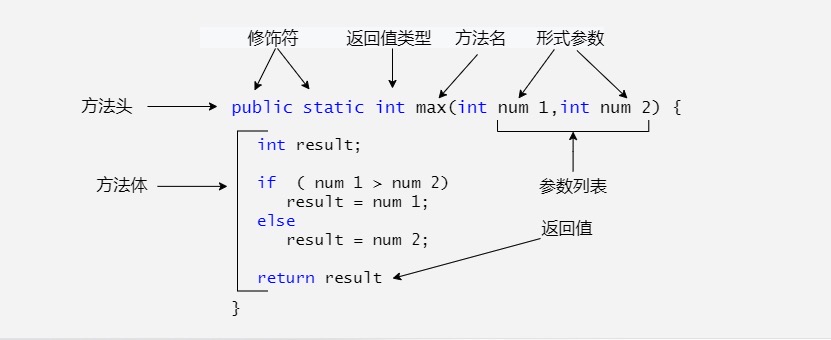
Java方法是语句的集合,它们在一起执行一个功能。方法是解决一类问题的步骤的有序代码组合,方法包含于类或对象中,方法在程序中被创建,在其他地方被引用。简单说就是类里的函数
1
2
3
4
5
6
7
8
9
10
//方法定义
修饰符 返回值类型 方法名(参数类型 参数名){
    ...
    方法体
    ...
    return 返回值;
}

//方法调用
方法名(参数类型 参数名)
- 修饰符: 修饰符,这是可选的,告诉编译器如何调用该方法。定义了该方法的访问类型。
- 返回值类型: 方法可能会返回值。有些方法执行所需的操作,但没有返回值,在这种情况下,是关键字void。
- 方法名: 是方法的实际名称。方法名和参数表共同构成方法签名。
- 参数类型: 参数像是一个占位符。当方法被调用时,传递值给参数。这个值被称为实参或变量。参数列表是指方法的参数类型、顺序和参数的个数。参数是可选的,方法可以不包含任何参数。
- 方法体: 方法体包含具体的语句,定义该方法的功能。
3.2 方法重载
同一个类中,定义了多个同名的方法,这些方法具有类似的功能。每个方法具有不同的参数类型和参数个数,这些同名的方法,就构成了重载关系
简单理解:同一个类,方法名相同,参数不同的方法,无需看返回值。
四、面向对象
4.1 对象和类
类(Class):
- 定义对象的蓝图,包括属性和方法。类是一个模板,它描述一类对象的行为和状态。
- 示例:
public class Car { ... }
1
2
3
4
5
6
7
8
9
10
11
12
13
14
15
16
17
18
19
20
21
22
23
public class User {
    private String name;
    private int age;

    public User() {
    }

    public String getName() {
        return name;
    }

    public void setName(String name) {
        this.name = name;
    }

    public int getAge() {
        return age;
    }

    public void setAge(int age) {
        this.age = age;
    }
}
对象(Object):
- 类的实例,具有状态和行为。对象是类的一个实例(对象不是找个女朋友),有状态和行为。例如,一条狗是一个对象,它的状态有:颜色、名字、品种;行为有:摇尾巴、叫、吃等。
- 示例:
Car myCar = new Car();
常用类
Array类
Java Number & Math 类
Java Character 类
Java String 类
4.2 特殊的类
4.2.1 枚举类
enum 是 Java 中的枚举类型,用来表示一组数量固定、取值明确的对象。
比如:
1
2
3
订单状态:待支付、处理中、已发货、已送达
星期:周一、周二、周三……
季节:春、夏、秋、冬
这些情况的特点都是:可选值是提前固定好的,很适合使用枚举。枚举中的每一个枚举项,本质上都是当前枚举类的一个对象。
enum 是 Java 中的枚举类型,用来表示一组固定的对象。
比如订单状态只有:
1
2
3
4
5
6
待支付
处理中
已发货
配送中
已送达
已取消
这种数量固定、取值明确的情况,就很适合使用枚举。
4.2.1.1 定义枚举
1
2
3
4
5
6
7
8
9
10
11
12
13
14
15
16
17
18
public enum OrderState {
    PAYMENT_PENDING("待支付"),
    PROCESSING("处理中"),
    SHIPPED("已发货"),
    OUT_FOR_DELIVERY("配送中"),
    DELIVERED("已送达"),
    CANCELLED("已取消");

    private String name;

    private OrderState(String name) {
        this.name = name;
    }

    public String getName() {
        return name;
    }
}
枚举类第一行先把所有对象列出来:每一个枚举项都是 OrderState 类的一个对象。枚举项默认相当于使用:
1
public static final
修饰,所以可以直接通过类名获取:
1
OrderState o1 = OrderState.PAYMENT_PENDING;
4.2.1.2 枚举也可以有属性和构造方法
1
private String name;
用来保存订单状态对应的中文名称。构造方法:
1
2
3
private OrderState(String name) {
    this.name = name;
}
当写:
1
PAYMENT_PENDING("待支付")
时,就会把 "待支付" 传给构造方法,并保存到 name 中。
通过 getter 获取:
1
2
3
public String getName() {
    return name;
}
使用:
1
2
3
4
OrderState o1 = OrderState.PAYMENT_PENDING;

System.out.println(o1.getName());
// 待支付
4.2.1.3 枚举可以配合 switch 使用
1
2
3
4
5
6
7
8
switch (o1) {
    case PAYMENT_PENDING -> System.out.println("待支付状态");
    case PROCESSING -> System.out.println("处理中");
    case SHIPPED -> System.out.println("已发货");
    case OUT_FOR_DELIVERY -> System.out.println("配送中");
    case DELIVERED -> System.out.println("已送达");
    case CANCELLED -> System.out.println("已取消");
}
根据枚举对象的不同值,执行不同的代码。
4.2.2 抽象类
在面向对象的概念中,所有的对象都是通过类来描绘的,但是反过来,并不是所有的类都是用来描绘对象的,如果一个类中没有包含足够的信息来描绘一个具体的对象,这样的类就是抽象类。抽象类除了不能实例化对象之外,类的其它功能依然存在,成员变量、成员方法和构造方法的访问方式和普通类一样。由于抽象类不能实例化对象,所以抽象类必须被继承,才能被使用。也是因为这个原因,通常在设计阶段决定要不要设计抽象类。父类包含了子类集合的常见的方法,但是由于父类本身是抽象的,所以不能使用这些方法。在 Java 中抽象类表示的是一种继承关系,一个类只能继承一个抽象类,而一个类却可以实现多个接口。
抽象类总结规定
- 抽象类不能被实例化(初学者很容易犯的错),如果被实例化,就会报错,编译无法通过。只有抽象类的非抽象子类可以创建对象。
- 抽象类中不一定包含抽象方法,但是有抽象方法的类必定是抽象类。
- 抽象类中的抽象方法只是声明,不包含方法体,就是不给出方法的具体实现也就是方法的具体功能。
- 构造方法,类方法(用 static 修饰的方法)不能声明为抽象方法。
- 抽象类的子类必须给出抽象类中的抽象方法的具体实现,除非该子类也是抽象类。
抽象方法:将共性的行为(方法)抽取到父类之后,因为每个子类的具体方法是不一样的,所有在父类中不能确定具体的方法,该方法就可以定义为抽象方法
1
public abstract 返回值类型 方法名(参数列表);
抽象类:如果一个类中存在抽象方法,那么该类就必须声明为抽象类
1
public abstract class 类名{...}
4.2.3 Math 类
Math 是 Java 提供的数学工具类,位于 java.lang 包中,不需要手动导入。
- 常用方法都是静态方法,直接用
Math.方法名()调用,不需要创建对象。 - 常用常量有
Math.PI(圆周率)和Math.E(自然常数)。
| 方法 | 作用 | 示例 |
|---|---|---|
abs(x) | 绝对值 | Math.abs(-5) → 5 |
max(a, b) / min(a, b) | 较大值/较小值 | Math.max(3, 8) → 8 |
ceil(x) | 向上取整,返回 double | Math.ceil(3.2) → 4.0 |
floor(x) | 向下取整,返回 double | Math.floor(-3.2) → -4.0 |
round(x) | 取最近的整数,正好居中时向正无穷方向取整 | Math.round(-1.5) → -1 |
pow(a, b) | a 的 b 次方 | Math.pow(2, 3) → 8.0 |
sqrt(x) | 平方根 | Math.sqrt(9) → 3.0 |
random() | 返回大于等于 0、小于 1 的伪随机 double | 0.0 <= 结果 < 1.0 |
1
2
3
4
5
6
double radius = 2.0;
double area = Math.PI * Math.pow(radius, 2);
System.out.println(area);

int dice = (int) (Math.random() * 6) + 1;
System.out.println(dice); // 1~6 的整数
注意:Math.round(float) 返回 int,Math.round(double) 返回 long。Math.abs(Integer.MIN_VALUE) 仍然是负数,因为对应的正数超出了 int 的范围。
4.2.4 System 类
System 提供与系统环境有关的字段和方法,位于 java.lang 包中,直接通过类名使用。
| 字段/方法 | 作用 |
|---|---|
System.in | 标准输入流,常配合 Scanner 使用 |
System.out | 标准输出流 |
System.err | 标准错误输出流 |
System.currentTimeMillis() | 获取从 Unix 纪元开始计算的毫秒数 |
System.nanoTime() | 获取适合计算经过时间的纳秒计时值,起点没有日期含义 |
System.arraycopy(...) | 把一个数组中的部分元素复制到另一个数组 |
System.getProperty(key) | 获取系统属性,例如 Java 版本 |
System.exit(status) | 终止当前 JVM,通常用 0 表示正常退出 |
System.gc() | 请求 JVM 进行垃圾回收,不保证立即执行或回收某个对象 |
1
2
3
4
5
6
7
8
9
10
11
12
13
System.out.println(System.getProperty("java.version"));

int[] source = {10, 20, 30, 40};
int[] target = new int[3];

// 源数组、源起始下标、目标数组、目标起始下标、复制数量
System.arraycopy(source, 1, target, 0, 3);
System.out.println(java.util.Arrays.toString(target)); // [20, 30, 40]

long start = System.nanoTime();
System.out.println("执行一段操作");
long elapsed = System.nanoTime() - start;
System.out.println("耗时:" + elapsed + " 纳秒");
- 计算一段操作的耗时通常用
nanoTime()的差值;它的单位是纳秒,不代表实际精度一定达到纳秒。 arraycopy()不会自动扩容目标数组,需要保证类型兼容、下标和长度合法;引用类型数组复制的是引用,不是深拷贝。System.exit()会结束整个 JVM,不等于退出当前方法,不要把它当作普通的return使用。
4.2.5 Object 类
Object 是 Java 类继承体系的根类。一个类没有显式继承其他类时,会默认继承 Object;其他类也会通过继承链间接继承它。
| 方法 | 作用 |
|---|---|
toString() | 返回对象的字符串表示,打印对象时常会调用 |
equals(Object obj) | 判断对象是否相等,默认实现比较是否为同一个对象 |
hashCode() | 返回对象的哈希码,常用于 HashSet、HashMap |
getClass() | 获取对象运行时所属的类 |
toString()
默认的 toString() 通常是“类名+@+哈希码的十六进制表示”,不是对象字段的内容,也不能当作实际内存地址。重写后可以更直观地显示对象信息。
equals() 和 hashCode()
==比较引用类型时,判断是否指向同一个对象。equals()可以被重写,用来判断业务意义上的相等,例如两个学生是否有相同的学号。- 重写
equals()时也要重写hashCode():两个对象如果equals()为true,哈希码必须相同。 - 哈希码相同,不代表两个对象一定相等。
1
2
3
4
5
6
7
8
9
10
11
12
13
14
15
16
17
18
19
20
21
22
23
24
25
26
27
28
29
30
31
final class Student {
    private final int id;
    private final String name;

    public Student(int id, String name) {
        this.id = id;
        this.name = name;
    }

    @Override
    public String toString() {
        return "Student{id=" + id + ", name='" + name + "'}";
    }

    @Override
    public boolean equals(Object obj) {
        if (this == obj) {
            return true;
        }
        if (!(obj instanceof Student)) {
            return false;
        }
        Student other = (Student) obj;
        return id == other.id;
    }

    @Override
    public int hashCode() {
        return Integer.hashCode(id);
    }
}
这里把“学号相同”定义为学生对象相等,姓名不参与比较。
1
2
3
4
5
6
7
8
// 写在 main 方法中,与上面的 Student 类配合使用
Student s1 = new Student(1, "小明");
Student s2 = new Student(1, "小明");

System.out.println(s1 == s2);        // false
System.out.println(s1.equals(s2));   // true
System.out.println(s1);              // Student{id=1, name='小明'}
System.out.println(s1.getClass().getSimpleName()); // Student
4.3 构造方法
在 Java 中,构造方法(Constructor)是用于创建类的对象的特殊方法。
当使用 new 关键字创建对象时,构造方法会自动调用,用来初始化对象的属性。
构造方法具有以下几个特点:
- 与类名相同:构造方法的名称必须与类名完全一致,包括大小写。这是构造方法的一个基本要求。
- 没有返回类型:构造方法没有返回类型声明,即使是
void也不写。这使得它与普通方法区分开来。不能写return - 自动调用:每次使用
new创建对象时,构造方法会自动调用,以初始化对象的属性和状态。 - 不能直接调用:构造方法只能通过
new关键字在创建对象时调用,不能像普通方法那样直接调用。 - 支持重载:可以为一个类定义多个构造方法,只要它们的参数列表不同。通过重载,可以创建不同的构造方法以适应不同的初始化需求。
- 默认构造方法:如果没有定义任何构造方法,Java 会提供一个无参的默认构造方法。但一旦定义了任何其他构造方法,Java 不再提供默认构造方法。
this关键字的使用:在构造方法中可以使用this来引用当前对象的属性、方法,或调用另一个构造方法(必须是构造方法的第一行),以避免重复代码。- 不能被继承,但可以被调用:构造方法不能被子类继承,但子类可以使用
super()来调用父类的构造方法,以便初始化继承的属性。 - 对象初始化保障:构造方法的主要作用是初始化对象的属性和状态,保证对象在创建时处于一个合法的初始状态。
构造方法的作用:
- 初始化对象属性:构造方法的主要作用是为对象的属性赋初值。
- 保证对象初始化的完整性:在构造方法中可以设置默认值或必要参数,从而避免对象未完全初始化的问题。
构造方法的类型
Java 中的构造方法分为两种类型:无参构造方法和有参构造方法。
4.3.1 无参构造方法(默认构造方法)
如果一个类中没有定义任何构造方法,Java 会默认提供一个无参构造方法。例如:
1
2
3
4
5
public class Person {
    public Person() {
        System.out.println("Person对象已创建");
    }
}
- 在没有显式定义构造方法时,Java 自动提供一个默认的无参构造方法。
- 一旦定义了其他构造方法,Java 将不再提供默认构造方法。
4.3.2 有参构造方法
可以定义带有参数的构造方法,用来在创建对象时为属性赋值:
1
2
3
4
5
6
7
8
9
public class Person {
    String name;
    int age;

    public Person(String name, int age) {
        this.name = name;
        this.age = age;
    }
}
调用有参构造方法时,可以为对象的属性进行初始化:
1
Person p = new Person("Alice", 25);
4.3.3 构造方法的重载
Java 支持构造方法的重载,即可以在同一个类中定义多个构造方法,只要参数列表不同即可。例如:
1
2
3
4
5
6
7
8
9
10
11
12
13
14
15
16
17
18
19
public class Person {
    String name;
    int age;

    public Person() {
        this.name = "Unknown";
        this.age = 0;
    }

    public Person(String name) {
        this.name = name;
        this.age = 0;
    }

    public Person(String name, int age) {
        this.name = name;
        this.age = age;
    }
}
创建对象时,Java 会根据传入的参数数量和类型自动选择匹配的构造方法:
1
2
3
Person p1 = new Person(); // 调用无参构造方法
Person p2 = new Person("Alice"); // 调用单参数构造方法
Person p3 = new Person("Bob", 30); // 调用双参数构造方法
4.3.4 构造方法中的 this 关键字
在构造方法中,this 关键字通常用于两种情况:
1、引用当前对象的属性或方法:当构造方法的参数名与类属性名相同时,使用 this 来区分类属性和参数。例如:
1
2
3
4
public Person(String name, int age) {
    this.name = name; // this.name 表示类的属性
    this.age = age;
}
2、调用另一个构造方法:可以使用 this() 调用当前类的其他构造方法,常用于避免重复代码,但必须放在构造方法的第一行。
1
2
3
4
5
6
7
8
public Person(String name) {
    this(name, 0); // 调用另一个双参数的构造方法
}

public Person(String name, int age) {
    this.name = name;
    this.age = age;
}
构造方法是 Java 面向对象编程中非常重要的部分,通过使用构造方法可以有效控制对象的初始化过程,保证创建出的对象状态的完整性和一致性。
4.4 继承
继承是java面向对象编程技术的一块基石,因为它允许创建分等级层次的类。继承就是子类继承父类的特征和行为,使得子类对象(实例)具有父类的实例域和方法,或子类从父类继承方法,使得子类具有父类相同的行为。
4.4.1 类的继承格式
1
2
3
4
5
class 父类 {
}

class 子类 extends 父类 {
}
4.4.2 继承的特性
- 子类拥有父类非 private 的属性、方法。
- 子类可以拥有自己的属性和方法,即子类可以对父类进行扩展。
- 子类可以用自己的方式实现父类的方法。
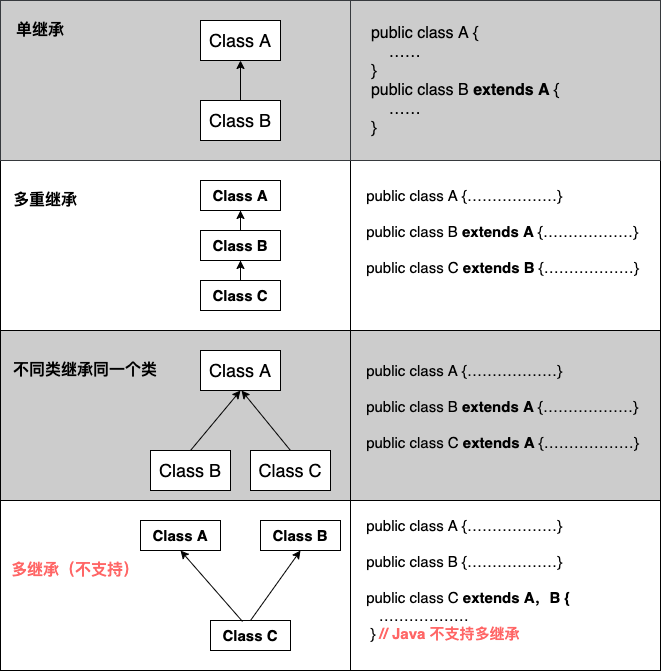
- Java 的继承是单继承,但是可以多重继承,单继承就是一个子类只能继承一个父类,多重继承就是,例如 B 类继承 A 类,C 类继承 B 类,所以按照关系就是 B 类是 C 类的父类,A 类是 B 类的父类,这是 Java 继承区别于 C++ 继承的一个特性。
- 提高了类之间的耦合性(继承的缺点,耦合度高就会造成代码之间的联系越紧密,代码独立性越差)。
4.4.3 继承关键字
继承可以使用 extends 和 implements 这两个关键字来实现继承,而且所有的类都是继承于 java.lang.Object,当一个类没有继承的两个关键字,则默认继承 Object(这个类在 java.lang 包中,所以不需要 import)祖先类。
extends关键字
在 Java 中,类的继承是单一继承,也就是说,一个子类只能拥有一个父类,所以 extends 只能继承一个类。
1
2
3
4
5
6
7
8
9
10
11
12
public class Animal {
    private String name;
    private int id;
    public Animal(String myName, int myid) {
        //初始化属性值
    }
    public void eat() {  //吃东西方法的具体实现  }
    public void sleep() { //睡觉方法的具体实现  }
}

public class Penguin  extends  Animal{
}
implements关键字
使用 implements 关键字可以变相的使java具有多继承的特性,使用范围为类继承接口的情况,可以同时继承多个接口(接口跟接口之间采用逗号分隔)。
1
2
3
4
5
6
7
8
9
10
11
public interface A {
    public void eat();
    public void sleep();
}

public interface B {
    public void show();
}

public class C implements A,B {
}
super 与 this 关键字
super 关键字:我们可以通过 super 关键字来实现对父类成员的访问,用来引用当前对象的父类。
this 关键字:指向自己的引用,引用当前对象,即它所在的方法或构造函数所属的对象实例。。
1
2
3
4
5
6
7
8
9
10
11
12
13
14
15
16
17
18
19
20
21
22
23
24
class Animal {
    void eat() {
        System.out.println("animal : eat");
    }
}

class Dog extends Animal {
    void eat() {
        System.out.println("dog : eat");
    }
    void eatTest() {
        this.eat();   // this 调用自己的方法
        super.eat();  // super 调用父类方法
    }
}

public class Test {
    public static void main(String[] args) {
        Animal a = new Animal();
        a.eat();
        Dog d = new Dog();
        d.eatTest();
    }
}
final 关键字
final 可以用来修饰变量(包括类属性、对象属性、局部变量和形参)、方法(包括类方法和对象方法)和类。使用 final 关键字声明类,就是把类定义定义为最终类,不能被继承,或者用于修饰方法,该方法不能被子类重写。
4.4.4 构造器
子类是不继承父类的构造器(构造方法或者构造函数)的,它只是调用(隐式或显式)。如果父类的构造器带有参数,则必须在子类的构造器中显式地通过 super 关键字调用父类的构造器并配以适当的参数列表。如果父类构造器没有参数,则在子类的构造器中不需要使用 super 关键字调用父类构造器,系统会自动调用父类的无参构造器。
4.4.5 子类真正能继承父类的是什么?
| 父类成员 | 是否能被子类继承 | 说明 |
|---|---|---|
| 构造方法 | ❌ 不能继承 | 构造方法用于创建对象,子类通过 super() 调用父类构造方法 |
| 成员变量(实例变量) | ✅ 可以继承(但有访问限制) | public、protected、默认权限可以直接访问;private 成员存在于子类对象中,但不能直接访问 |
| 成员方法 | ✅ 可以继承(但有访问限制) | public、protected、默认权限方法可以继承;private 方法不能被子类访问 |
| final 方法 | ✅ 可以继承,但不能重写 | final 的作用是禁止子类修改方法实现,不是禁止继承 |
| static 方法 | ⚠️ 可以被子类继承,但属于类方法 | 可以通过子类名调用,但不存在真正的多态重写(叫隐藏,不叫覆盖) |
| private 方法 | ❌ 不能继承 | 子类无法访问,子类中可以定义同名方法,但不是重写 |
4.5 封装
封装是面向对象程式设计中的一种机制,它将对象的内部实现细节隐藏起来,只通过规定的接口与外部进行交互。这样可以保护数据和代码,避免被外部随意修改或访问。同时,封装让程式在修改内部实现时,不需要影响调用它的其他程式,提高了代码的安全性、可维护性和易理解性。
封装的优点
良好的封装能够减少耦合。
类内部的结构可以自由修改。
可以对成员变量进行更精确的控制。
隐藏信息,实现细节。
修改属性的可见性来限制对属性的访问(一般限制为private),例如将 name 和 age 属性设置为私有的,只能本类才能访问,其他类都访问不了,如此就对信息进行了隐藏。
1
2
3
4
public class Person {
    private String name;
    private int age;
}
- 对每个值属性提供对外的公共方法访问,也就是创建一对赋取值方法,用于对私有属性的访问,例如采用 this 关键字是为了解决实例变量(private String name)和局部变量(setName(String name)中的name变量)之间发生的同名的冲突。
1
2
3
4
5
6
7
8
9
10
11
12
13
14
15
16
17
18
19
20
public class Person{
    private String name;
    private int age;

    public int getAge(){
      return age;
    }

    public String getName(){
      return name;
    }

    public void setAge(int age){
      this.age = age;
    }

    public void setName(String name){
      this.name = name;
    }
}
4.6 多态
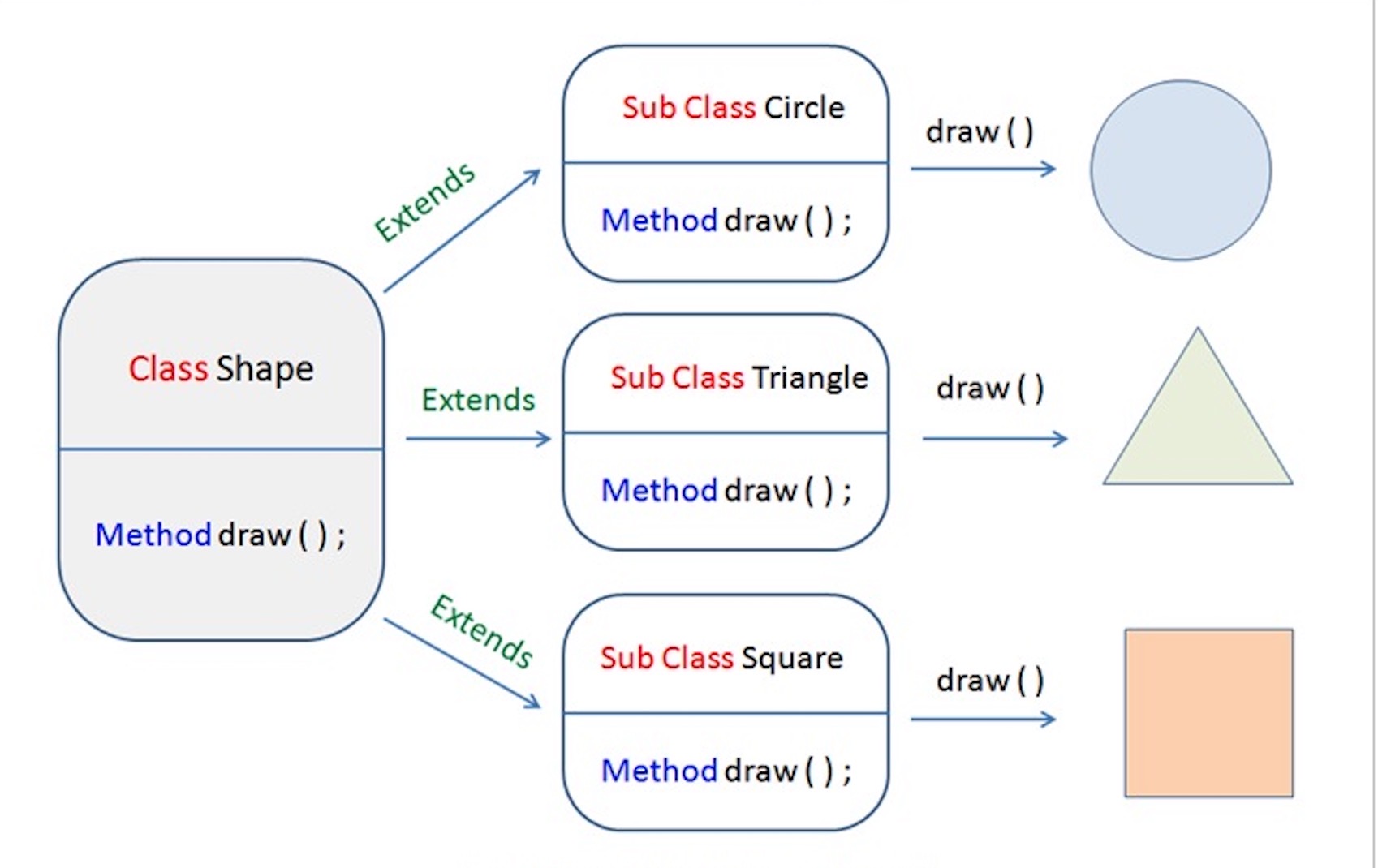
指同一个接口或方法在不同对象中可以表现出不同的行为。简单来说,就是“同一种调用方式,不同的执行结果”。多态通过继承、方法重写和父类引用指向子类对象实现,使程序具有更强的扩展性和灵活性。例如,父类定义一个 move() 方法,子类 Dog 和 Bird 分别重写该方法,当通过父类类型调用 move() 时,会根据实际对象类型执行对应的子类方法。多态可以降低代码之间的耦合,提高程序的可维护性和扩展能力。
多态的前提
- 有继承/实现关系 必须的
- 有父类引用指向子类对象 必须的
- 有方法重写 可选的
多态的实现方式
- 方式一:重写:
- 方式二:接口
- 方式三:抽象类和抽象方法
4.7 接口
接口(interface)是一种引用类型,用于定义行为规范:规定“能做什么”,由实现类决定“怎么做”。
- 不能直接实例化,没有构造方法,也不能定义实例字段。
- 类通过
implements实现接口;接口通过extends继承接口。 - 类只能继承一个类,但可以实现多个接口;接口可以继承多个接口。
- 接口类型的变量可以引用实现类对象,也可以赋值为
null。
4.7.1 接口的声明
1
2
3
4
5
6
7
8
9
10
11
12
13
interface Animal {
    int MAX_AGE = 100; // 隐式为 public static final,声明时必须初始化

    void eat();       // 隐式为 public abstract

    default void sleep() { // Java 8+:默认方法,有方法体
        System.out.println("睡觉");
    }

    static void info() {   // Java 8+:静态方法,有方法体
        System.out.println("动物接口");
    }
}
| 成员 | 关键规则 |
|---|---|
| 字段 | 隐式为 public static final,没有实例字段 |
| 抽象方法 | 隐式为 public abstract,没有方法体 |
default 方法 | Java 8+;公开的实例方法,实现类可直接使用或重写 |
static 方法 | Java 8+;通过接口名调用,不被实现类或子接口继承 |
private 方法 | Java 9+;有方法体,仅供接口内部复用,也可为 private static |
“接口中的方法都是抽象方法”只适用于 Java 8 之前。现代接口可以包含方法实现。
4.7.2 接口的实现
1
2
3
4
5
6
7
8
9
10
11
12
class Cat implements Animal {
    @Override
    public void eat() { // 必须是 public,不能缩小访问权限
        System.out.println("猫吃鱼");
    }
}

// 以下语句放在 main 方法中
Animal animal = new Cat(); // 接口引用指向实现类对象:多态
animal.eat();             // 调用 Cat 的实现
animal.sleep();           // 使用接口的默认实现
Animal.info();            // 接口名调用静态方法
实现规则:
- 具体类必须具备接口要求的全部抽象方法实现,也可以继承父类已有的实现;否则必须声明为
abstract。 - 重写时方法名、参数列表应匹配;返回类型应相同,引用返回类型可使用协变子类型。
- 不能新增或扩大原方法声明的受检异常;可以不抛出、减少或缩小其范围。非受检异常不受此限制。
- 接口引用只能直接使用该接口暴露的实例方法,不能直接调用实现类独有的方法。
同时继承类、实现多个接口:
1
2
3
class Student extends Person implements Runnable, Comparable<Student> {
    // 实现所需的方法;extends 在前,implements 在后
}
4.7.3 接口的继承与多继承
1
2
3
4
5
6
7
8
9
10
11
interface RunnableTask {
    void run();
}

interface Named {
    String getName();
}

interface Worker extends RunnableTask, Named {
    void work();
}
实现 Worker 的具体类需要具备 run()、getName()、work() 三个方法的实现。
多继承中的方法冲突:
- 多个接口声明相同签名的抽象方法,且返回类型兼容时,一份实现即可满足要求。
- 继承两个互不相关接口的同签名
default方法时,必须重写以解决冲突。 - 默认方法选择规则:父类的具体实例方法优先;更具体的子接口默认方法优先。
1
2
3
4
5
6
7
8
9
10
11
12
13
14
interface A {
    default void show() { System.out.println("A"); }
}

interface B {
    default void show() { System.out.println("B"); }
}

class Demo implements A, B {
    @Override
    public void show() {
        A.super.show(); // 显式选择直接父接口 A 的默认实现
    }
}
4.7.4 标记接口
标记接口通常不声明方法和字段,用接口类型标识某种身份或能力,供相关机制或代码识别。
1
2
3
4
5
6
7
8
9
interface Auditable { }

class Order implements Auditable { }

// 放在方法中:通过类型判断识别标记
Object obj = new Order();
if (obj instanceof Auditable) {
    System.out.println("需要审计");
}
常见例子:
| 接口用途 | |
|---|---|
Serializable | 标识参与 Java 对象序列化机制的类型 |
Cloneable | 配合 Object.clone();本身不声明 clone() 方法 |
EventListener | 事件监听器接口的公共父接口 |
4.7.5 接口与抽象类对比
| 对比项 | 接口 interface | 抽象类 abstract class |
|---|---|---|
| 主要用途 | 定义能力与行为规范 | 复用状态与公共逻辑 |
| 类的继承/实现数量 | 一个类可实现多个接口 | 一个类只能继承一个类 |
| 实例字段 | 不允许 | 允许 |
| 构造方法 | 没有 | 有,供子类构造时调用 |
| 方法 | 抽象、默认、静态、私有方法 | 抽象方法和普通方法等 |
| 直接实例化 | 不允许 | 不允许 |
五、API
API(Application Programming Interface,应用程序编程接口):可以理解为已经提供好的类、接口和方法。使用 Java 标准库时,重点是知道“它能做什么、需要什么参数、返回什么结果”。
5.1 String 字符串
5.1.1 创建字符串与不可变性
String 用来表示字符串,位于 java.lang 包中,不需要手动导入。
1
2
3
4
5
6
String s1 = "hello";
String s2 = new String("hello");

char[] chars = {'J', 'a', 'v', 'a'};
String s3 = new String(chars);
System.out.println(s3); // Java
字符串是不可变的:创建后,字符串对象中的内容不能修改。拼接、替换等操作返回结果字符串,不会改变原对象。
1
2
3
4
5
6
String text = "hello";
text.concat(" Java");
System.out.println(text); // hello

text = text.concat(" Java");
System.out.println(text); // hello Java
第二次给 text 赋值,是让变量指向结果字符串,不是修改原来的 "hello" 对象。
5.1.2 字符串比较
==:比较两个引用是否指向同一个对象。equals():比较字符串内容是否相同。equalsIgnoreCase():忽略大小写比较字符串内容。
字符串字面量会共享字符串池中的对象,但不能因此用 == 代替内容比较。
1
2
3
4
5
6
7
8
String a = "Java";
String b = "Java";
String c = new String("Java");

System.out.println(a == b);                  // true:相同的字符串字面量
System.out.println(a == c);                  // false:不同对象
System.out.println(a.equals(c));             // true:内容相同
System.out.println(a.equalsIgnoreCase("java")); // true
空字符串与 null
"" 是长度为 0 的字符串对象;null 表示没有指向对象,两者不是一回事。
1
2
3
4
5
6
String input = null;
System.out.println("Java".equals(input)); // false,不会因为 input 为 null 而报错

if (input != null && !input.isEmpty()) {
    System.out.println(input);
}
5.1.3 常用方法
| 方法 | 作用 |
|---|---|
length() | 返回字符串长度,按 UTF-16 代码单元计数 |
charAt(index) | 获取指定下标处的 char,下标从 0 开始 |
substring(begin, end) | 截取字符串,包含 begin,不包含 end |
substring(begin) | 从 begin 截取到末尾 |
contains(text) | 是否包含指定内容 |
indexOf(text) | 返回第一次出现的位置,没有找到返回 -1 |
startsWith(prefix) / endsWith(suffix) | 判断开头/结尾 |
replace(old, new) | 按字面内容替换,不使用正则表达式 |
split(regex) | 按正则表达式拆分,返回字符串数组 |
trim() | 去掉两端编码值不大于 U+0020 的字符,常用于普通空格 |
toUpperCase() / toLowerCase() | 转换大小写 |
isEmpty() | 是否为长度为 0 的字符串 |
toCharArray() | 转成字符数组 |
1
2
3
4
5
6
7
8
9
10
11
12
13
14
15
String text = "Hello Java";

System.out.println(text.length());             // 10
System.out.println(text.charAt(0));            // H
System.out.println(text.substring(6, 10));     // Java
System.out.println(text.indexOf("Python"));    // -1
System.out.println(text.replace("Java", "World")); // Hello World

String[] names = "小明,小红,小刚".split(",");
for (String name : names) {
    System.out.println(name);
}

String[] parts = "a.b.c".split("\\."); // 点号在正则中有特殊含义,需要转义
System.out.println(java.util.Arrays.toString(parts)); // [a, b, c]
注意事项
charAt()和substring()的下标不合法时会抛出越界异常。length()不一定等于人眼看到的字符数量,例如部分 emoji 会占两个char。split(regex)默认丢弃末尾的空字符串;需要保留时使用split(regex, -1)。- Java 11 起可以用
strip()去掉两端按Character.isWhitespace判断的空白,用isBlank()判断空字符串或全部由这类空白组成的字符串;isEmpty()不会把普通空格当作空字符串。
5.2 StringBuilder
如果需要在循环中反复拼接字符串,可以使用 StringBuilder。
String的内容不可变;StringBuilder中保存的内容可以修改。append()等方法返回当前对象,可以连续调用。- 最后用
toString()得到String。 StringBuilder不保证线程安全,通常用于单线程中的字符串构建。
| 方法 | 作用 |
|---|---|
append(value) | 在末尾追加内容 |
insert(index, value) | 在指定位置插入 |
delete(start, end) | 删除指定范围,包含 start,不包含 end |
reverse() | 反转内容 |
length() | 获取当前长度 |
toString() | 转成字符串 |
1
2
3
4
5
6
7
8
StringBuilder builder = new StringBuilder();
builder.append("Java").append(" ").append("Basics");
builder.insert(0, "Learn ");
System.out.println(builder); // Learn Java Basics

builder.delete(0, 6);
String result = builder.toString();
System.out.println(result); // Java Basics
5.3 集合框架
集合:用来保存一组对象。与数组相比,许多常用集合可以动态增加、删除元素,并提供现成的查找和遍历方法。
| 类型 | 特点 | 常见实现 |
|---|---|---|
List | 按位置组织元素,可以重复,可通过下标访问 | ArrayList、LinkedList |
Set | 不允许重复元素 | HashSet、LinkedHashSet、TreeSet |
Queue / Deque | 队列/双端队列,可用于先进先出或栈操作 | ArrayDeque、LinkedList |
Map | 保存键值对,键不能重复,值可以重复 | HashMap、LinkedHashMap、TreeMap |
List、Set、Queue都属于Collection接口体系;Deque继承Queue。Map是独立的接口体系,不继承Collection。Collection是集合接口,Collections是提供排序等操作的工具类,二者不是同一个东西。- “有顺序”不一定代表“已排序”,例如
ArrayList保留列表中的位置顺序,不会自动按数值大小排序。
泛型
泛型用来指定集合中保存的数据类型,减少把不同类型混在一起的问题。
1
2
3
4
5
6
7
8
9
java.util.ArrayList<String> names = new java.util.ArrayList<>();
java.util.ArrayList<Integer> numbers = new java.util.ArrayList<>();

names.add("小明");
numbers.add(10); // int 自动装箱成 Integer
int first = numbers.get(0); // Integer 自动拆箱成 int

// names.add(10); // 类型不匹配,编译错误
// ArrayList<int> list; // 泛型参数不能直接使用基本类型
实际代码通常先 import,再使用简单类名。<> 中的类型可以由编译器根据左侧推断。
5.4 ArrayList
ArrayList 是基于可扩容数组实现的列表,位于 java.util 包中。
- 可以动态添加、删除元素,允许重复元素和
null。 - 下标从
0开始,按下标读取元素很方便。 - 中间插入或删除元素通常需要移动后面的元素。
- 不保证线程安全,多线程共享修改时需要额外处理。
5.4.1 创建与常用方法
1
2
3
4
5
6
import java.util.ArrayList;
import java.util.List;

// 以下语句写在方法中
ArrayList<String> names = new ArrayList<>();
List<Integer> numbers = new ArrayList<>();
List<Integer> numbers = new ArrayList<>(); 是“接口类型引用指向实现类对象”的写法,后续可以通过 List 接口的方法操作集合。
| 方法 | 作用 |
|---|---|
add(element) | 在末尾添加元素 |
add(index, element) | 在指定位置插入元素 |
get(index) | 获取指定位置的元素 |
set(index, element) | 替换指定位置的元素,并返回旧元素 |
remove(index) | 删除指定位置的元素,并返回被删元素 |
remove(object) | 删除第一个相等的元素,返回是否成功 |
size() | 获取元素数量 |
isEmpty() | 判断是否没有元素 |
contains(object) | 判断是否包含相等元素 |
indexOf(object) | 查找第一个相等元素的位置,不存在返回 -1 |
clear() | 删除全部元素 |
1
2
3
4
5
6
7
8
9
10
11
12
13
14
15
16
17
18
19
import java.util.ArrayList;

public class ListDemo {
    public static void main(String[] args) {
        ArrayList<String> names = new ArrayList<>();

        names.add("小明");
        names.add("小红");
        names.add(1, "小刚");
        System.out.println(names); // [小明, 小刚, 小红]

        System.out.println(names.get(0)); // 小明
        names.set(1, "小李");
        names.remove("小红");

        System.out.println(names);        // [小明, 小李]
        System.out.println(names.size()); // 2
    }
}
注意:数组用 length,字符串用 length(),集合用 size()。new ArrayList<>(10) 设置的是初始容量,不是放入 10 个元素,此时 size() 仍然是 0。
get()、set()、remove(index) 的有效下标为 0 到 size() - 1;add(index, element) 还允许下标等于 size(),表示在末尾插入。
5.4.2 删除整数时的区别
ArrayList<Integer> 同时可以用“下标”和“对象”删除元素,注意参数类型。
1
2
3
4
5
6
7
8
java.util.ArrayList<Integer> numbers = new java.util.ArrayList<>();
numbers.add(10);
numbers.add(20);
numbers.add(30);

numbers.remove(1);                   // 删除下标 1 的元素:20
numbers.remove(Integer.valueOf(10)); // 删除值为 10 的元素
System.out.println(numbers);        // [30]
5.4.3 遍历与遍历时删除
普通 for 循环与增强 for 循环
1
2
3
4
5
6
7
8
9
10
11
java.util.ArrayList<String> names = new java.util.ArrayList<>();
names.add("小明");
names.add("小红");

for (int i = 0; i < names.size(); i++) {
    System.out.println(names.get(i));
}

for (String name : names) {
    System.out.println(name);
}
使用迭代器删除
不要在增强 for 循环中直接调用集合的 add()、remove() 改变结构,这可能抛出 ConcurrentModificationException。需要边遍历边删除时,可以使用迭代器自己的 remove()。
1
2
3
4
5
6
7
8
9
// 接上面的 names
java.util.Iterator<String> iterator = names.iterator();
while (iterator.hasNext()) {
    String name = iterator.next();
    if ("小明".equals(name)) {
        iterator.remove();
    }
}
System.out.println(names); // [小红]
每次调用 next() 后最多调用一次 iterator.remove()。这个异常不是只在多线程中才会出现,也不要依赖它检测所有错误修改。
5.4.4 排序
Collections.sort() 可以对列表进行自然顺序排序,例如整数升序、字符串按字典顺序排序。
1
2
3
4
5
6
7
java.util.ArrayList<Integer> numbers = new java.util.ArrayList<>();
numbers.add(30);
numbers.add(10);
numbers.add(20);

java.util.Collections.sort(numbers);
System.out.println(numbers); // [10, 20, 30]
5.5 其他常用集合
5.5.1 HashSet
HashSet 适合保存不重复的元素,不保证遍历顺序。判断重复依赖 hashCode() 和 equals(),因此自定义对象需要正确实现这两个方法。
1
2
3
4
5
6
7
java.util.Set<String> names = new java.util.HashSet<>();
System.out.println(names.add("小明")); // true
System.out.println(names.add("小明")); // false:没有重复加入
names.add("小红");

System.out.println(names.size());           // 2
System.out.println(names.contains("小明")); // true
需要保留插入顺序时可以使用 LinkedHashSet;需要按自然顺序或指定比较器排序时可以使用 TreeSet。
5.5.2 HashMap
HashMap 保存“键—值”对应关系,不保证遍历顺序。同一个键再次 put() 时,会覆盖原来的值。
| 方法 | 作用 |
|---|---|
put(key, value) | 添加或替换键值对,返回旧值,没有旧值时返回 null |
get(key) | 根据键获取值,键不存在时返回 null |
getOrDefault(key, defaultValue) | 键不存在时返回指定的默认值 |
containsKey(key) | 判断键是否存在 |
remove(key) | 根据键删除键值对 |
keySet() | 获取键的集合视图 |
values() | 获取值的集合视图 |
entrySet() | 获取键值对的集合视图 |
1
2
3
4
5
6
7
8
9
10
11
java.util.Map<String, Integer> scores = new java.util.HashMap<>();
scores.put("小明", 90);
scores.put("小红", 95);
scores.put("小明", 98); // 覆盖小明原来的成绩

System.out.println(scores.get("小明"));             // 98
System.out.println(scores.getOrDefault("小刚", 0)); // 0

for (java.util.Map.Entry<String, Integer> entry : scores.entrySet()) {
    System.out.println(entry.getKey() + ":" + entry.getValue());
}
HashMap允许null值,所以get()返回null不一定说明键不存在,可以用containsKey()判断。HashMap的键、HashSet的元素,在放入之后不要修改参与equals()和hashCode()的字段,否则可能找不到原来的对象。- 需要保留插入顺序时通常使用
LinkedHashMap;需要按键排序时可以使用TreeMap。
5.5.3 ArrayDeque
ArrayDeque 是双端队列,可以从两端添加、获取、删除元素,不允许存放 null。
作为队列:先进先出
1
2
3
4
5
6
7
java.util.Deque<String> queue = new java.util.ArrayDeque<>();
queue.offerLast("A");
queue.offerLast("B");
System.out.println(queue.peekFirst()); // A:查看,不删除
System.out.println(queue.pollFirst()); // A:取出并删除
System.out.println(queue.pollFirst()); // B
System.out.println(queue.pollFirst()); // null:队列为空
作为栈:后进先出
1
2
3
4
5
java.util.Deque<Integer> stack = new java.util.ArrayDeque<>();
stack.push(10);
stack.push(20);
System.out.println(stack.pop()); // 20
System.out.println(stack.pop()); // 10
pop() 在空栈上会抛出 NoSuchElementException;如果希望为空时返回 null,可以使用 pollFirst()。
1. Getting to Know Java
Java is the collective name for the object-oriented programming language and Java platform introduced by Sun Microsystems in May 1995. It was developed by James Gosling and his colleagues. Sun was later acquired by Oracle, and Java became an Oracle product.
Java Features
1. Platform Independence (Cross-Platform)
This is Java’s most central and recognizable feature: “write once, run anywhere.” Java source code is compiled into bytecode that is independent of specific hardware and operating systems. As long as the target platform has the corresponding Java Virtual Machine (JVM) installed, the bytecode can run. This mechanism breaks the limitation of C/C++ programs being compiled for specific platforms, allowing Java programs to be easily deployed on Windows, Linux, macOS, and other systems.
2. Object-Oriented
Java is a purely object-oriented language. Except for a small number of primitive data types, everything in Java is an object. It fully supports encapsulation, inheritance, and polymorphism, encouraging developers to build software with modularity and reusability in mind. Unlike C++, Java removes complex features such as multiple inheritance and operator overloading. It achieves the flexibility of multiple inheritance through interfaces, making the language simpler and purer.
3. Automatic Memory Management
Java introduces a garbage collection mechanism (Garbage Collection, GC). The JVM automatically reclaims memory occupied by objects that are no longer referenced. Programmers do not need to manually manage memory allocation and release as they do in C/C++, which effectively avoids problems such as memory leaks and dangling pointers that can cause programs to crash, greatly improving program robustness and security.
JDK
JDK stands for Java Development Kit. It is the core of Java development and contains the tools and runtime environment required to develop Java programs.
IntelliJ IDEA
IntelliJ IDEA is a professional integrated development environment (IDE) developed by JetBrains. It is mainly used for Java and Kotlin development and is widely regarded as one of the most powerful development tools in the Java field.
Hello World
1
2
3
4
5
6
7
8
9
10
11
12
13
14
15
16
17
18
// public: an access modifier indicating that this class is public
// class: the keyword used to declare a class
// HelloWorld: the class name, which must exactly match the file name HelloWorld.java

// public: an access modifier indicating that main is public and can be called by the JVM
// static: indicates that the method belongs to the class and can be called without creating an object
// void: the return type, indicating that the method returns no value
// main: the method name and the entry point of a Java program; execution starts here
// String[]: the parameter type, representing a string array
// args: the parameter name used to receive command-line arguments
public class HelloWorld {
    public static void main(String[] args) {
        // This is a single-line comment
        /* This is a
        multi-line comment */
        System.out.println("Hello, world!");
    }
}
Comments
Line comment: A single-line comment begins with two slashes, //.
Block comment: A multi-line comment begins with /* and ends with */.
Documentation comment: A documentation comment begins with /** and ends with */. It usually appears before declarations of classes, methods, fields, and so on, and is used to generate code documentation. Tools can extract these comments to generate API documentation such as Javadoc.
2. Core Syntax
2.1 Data Types
2.1.1 Literals: Do Not Mix Single and Double Quotes
| Literal type | Description |
|---|---|
| Integer types: byte, short, int, long | Write the value directly, such as 18 or -88 |
| Decimal types: float, double | Write the value with a decimal point, such as 1.93 or -5.21 |
| String type: String | Enclose the value in double quotes, such as “Nicholas · Purehearted · Warm Guy · Innocent · A-Wei” |
| Character type: char | Enclose the value in single quotes; it can contain only one character, such as ‘男’, ‘A’, or ‘0’ |
| Boolean type: boolean | Boolean values representing true and false |
| Null type | A special null value: null |
Variables and data types: when defining a variable for the first time, you need to specify its type.
2.1.2 Integer Types
For integer types, Java defines only signed integers, so the highest bit represents the sign bit (0 represents a positive number, and 1 represents a negative number). The maximum ranges of the integer types are shown below. A value of type long needs an L suffix:
1
2
3
4
5
6
7
byte: -128 ~ 127
short: -32768 ~ 32767
int: -2147483648 ~ 2147483647
long: -9223372036854775808 ~ 9223372036854775807

int a = 1
long a = 1000000000001L
2.1.3 Floating-Point Types
Floating-point numbers are decimals. When a decimal is written in scientific notation, the decimal point can “float,” which is why it is called a floating-point number. Values of type float require an f suffix. Floating-point numbers have very large ranges: float can represent values up to 3.4x1038, while double can represent values up to 1.79x10308.
1
2
3
4
5
6
7
float f1 = 3.14f;
float f2 = 3.14e38f; // Scientific notation for 3.14x10^38
float f3 = 1.0; // Error: a value without an f suffix is double and cannot be assigned to float

double d1 = 1.79e308;
double d2 = -1.79e308;
double d3 = 4.9e-324;
2.1.4 Boolean Type
The boolean type has only two values: true and false. A Boolean value is always the result of a relational operation. The Java language does not specify how Boolean values are stored. In theory, a Boolean value needs only 1 bit, but the JVM usually represents a boolean internally as a 4-byte integer.
1
2
3
4
5
boolean b1 = true;
boolean b2 = false;
boolean isGreater = 5 > 3; // The result is true
int age = 12;
boolean isAdult = age >= 18; // The result is false
2.1.5 Character Type
The char type represents one character. In addition to standard ASCII characters, Java’s char type can represent a Unicode character.
Note that a char uses single quotes (') and contains only one character. It must be distinguished from the string type, which uses double quotes (").
1
2
char a = 'A';
char zh = '中';
2.1.6 Reference Types
Apart from the primitive types described above, all remaining types are reference types. The most commonly used reference type is the String class. A reference-type variable is similar to a pointer in C: internally, it stores an “address” that points to the location of an object in memory.
1
String s = "hello";
2.1.7 Constants
When a variable is declared with the final modifier, it becomes a constant. After being initialized when it is defined, it cannot be assigned again; assigning it again causes a compilation error. By convention, constant names are usually written in ALL CAPS to distinguish them from variables.
1
2
3
4
final double PI = 3.14; // PI is a constant
double r = 5.0;
double area = PI * r * r;
PI = 300; // compile error!
2.1.8 The var Keyword
Sometimes a type name is too long and cumbersome to write. For example:
1
StringBuilder sb = new StringBuilder();
In this case, if you want to omit the variable type, you can use the var keyword:
1
var sb = new StringBuilder();
The compiler infers from the assignment that the type of sb is StringBuilder. To the compiler, the statement:
1
var sb = new StringBuilder();
is automatically treated as:
1
StringBuilder sb = new StringBuilder();
Therefore, using var to define a variable merely saves you from writing the type name.
2.1.9 Variable Scope
In Java, multiple statements are enclosed in { ... }. As long as these braces are nested correctly, the compiler can identify the beginning and end of each statement block. A variable defined inside a block has a scope from its definition to the end of that block. Referring to the variable outside its scope causes a compilation error. When defining variables, follow the principle of minimizing scope: define a variable in the smallest possible scope and do not reuse variable names. For example:
1
2
3
4
5
6
7
8
9
10
11
12
13
14
15
16
17
18
19
20
21
{
    ...
    int i = 0; // The scope of i begins here
    ...
    {
        ...
        int x = 1; // The scope of x begins here
        ...
        {
            ...
            String s = "hello"; // The scope of s begins here
            ...
        } // The scope of s ends here
        ...
        // Note: this is a new variable named s.
        // It is different from the variable above because their scopes differ:
        String s = "hi";
        ...
    } // The scopes of x and s end here
    ...
} // The scope of i ends here
2.1.10 Wrapper Classes, Autoboxing, and Unboxing
Wrapper classes represent primitive values as objects, allowing them to be used where objects are required, such as in collections.
| Primitive Type | Wrapper Class |
|---|---|
byte | Byte |
short | Short |
int | Integer |
long | Long |
float | Float |
double | Double |
char | Character |
boolean | Boolean |
- Boxing converts a primitive value into its corresponding wrapper type.
- Unboxing converts a wrapper object into its corresponding primitive type.
- Autoboxing and automatic unboxing let the compiler perform these conversions automatically.
1
2
3
4
5
6
7
8
Integer a = Integer.valueOf(10); // Explicit boxing
int b = a.intValue();            // Explicit unboxing

Integer count = 20;              // Autoboxing: int → Integer
int total = count;               // Automatic unboxing: Integer → int

Double price = 3.14;             // Autoboxing: double → Double
double value = price;            // Automatic unboxing: Double → double
Converting Between Strings and Numbers
1
2
3
4
int age = Integer.parseInt("18");           // Returns int
double score = Double.parseDouble("92.5"); // Returns double
Integer number = Integer.valueOf("123");   // Returns Integer
String text = String.valueOf(age);         // Number to string
If a string is not a valid number, such as in Integer.parseInt("abc"), a NumberFormatException is thrown.
Things to Note
- Wrappers are reference types and can be
null. Unboxingnullthrows aNullPointerException. - Using
==between two wrapper objects checks whether they are the same object. Usually useequals()to compare their values, and do not rely on wrapper caches. equals()also checks the type. For example,Integer.valueOf(1).equals(Double.valueOf(1.0))isfalse.
1
2
3
4
5
6
Integer a = 1000;
Integer b = 1000;
System.out.println(a.equals(b)); // true

Integer count = null;
// int total = count; // Throws NullPointerException during unboxing
2.2 Operations
2.2.1 Arithmetic Operators
| Operator | Description |
|---|---|
| + | Addition — adds the values on both sides of the operator |
| - | Subtraction — subtracts the right operand from the left operand |
| * | Multiplication — multiplies the values on both sides of the operator |
| / | Division — divides the left operand by the right operand; integer division produces only an integer |
| % | Remainder — returns the remainder after dividing the left operand by the right operand |
| ++ | Increment: increases the operand by 1; ++n increments before using n, while n++ uses n before incrementing |
| – | Decrement: decreases the operand by 1 |
+=, -=, *=, /= | Shorthand operators |
2.2.2 Relational Operators
| Operator | Description |
|---|---|
| == | Checks whether the values of two operands are equal; if they are, the condition is true. |
| != | Checks whether the values of two operands are unequal; if they are, the condition is true. |
| > | Checks whether the left operand is greater than the right operand; if it is, the condition is true. |
| < | Checks whether the left operand is less than the right operand; if it is, the condition is true. |
| >= | Checks whether the left operand is greater than or equal to the right operand; if it is, the condition is true. |
| <= | Checks whether the left operand is less than or equal to the right operand; if it is, the condition is true. |
2.2.3 Type Conversion
Implicit conversion
Java automatically performs the type conversion, so you do not need to write conversion code manually. The range relationship among common integer and floating-point types can be remembered as:
1
byte → short → int → long → float → double
Rule 1: When byte, short, and char participate in an operation, they are first automatically promoted to int.
Rule 2: When different types participate in an operation, the type with the smaller range is promoted to the type with the larger range before the operation is performed.
Explicit conversion
When you want to convert a type with a larger range to a type with a smaller range, Java does not convert it automatically; you need to perform an explicit cast.
1
2
3
4
5
Format: targetType variableName = (targetType) data;
double a = 3.14;
int b = (int) a;
System.out.println(b);
3
Note that when a floating-point number is explicitly converted to an integer, it is not rounded; the fractional part is discarded directly. Explicit conversion may cause data loss. If the value exceeds the range, overflow occurs after conversion.
1
2
3
4
5
6
7
8
9
10
11
12
13
14
15
16
17
18
19
20
21
22
23
24
25
26
27
28
29
30
31
32
// Convert an integer to a floating-point number
int a = 10;
double b = a;
// Convert a floating-point number to an integer
double a = 3.99;
int b = (int) a; // Discard the fractional part directly
// Conversions among numeric types
int a = 10;
long b = a;
float c = a;
double d = a;
// The other way around:
double a = 10.5;
float b = (float) a;
long c = (long) a;
int d = (int) a;
// Conversions between numbers and strings
int a = 123;
String str1 = String.valueOf(a);     // Number to string

String str2 = "456";
int b = Integer.parseInt(str2);      // String to integer

String str3 = "3.14";
double c = Double.parseDouble(str3); // String to decimal

// Conversions between char and numbers
char ch1 = 'A';
int num1 = ch1;                      // char to int; the result is 65

int num2 = 66;
char ch2 = (char) num2;              // int to char; the result is 'B'
2.2.4 Bitwise Operations
| Operator | Description | Example |
|---|---|---|
| & | If both corresponding bits are 1, the result is 1; otherwise, it is 0 | (A & B) gives 12, or 0000 1100 |
| | | If both corresponding bits are 0, the result is 0; otherwise, it is 1 | (A | B) gives 61, or 0011 1101 |
| ^ | If corresponding bits are the same, the result is 0; otherwise, it is 1 | (A ^ B) gives 49, or 0011 0001 |
| ~ | The bitwise complement operator flips every bit: 0 becomes 1 and 1 becomes 0 | (~A) gives -61, or 1100 0011 |
| « | Left-shift operator. Shifts the left operand left by the number of bits specified by the right operand | A « 2 gives 240, or 1111 0000 |
| » | Right-shift operator. Shifts the left operand right by the number of bits specified by the right operand | A » 2 gives 15, or 1111 |
| »> | Zero-fill right-shift operator. Shifts the left operand right and fills the vacated bits with zeros | A »> 2 gives 15, or 0000 1111 |
| «= | Left-shift assignment operator | C «= 2 is equivalent to C = C « 2 |
| »= | Right-shift assignment operator | C »= 2 is equivalent to C = C » 2 |
| &= | Bitwise AND assignment operator | C &= 2 is equivalent to C = C & 2 |
| ^= | Bitwise XOR assignment operator | C ^= 2 is equivalent to C = C ^ 2 |
| |= | Bitwise OR assignment operator | C |= 2 is equivalent to C = C | 2 |
2.2.5 Logical Operators
The following table lists the basic logical operations, assuming Boolean variable A is true and variable B is false.
| Operator | Description | Example |
|---|---|---|
| && | Logical AND. The condition is true if and only if both operands are true. | (A && B) is false. |
| || | Logical OR. The condition is true if either operand is true. | (A || B) is true. |
| ! | Logical NOT. Reverses the logical state of its operand. If a condition is true, logical NOT produces false. | !(A && B) is true. |
2.2.6 Ternary Operation
2.3 Input and Output
1
2
3
4
5
6
7
8
9
10
11
12
13
14
15
16
17
18
19
20
21
22
23
24
25
26
27
28
29
30
31
32
33
34
35
36
37
38
39
40
41
42
43
44
45
46
47
48
49
50
51
52
53
54
55
56
57
58
59
60
61
62
63
64
65
66
67
68
69
70
71
72
73
74
75
76
77
78
79
80
81
82
83
84
85
86
87
88
89
import java.util.Scanner;

public class VariableDemo6 {
    public static void main(String[] args) {
        // ==================== Input ====================
        /*
         * Java input and output
         *
         * Input:
         * 1. Import Scanner
         * 2. Create a Scanner object
         * 3. Use Scanner to receive different types of data
         *
         * Output:
         * 1. System.out.print()
         * 2. System.out.println()
         * 3. System.out.printf()
         */

        // 1. Create a Scanner object
        Scanner sc = new Scanner(System.in);

        // 2. Input an integer
        int num = sc.nextInt();
        System.out.println(num);

        // 3. Input a decimal
        double num2 = sc.nextDouble();
        System.out.println(num2);

        // 4. Input a string (stops at whitespace)
        String str = sc.next();
        System.out.println(str);

        // 5. Input a whole line of text
        String line = sc.nextLine();
        System.out.println(line);

        // 6. Input a single character
        char ch = sc.next().charAt(0);
        System.out.println(ch);

        // 7. Input multiple integers at once
        int a = sc.nextInt();
        int b = sc.nextInt();
        int c = sc.nextInt();

        System.out.println(a);
        System.out.println(b);
        System.out.println(c);

        // 8. Multi-line input
        for (int i = 0; i < 3; i++) {
            String str = sc.nextLine();
            System.out.println(str);
        }

        // 9. An unknown number of input lines
        while (sc.hasNextLine()) {
            String str = sc.nextLine();
            System.out.println(str);
        }

        // 10. Mixing nextInt() and nextLine()
        int age = sc.nextInt();
        // Consume the newline remaining after the integer
        sc.nextLine();
        String name = sc.nextLine();
        System.out.println(age);
        System.out.println(name);


        // ==================== Output ====================

        // 11. print: do not start a new line after output
        System.out.print("Hello ");
        System.out.print("Java");
        // 12. println: start a new line automatically after output
        System.out.println("Hello");
        System.out.println("Java");

        // 13. printf formatted output
        String name = "Zhang San";
        System.out.printf("Name: %s%n", name);


        sc.close();
    }
}
| Placeholder | Description |
|---|---|
| %d | Formats an integer |
| %x | Formats a hexadecimal integer |
| %f | Formats a floating-point number |
| %e | Formats a floating-point number in scientific notation |
| %s | Formats a string |
Because % indicates a placeholder, two consecutive percent signs, %%, represent the % character itself.
2.4 Modifiers
2.4.1 The static Modifier
static means that something “belongs to the class itself” rather than to a particular object.
- A variable modified with
staticis called a static variable, and all objects share one copy. - A method modified with
staticis called a static method. It can be called directly withClassName.methodName()without creating an object. - A static method cannot directly access non-static members because non-static members belong to specific objects.
- The
mainmethod usesstaticso that the JVM can call it directly through the class without first creating an object.
1
2
3
4
5
6
7
8
9
10
11
12
13
14
15
16
class Student {
    String name;
    static String school = "No. 1 Middle School";

    static void test() {
        System.out.println("Static method");
    }
}

Student s1 = new Student();
s1.name = "Xiaoming";

System.out.println(s1.name);        // Xiaoming
System.out.println(Student.school); // No. 1 Middle School

Student.test();                     // Static method
2.4.2 The public, private, and protected Modifiers
public, private, and protected are access modifiers used to control who can access a member.
public
public means publicly accessible, so other classes can also access it.
1
public String name;
It can be accessed directly from outside the class:
1
2
Student s = new Student();
s.name = "Xiaoming";
private
private means private, so it can be accessed only within the current class.
1
private int age;
Direct access from outside the class causes an error:
1
2
Student s = new Student();
s.age = 18;   // Error
A private field is usually used together with a getter and setter.
1
2
3
4
5
6
7
8
9
private String name;

public void setName(String name) {
    this.name = name;
}

public String getName() {
    return name;
}
protected
protected means protected. It can be accessed by the current class, classes in the same package, and subclasses.
1
protected String name;
It can be accessed directly in a subclass:
1
2
3
4
5
6
7
8
9
10
class Animal {
    protected String name;
}

class Dog extends Animal {
    public void show() {
        name = "Blackie";
        System.out.println(name);
    }
}
An ordinary class in another package cannot access it directly if that class is not a subclass.
2.4.3 The final Modifier
final means final and cannot be changed again.
When it modifies a variable, the variable cannot be assigned again:
1
2
final int AGE = 18;
AGE = 20;   // Error
When it modifies a method, the method cannot be overridden by a subclass:
1
2
3
final void show() {
    System.out.println("hello");
}
When it modifies a class, the class cannot be inherited:
1
2
final class Student {
}
2.4.4 The abstract Modifier
abstract means abstract and is mainly used to modify abstract classes and abstract methods.
An abstract class cannot be instantiated directly:
1
2
3
abstract class Animal {
}
Animal a = new Animal();   // Error
An abstract method has only a method declaration and no method body:
1
abstract void eat();
A subclass must implement this method:
1
2
3
4
5
6
7
8
9
abstract class Animal {
    abstract void eat();
}

class Dog extends Animal {
    void eat() {
        System.out.println("The dog eats a bone");
    }
}
2.5 Control Statements
2.5.1 Conditional Statements
if statement
1
2
3
4
if (booleanExpression)
{
   // Statements executed when the Boolean expression is true
}
if…else statement
1
2
3
4
5
if (booleanExpression) {
   // Executed when the Boolean expression is true
} else {
   // Executed when the Boolean expression is false
}
if…else if…else statement
1
2
3
4
5
6
7
8
9
if (booleanExpression1) {
   // Executed when Boolean expression 1 is true
} else if (booleanExpression2) {
   // Executed when Boolean expression 2 is true
} else if (booleanExpression3) {
   // Executed when Boolean expression 3 is true
} else {
   // Executed when none of the Boolean expressions above is true
}
2.5.2 Loop Statements
while loop
1
2
3
while (booleanExpression) {
  // Loop body
}
do…while loop
1
2
3
do {
  // Statements
} while (booleanExpression);
for loop
1
2
3
for (initialization; booleanExpression; update) {
  // Statements
}
Enhanced for loop
1
2
3
4
5
6
7
// Declaration: declares a new local variable whose type must match the array element type.
// Its scope is limited to the loop block, and its value equals the current array element.
// Expression: the array name to access, or a method that returns an array.
for (declaration : expression)
{
  // Statements
}
The break and continue keywords
1
2
3
4
5
6
7
// break is mainly used in loops or switch statements to exit the entire statement block.
// It exits the innermost loop and continues with the statement following that loop.
// continue can be used in any loop-control structure and immediately starts the next iteration.
// In a for loop, it jumps to the update statement. In a while or do...while loop,
// it immediately jumps to the Boolean-expression test.
break;
continue;
2.5.3 Selection Statements
A switch case statement determines whether a variable equals one of a series of values. Each value is called a branch.
The switch case statement follows these rules:
- The variable in a
switchstatement can be of typebyte,short,int, orchar. Starting with Java SE 7,switchalso supports theStringtype, and eachcaselabel must be a string constant or literal. - A
switchstatement can contain multiplecasestatements. Eachcaseis followed by a value to compare and a colon. - The data type of a value in a
casestatement must be the same as the variable’s data type, and the value can only be a constant or literal. - When the variable equals the value in a
case, execution begins with the statements following thatcaseand continues until abreakstatement exits theswitchstatement. - When a
breakstatement is encountered, theswitchstatement ends and execution jumps to the statement after it. Acasestatement does not have to containbreak. Withoutbreak, execution continues into the nextcaseuntil abreakis encountered. - A
switchstatement can contain adefaultbranch. It is generally the last branch, although it can appear anywhere.defaultruns when nocasevalue equals the variable. Thedefaultbranch does not require abreakstatement.
1
2
3
4
5
6
7
8
9
10
11
switch (expression) {
    case value:
       // Statements
       break; // Optional
    case value:
       // Statements
       break; // Optional
    // Any number of case statements can be used
    default: // Optional
       // Statements
}
2.6 Arrays
Array initialization
1
2
3
4
5
6
7
8
9
10
11
12
13
14
15
// Static initialization
// DataType arrayName[] = new DataType[]{value, value...};
int arr[] = new int[]{1, 2, 3};
// DataType[] arrayName = new DataType[]{value, value...};
int[] arr = new int[]{1, 2, 3};
// Shorthand
int[] ns = {1, 2, 3};

// Dynamic initialization
// DataType arrayName[] = new DataType[length];
int arr [] = new int[3]

// Two-dimensional array
// DataType[]p[] arrayName = new DataType[length][length]
int[][] a = new int[2][3];
Traversing an array
1
2
3
4
5
6
7
8
9
double[] arr = {1.1, 2.5, 6.63}
// Ordinary traversal
for (int i = 0; i < arr.length-1; i++){
    System.out.println(arr[i]);
}
// For-Each loop, also called the enhanced loop
for (double element: arr) {
 System.out.println(element);
}
The Arrays class
The java.util.Arrays class makes arrays convenient to work with. All of its methods are static.
It provides the following features:
- Assign values to an array with the
fillmethod. - Sort an array in ascending order with the
sortmethod. - Compare arrays with the
equalsmethod to determine whether their element values are equal. - Find array elements with the
binarySearchmethod, which performs a binary search on a sorted array.
See the following table for details:
| No. | Method and description |
|---|---|
| 1 | public static int binarySearch(Object[] a, Object key) Uses the binary-search algorithm to search the given array for an object with the specified value (Byte, Int, double, and so on). The array must be sorted before the call. If the search value is contained in the array, the method returns the search key’s index; otherwise, it returns (-(insertion point) - 1). |
| 2 | public static boolean equals(long[] a, long[] a2) Returns true if the two specified arrays of type long are equal. Two arrays are considered equal if they contain the same number of elements and every corresponding pair of elements is equal. In other words, two arrays are equal if they contain the same elements in the same order. The same method applies to all other primitive data types (Byte, short, Int, and so on). |
| 3 | public static void fill(int[] a, int val) Assigns the specified int value to every element in the specified range of an int array. The same method applies to all other primitive data types (Byte, short, Int, and so on). |
| 4 | public static void sort(Object[] a) Sorts the specified object array in ascending order according to the natural ordering of its elements. The same method applies to all other primitive data types (Byte, short, Int, and so on). |
2.7 Packages and Imports
2.7.1 The package Declaration
A package organizes classes and interfaces and prevents naming conflicts. Think of it as a directory that groups related code.
- Use
packageto declare the package of a class. It appears before imports and type declarations, though comments may come first. - Package names are usually lowercase and correspond to the source directory structure.
- Different packages can contain classes with the same name. Use the package name and class name to distinguish them, such as
java.util.Dateandjava.sql.Date.
1
2
3
4
5
6
// File: com/example/model/Student.java
package com.example.model;

public class Student {
    public String name;
}
2.7.2 The import Declaration
import allows the current file to use a class’s simple name instead of writing its fully qualified name each time.
1
2
3
4
5
6
7
8
9
10
11
12
13
14
15
16
// File: com/example/app/Main.java
package com.example.app;

import com.example.model.Student;
import java.util.ArrayList;

public class Main {
    public static void main(String[] args) {
        Student student = new Student();
        student.name = "Xiaoming";

        ArrayList<Student> students = new ArrayList<>();
        students.add(student);
        System.out.println(students.get(0).name);
    }
}
Things to Note
- Classes in
java.langare imported automatically, includingString,System,Math, andObject. - Classes in the same package usually do not need an import.
import java.util.*;does not import classes from subpackages.- Imports only simplify names; they do not copy class code or bypass access restrictions.
- When two classes have the same name, use a fully qualified name for one of them, such as
java.sql.Date.
2.7.3 Default Access
An ordinary class or member without an access modifier has package-private access, meaning it is accessible only within the same package. No default keyword is needed.
Access to ordinary class members can be summarized as follows:
| Modifier | Current Class | Other Classes in Same Package | Subclasses in Other Packages | Non-Subclasses in Other Packages |
|---|---|---|---|---|
private | Yes | No | No | No |
| None (package-private) | Yes | Yes | No | No |
protected | Yes | Yes | Yes, with restrictions | No |
public | Yes | Yes | Yes | Yes |
- A subclass in a different package cannot access a
protectedinstance member through an arbitrary superclass object. It typically accesses it throughthis,super, or a reference with an appropriate subclass type. - Top-level classes can be
publicor package-private, but notprivateorprotected. - Access to a member also depends on whether its declaring class is accessible.
- Interface members follow their own rules; omitting a modifier does not simply mean package-private access in an interface.
1
2
3
4
5
6
package com.example.model;

class Student {      // Top-level class: accessible within this package
    String name;     // Field: accessible within this package
    private int age; // Field: directly accessible only inside this class
}
2.8 Exception Handling
An exception represents a problem during execution, such as accessing a null object, using an invalid array index, or converting a non-numeric string to a number.
Exception handling lets a program report problems, clean up resources, or pass the problem to its caller.
2.8.1 Exception Categories
In Java, Throwable is the superclass of Error and Exception.
| Category | Description | Examples |
|---|---|---|
Error | Usually a serious runtime environment problem, generally not caught by ordinary application code | OutOfMemoryError |
| Checked exception | The compiler requires it to be caught or declared | IOException |
Runtime exception (RuntimeException and its subclasses) | The compiler does not require it to be caught or declared; often related to logic errors or invalid arguments | NullPointerException, NumberFormatException, IndexOutOfBoundsException |
RuntimeException, Error, and their subclasses are unchecked exceptions. Checked exceptions also occur at runtime; they are not compilation errors. The compiler simply checks whether they are handled.
2.8.2 try, catch, and finally
trycontains code that may throw an exception.catchcatches and handles an exception of the specified type.finallyruns when leavingtry/catchnormally and usually also when an exception occurs. It is often used for cleanup, but execution is not guaranteed if the JVM is terminated, for example.
1
2
3
4
5
6
7
8
try {
    int number = Integer.parseInt("abc");
    System.out.println(number); // Not executed if conversion fails
} catch (NumberFormatException e) {
    System.out.println("The input is not a valid integer");
} finally {
    System.out.println("Conversion attempt finished");
}
Things to Note
- When an exception occurs, the remaining statements in
tryare skipped and a matchingcatchis sought. - Exceptions not handled by the current method propagate to its caller.
- With multiple
catchblocks, subclass exceptions must appear before superclass exceptions. - Do not hide problems with an empty
catchor usereturninfinally, which may override the original return value or exception.
2.8.3 throw and throws
| Keyword | Location | Purpose |
|---|---|---|
throw | Method body | Explicitly throws an exception object |
throws | Method declaration | Declares exception types the method may throw |
1
2
3
4
5
6
// Place inside a class
public static void checkAge(int age) {
    if (age < 0) {
        throw new IllegalArgumentException("Age cannot be negative");
    }
}
A checked exception can be passed to the caller using throws:
1
2
3
4
5
6
7
8
9
10
11
12
13
14
15
16
17
18
19
20
21
22
import java.io.BufferedReader;
import java.io.IOException;
import java.nio.charset.StandardCharsets;
import java.nio.file.Files;
import java.nio.file.Paths;

public class FileDemo {
    public static String readFirstLine(String path) throws IOException {
        try (BufferedReader reader =
                Files.newBufferedReader(Paths.get(path), StandardCharsets.UTF_8)) {
            return reader.readLine();
        }
    }

    public static void main(String[] args) {
        try {
            System.out.println(readFirstLine("test.txt"));
        } catch (IOException e) {
            System.out.println("Failed to read the file: " + e.getMessage());
        }
    }
}
The try (...) syntax is called try-with-resources. Resources in the parentheses must implement AutoCloseable. They are closed automatically when leaving the block, including when an exception occurs or a return statement is executed.
2.8.4 Custom Exceptions
When existing exception types do not clearly describe a business problem, define a custom exception class.
- Extend
RuntimeExceptionfor an unchecked exception. - Extend
Exception, but notRuntimeException, for a checked exception that callers must catch or declare.
1
2
3
4
5
class InvalidAgeException extends RuntimeException {
    public InvalidAgeException(String message) {
        super(message);
    }
}
Create and throw it when needed:
1
2
3
4
5
6
7
// Place inside the class that uses this exception
public static void register(int age) {
    if (age < 0) {
        throw new InvalidAgeException("Age cannot be negative");
    }
    System.out.println("Registration successful");
}
3. Methods
3.1 Methods
A Java method is a collection of statements that work together to perform a function. A method is an ordered combination of code steps used to solve a class of problems. Methods are contained in classes or objects, created in a program, and referenced elsewhere. Put simply, a method is a function inside a class.
1
2
3
4
5
6
7
8
9
10
// Method definition
modifier returnType methodName(parameterType parameterName) {
    ...
    method body
    ...
    return returnValue;
}

// Method call
methodName(parameterType parameterName)
- Modifier: The modifier is optional and tells the compiler how to call the method. It defines the method’s access type.
- Return type: A method may return a value. Some methods perform the required operation but return no value; in that case, the keyword is void.
- Method name: The method’s actual name. The method name and parameter list together form the method signature.
- Parameter type: A parameter acts like a placeholder. When the method is called, a value is passed to the parameter. This value is called an argument or variable. The parameter list describes the types, order, and number of a method’s parameters. Parameters are optional, and a method may have none.
- Method body: The method body contains the specific statements that define what the method does.
3.2 Method Overloading
When multiple methods with the same name are defined in one class, have similar functions, and each method has a different parameter type or number of parameters, those methods form an overload relationship.
In simple terms: in the same class, methods with the same name and different parameters are overloaded; the return value does not need to be considered.
4. Object-Oriented Programming
4.1 Objects and Classes
Class:
- Defines the blueprint for objects, including properties and methods. A class is a template that describes the behavior and state of a category of objects.
- Example:
public class Car { ... }
1
2
3
4
5
6
7
8
9
10
11
12
13
14
15
16
17
18
19
20
21
22
23
public class User {
    private String name;
    private int age;

    public User() {
    }

    public String getName() {
        return name;
    }

    public void setName(String name) {
        this.name = name;
    }

    public int getAge() {
        return age;
    }

    public void setAge(int age) {
        this.age = age;
    }
}
Object:
- An instance of a class with state and behavior. An object is an instance of a class (an object does not mean finding a girlfriend). For example, a dog is an object. Its state includes its color, name, and breed; its behaviors include wagging its tail, barking, and eating.
- Example:
Car myCar = new Car();
Common classes
Array class
Java Number & Math classes
Java Character class
Java String class
4.2 Special Classes
4.2.1 Enum Classes
enum is Java’s enumeration type, used to represent a fixed set of objects with clearly defined values.
For example:
1
2
3
Order states: pending payment, processing, shipped, delivered
Weekdays: Monday, Tuesday, Wednesday...
Seasons: spring, summer, autumn, winter
These situations all share one characteristic: the available values are fixed in advance, making them well suited to enums. Each enum constant is essentially an object of the current enum class.
enum is Java’s enumeration type and represents a fixed set of objects.
For example, the only order states are:
1
2
3
4
5
6
Pending payment
Processing
Shipped
Out for delivery
Delivered
Cancelled
Enums are well suited to situations like this, where the number of choices is fixed and the values are clearly defined.
4.2.1.1 Defining an Enum
1
2
3
4
5
6
7
8
9
10
11
12
13
14
15
16
17
18
public enum OrderState {
    PAYMENT_PENDING("Pending payment"),
    PROCESSING("Processing"),
    SHIPPED("Shipped"),
    OUT_FOR_DELIVERY("Out for delivery"),
    DELIVERED("Delivered"),
    CANCELLED("Cancelled");

    private String name;

    private OrderState(String name) {
        this.name = name;
    }

    public String getName() {
        return name;
    }
}
The first line of an enum class lists all its objects. Each enum constant is an object of the OrderState class. By default, an enum constant is equivalent to being modified with:
1
public static final
Therefore, it can be obtained directly through the class name:
1
OrderState o1 = OrderState.PAYMENT_PENDING;
4.2.1.2 Enums Can Also Have Fields and Constructors
1
private String name;
This field stores the name corresponding to the order state. The constructor is:
1
2
3
private OrderState(String name) {
    this.name = name;
}
When you write:
1
PAYMENT_PENDING("Pending payment")
"Pending payment" is passed to the constructor and stored in name.
Retrieve it through the getter:
1
2
3
public String getName() {
    return name;
}
Usage:
1
2
3
4
OrderState o1 = OrderState.PAYMENT_PENDING;

System.out.println(o1.getName());
// Pending payment
4.2.1.3 Enums Can Be Used with switch
1
2
3
4
5
6
7
8
switch (o1) {
    case PAYMENT_PENDING -> System.out.println("Pending payment state");
    case PROCESSING -> System.out.println("Processing");
    case SHIPPED -> System.out.println("Shipped");
    case OUT_FOR_DELIVERY -> System.out.println("Out for delivery");
    case DELIVERED -> System.out.println("Delivered");
    case CANCELLED -> System.out.println("Cancelled");
}
Different code is executed according to the enum object’s value.
4.2.2 Abstract Classes
In object-oriented concepts, all objects are described through classes, but not every class is used to describe an object. If a class does not contain enough information to describe a concrete object, it is an abstract class. Except that an abstract class cannot be instantiated, its other features still exist. Member variables, member methods, and constructors are accessed in the same way as those of an ordinary class. Because an abstract class cannot be instantiated, it must be inherited before it can be used. For this reason, whether to design an abstract class is usually decided during the design stage. A parent class contains methods common to a set of subclasses, but because the parent class itself is abstract, these methods cannot be used directly. In Java, an abstract class represents an inheritance relationship. A class can inherit only one abstract class, while it can implement multiple interfaces.
Summary of rules for abstract classes
- An abstract class cannot be instantiated, which is an easy mistake for beginners to make. Attempting to instantiate it causes a compilation error. Only a non-abstract subclass of an abstract class can create objects.
- An abstract class does not necessarily contain abstract methods, but a class containing an abstract method must be abstract.
- An abstract method in an abstract class is only a declaration and has no method body; it does not provide the method’s concrete implementation or functionality.
- Constructors and class methods (methods modified with
static) cannot be declared abstract. - A subclass of an abstract class must provide concrete implementations of the abstract methods in the abstract class unless the subclass is also abstract.
Abstract method: After common behavior (a method) is extracted into the parent class, each subclass may implement it differently. Because the concrete method cannot be determined in the parent class, it can be defined as an abstract method.
1
public abstract returnType methodName(parameterList);
Abstract class: If a class contains an abstract method, the class must be declared abstract.
1
public abstract class ClassName {...}
4.2.3 The Math Class
Math is Java’s mathematical utility class. It belongs to java.lang and does not require an explicit import.
- Its commonly used methods are static. Call them with
Math.methodName()without creating an object. - Common constants include
Math.PI(pi) andMath.E(Euler’s number).
| Method | Purpose | Example |
|---|---|---|
abs(x) | Absolute value | Math.abs(-5) → 5 |
max(a, b) / min(a, b) | Larger / smaller value | Math.max(3, 8) → 8 |
ceil(x) | Rounds upward and returns double | Math.ceil(3.2) → 4.0 |
floor(x) | Rounds downward and returns double | Math.floor(-3.2) → -4.0 |
round(x) | Nearest integer, with ties toward positive infinity | Math.round(-1.5) → -1 |
pow(a, b) | a raised to the power b | Math.pow(2, 3) → 8.0 |
sqrt(x) | Square root | Math.sqrt(9) → 3.0 |
random() | Pseudorandom double greater than or equal to 0 and less than 1 | 0.0 <= result < 1.0 |
1
2
3
4
5
6
double radius = 2.0;
double area = Math.PI * Math.pow(radius, 2);
System.out.println(area);

int dice = (int) (Math.random() * 6) + 1;
System.out.println(dice); // An integer from 1 to 6
Note: Math.round(float) returns int, while Math.round(double) returns long. Math.abs(Integer.MIN_VALUE) remains negative because the corresponding positive value is outside the int range.
4.2.4 The System Class
System provides fields and methods related to the runtime environment. It belongs to java.lang and is used directly through the class name.
| Field / Method | Purpose |
|---|---|
System.in | Standard input stream, often used with Scanner |
System.out | Standard output stream |
System.err | Standard error output stream |
System.currentTimeMillis() | Milliseconds since the Unix epoch |
System.nanoTime() | A nanosecond time value for measuring elapsed time, with no calendar meaning attached to its origin |
System.arraycopy(...) | Copies part of one array into another |
System.getProperty(key) | Retrieves a system property, such as the Java version |
System.exit(status) | Terminates the current JVM; 0 usually indicates normal termination |
System.gc() | Requests garbage collection, without guaranteeing immediate execution or collection of a particular object |
1
2
3
4
5
6
7
8
9
10
11
12
13
System.out.println(System.getProperty("java.version"));

int[] source = {10, 20, 30, 40};
int[] target = new int[3];

// Source array, source index, destination array, destination index, count
System.arraycopy(source, 1, target, 0, 3);
System.out.println(java.util.Arrays.toString(target)); // [20, 30, 40]

long start = System.nanoTime();
System.out.println("Perform an operation");
long elapsed = System.nanoTime() - start;
System.out.println("Elapsed: " + elapsed + " nanoseconds");
- Use a difference between
nanoTime()values to measure elapsed time. Nanosecond units do not guarantee nanosecond precision. arraycopy()does not resize the destination array. Types must be compatible, and indexes and lengths must be valid. For reference arrays it copies references, not a deep copy.System.exit()terminates the entire JVM, not just the current method. Do not use it as an ordinaryreturn.
4.2.5 The Object Class
Object is the root of Java’s class hierarchy. A class with no explicitly declared superclass extends Object by default; other classes inherit from it indirectly through their superclass chain.
| Method | Purpose |
|---|---|
toString() | Returns a string representation of an object, often used when printing it |
equals(Object obj) | Tests equality; the default implementation checks object identity |
hashCode() | Returns the object’s hash code, commonly used by HashSet and HashMap |
getClass() | Returns the object’s runtime class |
toString()
The default toString() usually produces a class name, @, and the hexadecimal representation of a hash code. It does not show the object’s fields and should not be treated as an actual memory address. Override it to display meaningful information.
equals() and hashCode()
- For reference types,
==checks whether references point to the same object. - Override
equals()to define logical equality, such as whether two students have the same ID. - When overriding
equals(), also overridehashCode(): objects that are equal according toequals()must have the same hash code. - The same hash code does not necessarily mean two objects are equal.
1
2
3
4
5
6
7
8
9
10
11
12
13
14
15
16
17
18
19
20
21
22
23
24
25
26
27
28
29
30
31
final class Student {
    private final int id;
    private final String name;

    public Student(int id, String name) {
        this.id = id;
        this.name = name;
    }

    @Override
    public String toString() {
        return "Student{id=" + id + ", name='" + name + "'}";
    }

    @Override
    public boolean equals(Object obj) {
        if (this == obj) {
            return true;
        }
        if (!(obj instanceof Student)) {
            return false;
        }
        Student other = (Student) obj;
        return id == other.id;
    }

    @Override
    public int hashCode() {
        return Integer.hashCode(id);
    }
}
Here, students are equal when they have the same ID. The name does not participate in the comparison.
1
2
3
4
5
6
7
8
// Place inside main and use with the Student class above
Student s1 = new Student(1, "Xiaoming");
Student s2 = new Student(1, "Xiaoming");

System.out.println(s1 == s2);        // false
System.out.println(s1.equals(s2));   // true
System.out.println(s1);              // Student{id=1, name='Xiaoming'}
System.out.println(s1.getClass().getSimpleName()); // Student
4.3 Constructors
In Java, a constructor is a special method used to create an object of a class.
When the new keyword is used to create an object, the constructor is called automatically to initialize the object’s properties.
Constructors have the following characteristics:
- Same name as the class: A constructor’s name must exactly match the class name, including capitalization. This is a basic requirement for constructors.
- No return type: A constructor has no return-type declaration, not even
void. This distinguishes it from an ordinary method. You cannot writereturn. - Called automatically: Every time an object is created with
new, the constructor is called automatically to initialize the object’s properties and state. - Cannot be called directly: A constructor can only be invoked with the
newkeyword while creating an object. It cannot be called directly like an ordinary method. - Supports overloading: A class can define multiple constructors as long as their parameter lists differ. Overloading makes it possible to provide different constructors for different initialization requirements.
- Default constructor: If no constructor is defined, Java provides a no-argument default constructor. Once any other constructor is defined, Java no longer provides the default constructor.
- Use of the
thiskeyword: A constructor can usethisto refer to the current object’s properties or methods, or to call another constructor. A call to another constructor must be the constructor’s first line, helping avoid duplicated code. - Cannot be inherited, but can be called: Constructors cannot be inherited by subclasses, but a subclass can use
super()to call its parent class’s constructor and initialize inherited properties. - Ensures object initialization: A constructor’s primary purpose is to initialize an object’s properties and state, ensuring that the object is in a valid initial state when created.
Purpose of constructors:
- Initialize object properties: The main purpose of a constructor is to assign initial values to an object’s properties.
- Ensure complete object initialization: Default values or required parameters can be set in a constructor to prevent an object from being only partially initialized.
Constructor types
Java constructors are divided into two types: no-argument constructors and parameterized constructors.
4.3.1 No-Argument Constructor (Default Constructor)
If a class does not define any constructor, Java provides a no-argument constructor by default. For example:
1
2
3
4
5
public class Person {
    public Person() {
        System.out.println("Person object created");
    }
}
- If no constructor is explicitly defined, Java automatically provides a default no-argument constructor.
- Once another constructor is defined, Java no longer provides the default constructor.
4.3.2 Parameterized Constructor
A constructor with parameters can be defined to assign values to properties when an object is created:
1
2
3
4
5
6
7
8
9
public class Person {
    String name;
    int age;

    public Person(String name, int age) {
        this.name = name;
        this.age = age;
    }
}
When calling a parameterized constructor, values can be used to initialize the object’s properties:
1
Person p = new Person("Alice", 25);
4.3.3 Constructor Overloading
Java supports constructor overloading: multiple constructors can be defined in the same class as long as their parameter lists differ. For example:
1
2
3
4
5
6
7
8
9
10
11
12
13
14
15
16
17
18
19
public class Person {
    String name;
    int age;

    public Person() {
        this.name = "Unknown";
        this.age = 0;
    }

    public Person(String name) {
        this.name = name;
        this.age = 0;
    }

    public Person(String name, int age) {
        this.name = name;
        this.age = age;
    }
}
When an object is created, Java automatically selects the matching constructor according to the number and types of arguments passed:
1
2
3
Person p1 = new Person(); // Calls the no-argument constructor
Person p2 = new Person("Alice"); // Calls the single-parameter constructor
Person p3 = new Person("Bob", 30); // Calls the two-parameter constructor
4.3.4 The this Keyword in Constructors
In a constructor, the this keyword is commonly used in two situations:
1. Referring to properties or methods of the current object: When a constructor’s parameter names are the same as the class’s property names, use this to distinguish the properties from the parameters. For example:
1
2
3
4
public Person(String name, int age) {
    this.name = name; // this.name refers to the class property
    this.age = age;
}
2. Calling another constructor: Use this() to call another constructor in the current class, commonly to avoid duplicated code. It must appear on the first line of the constructor.
1
2
3
4
5
6
7
8
public Person(String name) {
    this(name, 0); // Calls another constructor with two parameters
}

public Person(String name, int age) {
    this.name = name;
    this.age = age;
}
Constructors are a very important part of object-oriented programming in Java. They provide effective control over object initialization and ensure that newly created objects have complete and consistent state.
4.4 Inheritance
Inheritance is a cornerstone of Java’s object-oriented programming technology because it allows hierarchical classes to be created. Inheritance means that a subclass inherits the characteristics and behavior of its parent class, so subclass objects (instances) have the parent class’s instance fields and methods, or the subclass inherits methods from the parent class and therefore has the same behavior as the parent class.
4.4.1 Class Inheritance Syntax
1
2
3
4
5
class ParentClass {
}

class Subclass extends ParentClass {
}
4.4.2 Characteristics of Inheritance
- A subclass has the non-
privateproperties and methods of its parent class. - A subclass can have its own properties and methods; that is, it can extend its parent class.
- A subclass can implement the parent class’s methods in its own way.
- Java uses single inheritance, but it supports multilevel inheritance. Single inheritance means a subclass can inherit only one parent class. In multilevel inheritance, for example, class B inherits class A and class C inherits class B. Therefore, B is the parent of C, and A is the parent of B. This is one characteristic that distinguishes Java inheritance from C++ inheritance.
- Inheritance increases coupling between classes. This is a disadvantage because higher coupling makes code more tightly connected and less independent.
4.4.3 Inheritance Keywords
Inheritance can be implemented with the extends and implements keywords. All classes inherit from java.lang.Object. When a class uses neither inheritance keyword, it inherits the ancestor class Object by default. This class is in the java.lang package, so no import is required.
The extends keyword
Class inheritance in Java is single inheritance, which means that a subclass can have only one parent class. Therefore, extends can inherit only one class.
1
2
3
4
5
6
7
8
9
10
11
12
public class Animal {
    private String name;
    private int id;
    public Animal(String myName, int myid) {
        // Initialize property values
    }
    public void eat() {  // Concrete implementation of the eating method  }
    public void sleep() { // Concrete implementation of the sleeping method  }
}

public class Penguin extends Animal {
}
The implements keyword
The implements keyword gives Java a form of multiple-inheritance behavior. It is used when a class implements interfaces, and a class can implement multiple interfaces at the same time, separated by commas.
1
2
3
4
5
6
7
8
9
10
11
public interface A {
    public void eat();
    public void sleep();
}

public interface B {
    public void show();
}

public class C implements A, B {
}
The super and this keywords
The super keyword lets us access members of the parent class and refers to the parent-class part of the current object.
The this keyword points to the current object; it refers to the object instance to which the current method or constructor belongs.
1
2
3
4
5
6
7
8
9
10
11
12
13
14
15
16
17
18
19
20
21
22
23
24
class Animal {
    void eat() {
        System.out.println("animal : eat");
    }
}

class Dog extends Animal {
    void eat() {
        System.out.println("dog : eat");
    }
    void eatTest() {
        this.eat();   // this calls the object's own method
        super.eat();  // super calls the parent-class method
    }
}

public class Test {
    public static void main(String[] args) {
        Animal a = new Animal();
        a.eat();
        Dog d = new Dog();
        d.eatTest();
    }
}
The final keyword
final can modify variables (including class properties, object properties, local variables, and formal parameters), methods (including class methods and object methods), and classes. Declaring a class with final defines it as a final class that cannot be inherited. When final modifies a method, that method cannot be overridden by a subclass.
4.4.4 Constructors
A subclass does not inherit its parent class’s constructor; it only calls it, either implicitly or explicitly. If the parent constructor has parameters, the subclass constructor must explicitly call it with super and provide an appropriate argument list. If the parent constructor has no parameters, the subclass constructor does not need to call it with super; the system automatically calls the parent’s no-argument constructor.
4.4.5 What Does a Subclass Actually Inherit from Its Parent Class?
| Parent-class member | Can the subclass inherit it? | Description |
|---|---|---|
| Constructor | ❌ No | A constructor creates objects. A subclass calls the parent constructor with super(). |
| Member variable (instance variable) | ✅ Yes, with access restrictions | public, protected, and package-private members can be accessed directly. A private member exists in a subclass object but cannot be accessed directly. |
| Member method | ✅ Yes, with access restrictions | public, protected, and package-private methods can be inherited. A private method cannot be accessed by a subclass. |
| final method | ✅ Yes, but it cannot be overridden | final prevents a subclass from changing a method’s implementation; it does not prevent inheritance. |
| static method | ⚠️ It can be inherited by a subclass, but it belongs to the class | It can be called through the subclass name, but it is not truly overridden polymorphically; this is called hiding, not overriding. |
| private method | ❌ No | A subclass cannot access it. The subclass can define a method with the same name, but that is not overriding. |
4.5 Encapsulation
Encapsulation is a mechanism in object-oriented programming that hides an object’s internal implementation details and interacts with the outside only through specified interfaces. This protects data and code from arbitrary external modification or access. Encapsulation also allows a program’s internal implementation to change without affecting other programs that call it, improving the code’s security, maintainability, and understandability.
Advantages of encapsulation:
- Good encapsulation reduces coupling.
- A class’s internal structure can be modified freely.
- Member variables can be controlled more precisely.
Information and implementation details are hidden.
- Change the visibility of properties to restrict access, generally by making them
private. For example, making thenameandageproperties private means that only the class itself can access them and other classes cannot, thereby hiding the information.
1
2
3
4
public class Person {
    private String name;
    private int age;
}
- Provide public methods for external access to each property value; that is, create a pair of getter and setter methods for accessing private properties. For example, the this keyword resolves the naming conflict between the instance variable (
private String name) and the local variable (thenameparameter insetName(String name)).
1
2
3
4
5
6
7
8
9
10
11
12
13
14
15
16
17
18
19
20
public class Person {
    private String name;
    private int age;

    public int getAge() {
      return age;
    }

    public String getName() {
      return name;
    }

    public void setAge(int age) {
      this.age = age;
    }

    public void setName(String name) {
      this.name = name;
    }
}
4.6 Polymorphism
Polymorphism means that the same interface or method can exhibit different behavior in different objects. Put simply, it means “the same way of calling, but different execution results.” Polymorphism is implemented through inheritance, method overriding, and a parent-class reference pointing to a subclass object, giving a program greater extensibility and flexibility. For example, a parent class defines a move() method, and the subclasses Dog and Bird override it. When move() is called through the parent-class type, the corresponding subclass method is executed according to the actual object type. Polymorphism can reduce coupling between code and improve a program’s maintainability and extensibility.
Prerequisites for polymorphism
- An inheritance or implementation relationship: required.
- A parent-class reference pointing to a subclass object: required.
- Method overriding: optional.
Ways to implement polymorphism
- Method 1: overriding.
- Method 2: interfaces.
- Method 3: abstract classes and abstract methods.
4.7 Interfaces
An interface (interface) is a reference type used to define a behavioral contract: it specifies “what can be done,” while the implementing class decides “how to do it.”
- It cannot be instantiated directly, has no constructor, and cannot define instance fields.
- A class implements an interface with
implements; an interface inherits another interface withextends. - A class can inherit only one class but can implement multiple interfaces; an interface can inherit multiple interfaces.
- An interface-type variable can reference an implementing-class object or be assigned
null.
4.7.1 Declaring an Interface
1
2
3
4
5
6
7
8
9
10
11
12
13
interface Animal {
    int MAX_AGE = 100; // Implicitly public static final; must be initialized when declared

    void eat();        // Implicitly public abstract

    default void sleep() { // Java 8+: default method with a method body
        System.out.println("Sleep");
    }

    static void info() {   // Java 8+: static method with a method body
        System.out.println("Animal interface");
    }
}
| Member | Key rule |
|---|---|
| Field | Implicitly public static final; no instance fields |
| Abstract method | Implicitly public abstract; no method body |
default method | Java 8+; a public instance method that an implementing class can use directly or override |
static method | Java 8+; called through the interface name and not inherited by implementing classes or subinterfaces |
private method | Java 9+; has a method body and is used only for reuse within the interface; it can also be private static |
“All methods in an interface are abstract” applies only to versions before Java 8. Modern interfaces can contain method implementations.
4.7.2 Implementing an Interface
1
2
3
4
5
6
7
8
9
10
11
12
class Cat implements Animal {
    @Override
    public void eat() { // Must be public; access cannot be reduced
        System.out.println("The cat eats fish");
    }
}

// Place the following statements in the main method
Animal animal = new Cat(); // Interface reference points to an implementing object: polymorphism
animal.eat();              // Calls Cat's implementation
animal.sleep();            // Uses the interface's default implementation
Animal.info();             // Calls a static method through the interface name
Implementation rules:
- A concrete class must provide implementations of all abstract methods required by the interface, or inherit existing implementations from its parent class; otherwise, it must be declared
abstract. - When overriding, the method name and parameter list must match. The return type should be the same; a covariant subtype can be used for a reference return type.
- An implementation cannot add or broaden checked exceptions declared by the original method. It can throw none, fewer exceptions, or narrower exceptions. Unchecked exceptions are not subject to this restriction.
- An interface reference can directly use only the instance methods exposed by that interface; it cannot directly call methods unique to the implementing class.
Inheriting a class while implementing multiple interfaces:
1
2
3
class Student extends Person implements Runnable, Comparable<Student> {
    // Implement the required methods; extends comes before implements
}
4.7.3 Interface Inheritance and Multiple Inheritance
1
2
3
4
5
6
7
8
9
10
11
interface RunnableTask {
    void run();
}

interface Named {
    String getName();
}

interface Worker extends RunnableTask, Named {
    void work();
}
A concrete class implementing Worker needs implementations of run(), getName(), and work().
Method conflicts in multiple inheritance:
- When multiple interfaces declare an abstract method with the same signature and compatible return types, one implementation satisfies them all.
- When two unrelated interfaces provide
defaultmethods with the same signature, the implementing class must override the method to resolve the conflict. - Default-method selection rules: a concrete instance method from a parent class takes priority; a default method from a more specific subinterface takes priority.
1
2
3
4
5
6
7
8
9
10
11
12
13
14
interface A {
    default void show() { System.out.println("A"); }
}

interface B {
    default void show() { System.out.println("B"); }
}

class Demo implements A, B {
    @Override
    public void show() {
        A.super.show(); // Explicitly select the default implementation of direct parent interface A
    }
}
4.7.4 Marker Interfaces
A marker interface usually declares no methods or fields. Its interface type identifies a particular identity or capability for related mechanisms or code to recognize.
1
2
3
4
5
6
7
8
9
interface Auditable { }

class Order implements Auditable { }

// Place this in a method: identify the marker through a type check
Object obj = new Order();
if (obj instanceof Auditable) {
    System.out.println("Audit required");
}
Common examples:
| Interface purpose | Description |
|---|---|
Serializable | Identifies a type that participates in Java’s object-serialization mechanism |
Cloneable | Used with Object.clone(); it does not itself declare a clone() method |
EventListener | Common parent interface for event-listener interfaces |
4.7.5 Interfaces Compared with Abstract Classes
| Comparison | Interface interface | Abstract class abstract class |
|---|---|---|
| Primary purpose | Define capabilities and behavioral contracts | Reuse state and common logic |
| Number a class can inherit/implement | A class can implement multiple interfaces | A class can inherit only one class |
| Instance fields | Not allowed | Allowed |
| Constructors | None | Available for subclasses to call during construction |
| Methods | Abstract, default, static, and private methods | Abstract methods, ordinary methods, and others |
| Direct instantiation | Not allowed | Not allowed |
5. API
An API (Application Programming Interface) can be understood as a set of available classes, interfaces, and methods. When using the Java standard library, focus on what an API does, which parameters it requires, and what it returns.
5.1 String
5.1.1 Creating Strings and Immutability
String represents strings. It belongs to java.lang and requires no explicit import.
1
2
3
4
5
6
String s1 = "hello";
String s2 = new String("hello");

char[] chars = {'J', 'a', 'v', 'a'};
String s3 = new String(chars);
System.out.println(s3); // Java
Strings are immutable: once created, a string object’s contents cannot be modified. Concatenation and replacement return a result string without changing the original object.
1
2
3
4
5
6
String text = "hello";
text.concat(" Java");
System.out.println(text); // hello

text = text.concat(" Java");
System.out.println(text); // hello Java
Reassigning text makes the variable refer to the result string; it does not modify the original "hello" object.
5.1.2 Comparing Strings
==checks whether two references point to the same object.equals()compares string contents.equalsIgnoreCase()compares contents without considering case.
String literals share objects in the string pool, but this does not make == a substitute for content comparison.
1
2
3
4
5
6
7
8
String a = "Java";
String b = "Java";
String c = new String("Java");

System.out.println(a == b);                  // true: identical string literals
System.out.println(a == c);                  // false: different objects
System.out.println(a.equals(c));             // true: same contents
System.out.println(a.equalsIgnoreCase("java")); // true
Empty Strings and null
"" is a string object with length 0. null means there is no referenced object. They are not the same.
1
2
3
4
5
6
String input = null;
System.out.println("Java".equals(input)); // false; safe even when input is null
if (input != null && !input.isEmpty()) {
System.out.println(input);
}
5.1.3 Common Methods
| Method | Purpose |
|---|---|
length() | Returns the length in UTF-16 code units |
charAt(index) | Returns the char at the specified zero-based index |
substring(begin, end) | Extracts a substring including begin but excluding end |
substring(begin) | Extracts from begin to the end |
contains(text) | Checks whether the specified contents are present |
indexOf(text) | Returns the first occurrence’s index, or -1 if not found |
startsWith(prefix) / endsWith(suffix) | Checks a prefix / suffix |
replace(old, new) | Replaces literal contents without using regular expressions |
split(regex) | Splits using a regular expression and returns a string array |
trim() | Removes leading and trailing characters with values no greater than U+0020, commonly used for ordinary spaces |
toUpperCase() / toLowerCase() | Converts case |
isEmpty() | Checks whether the length is 0 |
toCharArray() | Converts to a character array |
1
2
3
4
5
6
7
8
9
10
11
12
13
14
15
String text = "Hello Java";
System.out.println(text.length()); // 10
System.out.println(text.charAt(0)); // H
System.out.println(text.substring(6, 10)); // Java
System.out.println(text.indexOf("Python")); // -1
System.out.println(text.replace("Java", "World")); // Hello World
String[] names = "Xiaoming,Xiaohong,Xiaogang".split(",");
for (String name : names) {
System.out.println(name);
}
String[] parts = "a.b.c".split("\\."); // A dot has special regex meaning and must be escaped
System.out.println(java.util.Arrays.toString(parts)); // [a, b, c]
Things to Note
- Invalid indexes in
charAt()andsubstring()cause an index-out-of-bounds exception. length()does not always equal the number of visually perceived characters. Some emoji occupy twocharvalues.split(regex)discards trailing empty strings by default. Usesplit(regex, -1)to retain them.- Since Java 11,
strip()removes leading and trailing whitespace as defined byCharacter.isWhitespace.isBlank()checks for an empty string or one consisting entirely of such whitespace.isEmpty()does not treat ordinary spaces as an empty string.
5.2 StringBuilder
Use StringBuilder when repeatedly concatenating strings, for example inside a loop.
Stringcontents are immutable, whileStringBuildercontents can be modified.- Methods such as
append()return the current object, allowing chained calls. - Call
toString()to obtain aString. StringBuilderdoes not guarantee thread safety and is typically used for single-threaded string construction.
| Method | Purpose |
|---|---|
append(value) | Appends contents |
insert(index, value) | Inserts at the specified position |
delete(start, end) | Deletes a range including start but excluding end |
reverse() | Reverses the contents |
length() | Returns the current length |
toString() | Converts to a string |
1
2
3
4
5
6
7
8
StringBuilder builder = new StringBuilder();
builder.append("Java").append(" ").append("Basics");
builder.insert(0, "Learn ");
System.out.println(builder); // Learn Java Basics
builder.delete(0, 6);
String result = builder.toString();
System.out.println(result); // Java Basics
5.3 The Collections Framework
A collection holds a group of objects. Unlike arrays, many commonly used collections support dynamic addition and removal and provide methods for searching and iteration.
| Type | Characteristics | Common Implementations |
|---|---|---|
List | Positional ordering, duplicates allowed, indexed access | ArrayList, LinkedList |
Set | No duplicate elements | HashSet, LinkedHashSet, TreeSet |
Queue / Deque | Queue / double-ended queue, supporting FIFO or stack operations | ArrayDeque, LinkedList |
Map | Key-value pairs with unique keys; values may repeat | HashMap, LinkedHashMap, TreeMap |
List,Set, andQueuebelong to theCollectioninterface hierarchy.DequeextendsQueue.Mapis a separate interface hierarchy and does not extendCollection.Collectionis an interface, whereasCollectionsis a utility class providing operations such as sorting.- Ordered does not necessarily mean sorted. For example,
ArrayListpreserves list positions but does not automatically sort by numeric value.
Generics
Generics specify the type of data stored in a collection, helping prevent incompatible types from being mixed.
1
2
3
4
5
6
7
8
9
java.util.ArrayList<String> names = new java.util.ArrayList<>();
java.util.ArrayList<Integer> numbers = new java.util.ArrayList<>();
names.add("Xiaoming");
numbers.add(10); // int is autoboxed to Integer
int first = numbers.get(0); // Integer is unboxed to int
// names.add(10); // Compilation error: incompatible type
// ArrayList<int> list; // Type arguments cannot be primitive types
In regular code, imports usually allow simple class names. The compiler can infer the type inside <> from the declaration on the left.
5.4 ArrayList
ArrayList is a resizable-array implementation of a list in java.util.
- Supports dynamic addition and removal, duplicates, and
null. - Uses zero-based indexes and provides convenient indexed access.
- Inserting or removing elements in the middle usually requires shifting later elements.
- Does not guarantee thread safety; shared modification across threads requires additional handling.
5.4.1 Creation and Common Methods
1
2
3
4
5
6
import java.util.ArrayList;
import java.util.List;
// Place the following statements inside a method
ArrayList<String> names = new ArrayList<>();
List<Integer> numbers = new ArrayList<>();
In List<Integer> numbers = new ArrayList<>();, an interface-typed reference points to an implementation object. The collection can then be accessed through methods declared by List.
| Method | Purpose |
|---|---|
add(element) | Appends an element |
add(index, element) | Inserts at a specified position |
get(index) | Retrieves an element by index |
set(index, element) | Replaces an element and returns the old element |
remove(index) | Removes and returns the element at an index |
remove(object) | Removes the first equal element and returns whether removal succeeded |
size() | Returns the element count |
isEmpty() | Checks whether there are no elements |
contains(object) | Checks for an equal element |
indexOf(object) | Returns the first equal element’s index, or -1 if absent |
clear() | Removes all elements |
1
2
3
4
5
6
7
8
9
10
11
12
13
14
15
16
17
18
19
import java.util.ArrayList;
public class ListDemo {
public static void main(String[] args) {
ArrayList<String> names = new ArrayList<>();
names.add("Xiaoming");
names.add("Xiaohong");
names.add(1, "Xiaogang");
System.out.println(names); // [Xiaoming, Xiaogang, Xiaohong]
System.out.println(names.get(0)); // Xiaoming
names.set(1, "Xiaoli");
names.remove("Xiaohong");
System.out.println(names); // [Xiaoming, Xiaoli]
System.out.println(names.size()); // 2
}
}
Note: arrays use length, strings use length(), and collections use size(). new ArrayList<>(10) sets the initial capacity; it does not insert 10 elements, so size() is still 0.
Valid indexes for get(), set(), and remove(index) range from 0 to size() - 1. add(index, element) also accepts size() to insert at the end.
5.4.2 Removing Integers
In ArrayList<Integer>, removal can target an index or an object. Pay attention to the argument type.
1
2
3
4
5
6
7
8
java.util.ArrayList<Integer> numbers = new java.util.ArrayList<>();
numbers.add(10);
numbers.add(20);
numbers.add(30);
numbers.remove(1); // Removes the element at index 1: 20
numbers.remove(Integer.valueOf(10)); // Removes the value 10
System.out.println(numbers); // [30]
5.4.3 Iteration and Removal During Iteration
Ordinary and Enhanced for Loops
1
2
3
4
5
6
7
8
9
10
11
java.util.ArrayList<String> names = new java.util.ArrayList<>();
names.add("Xiaoming");
names.add("Xiaohong");
for (int i = 0; i < names.size(); i++) {
System.out.println(names.get(i));
}
for (String name : names) {
System.out.println(name);
}
Removing with an Iterator
Do not call the collection’s add() or remove() directly to modify its structure during an enhanced for loop. This may throw ConcurrentModificationException. To remove elements while iterating, use the iterator’s own remove().
1
2
3
4
5
6
7
8
9
// Continue with names from the preceding example
java.util.Iterator<String> iterator = names.iterator();
while (iterator.hasNext()) {
String name = iterator.next();
if ("Xiaoming".equals(name)) {
iterator.remove();
}
}
System.out.println(names); // [Xiaohong]
Call iterator.remove() at most once after each next(). This exception can occur even in a single thread; do not rely on it to detect every invalid modification.
5.4.4 Sorting
Collections.sort() sorts a list in natural order, such as ascending order for integers or lexicographic order for strings.
1
2
3
4
5
6
7
java.util.ArrayList<Integer> numbers = new java.util.ArrayList<>();
numbers.add(30);
numbers.add(10);
numbers.add(20);
java.util.Collections.sort(numbers);
System.out.println(numbers); // [10, 20, 30]
5.5 Other Common Collections
5.5.1 HashSet
HashSet stores unique elements and does not guarantee iteration order. Duplicate detection relies on hashCode() and equals(), so custom objects need correct implementations of both.
1
2
3
4
5
6
7
java.util.Set<String> names = new java.util.HashSet<>();
System.out.println(names.add("Xiaoming")); // true
System.out.println(names.add("Xiaoming")); // false: not added again
names.add("Xiaohong");
System.out.println(names.size()); // 2
System.out.println(names.contains("Xiaoming")); // true
Use LinkedHashSet to preserve insertion order, or TreeSet for ordering by natural order or a specified comparator.
5.5.2 HashMap
HashMap stores key-value associations and does not guarantee iteration order. Calling put() again with the same key replaces its previous value.
| Method | Purpose |
|---|---|
put(key, value) | Adds or replaces a mapping and returns the old value, or null if none existed |
get(key) | Retrieves a value, or null if the key is absent |
getOrDefault(key, defaultValue) | Returns the default value when the key is absent |
containsKey(key) | Checks whether a key exists |
remove(key) | Removes a mapping by key |
keySet() | Returns a collection view of the keys |
values() | Returns a collection view of the values |
entrySet() | Returns a collection view of the key-value entries |
1
2
3
4
5
6
7
8
9
10
11
java.util.Map<String, Integer> scores = new java.util.HashMap<>();
scores.put("Xiaoming", 90);
scores.put("Xiaohong", 95);
scores.put("Xiaoming", 98); // Replaces Xiaoming's previous score
System.out.println(scores.get("Xiaoming")); // 98
System.out.println(scores.getOrDefault("Xiaogang", 0)); // 0
for (java.util.Map.Entry<String, Integer> entry : scores.entrySet()) {
System.out.println(entry.getKey() + ": " + entry.getValue());
}
HashMapallowsnullvalues, soget()returningnulldoes not necessarily mean the key is absent. UsecontainsKey()to distinguish the cases.- After insertion, do not change fields used by
equals()andhashCode()inHashMapkeys orHashSetelements; doing so may make the original object impossible to find through normal lookup. - Use
LinkedHashMapto preserve insertion order in the usual configuration, orTreeMapto sort by key.
5.5.3 ArrayDeque
ArrayDeque is a double-ended queue supporting insertion, retrieval, and removal at both ends. It does not allow null elements.
As a Queue: First In, First Out
1
2
3
4
5
6
7
java.util.Deque<String> queue = new java.util.ArrayDeque<>();
queue.offerLast("A");
queue.offerLast("B");
System.out.println(queue.peekFirst()); // A: inspect without removing
System.out.println(queue.pollFirst()); // A: retrieve and remove
System.out.println(queue.pollFirst()); // B
System.out.println(queue.pollFirst()); // null: the queue is empty
As a Stack: Last In, First Out
1
2
3
4
5
java.util.Deque<Integer> stack = new java.util.ArrayDeque<>();
stack.push(10);
stack.push(20);
System.out.println(stack.pop()); // 20
System.out.println(stack.pop()); // 10
pop() throws NoSuchElementException on an empty stack. Use pollFirst() if you want null when empty.